Calibrate a Multi-Sensor System Using MUN-FRL Dataset
R2026bThis series of examples show how to calibrate a multi-sensor system. The calibration workflow consists of two major steps:
Intrinsic calibration: Estimate internal parameters for each sensor, including focal length and distortion coefficients for cameras and noise characteristics for the IMU.
Extrinsic calibration: Estimate rigid transformations between sensor pairs and then chain the resulting transformations to express all sensors in a common reference frame.
For more background on multi-sensor calibration concepts, methodology, and accuracy evaluation, see What Is Multi-Sensor Calibration??.
Calibration Dataset
This example uses the MUN-FRL VIL dataset [1], a visual-inertial-lidar dataset collected for aerial autonomous navigation and mapping. The sensor suite includes a front-facing camera, a down-facing camera, a 16-beam lidar, and an IMU. All sensors are hardware time-synchronized and rigidly mounted on a common payload platform.
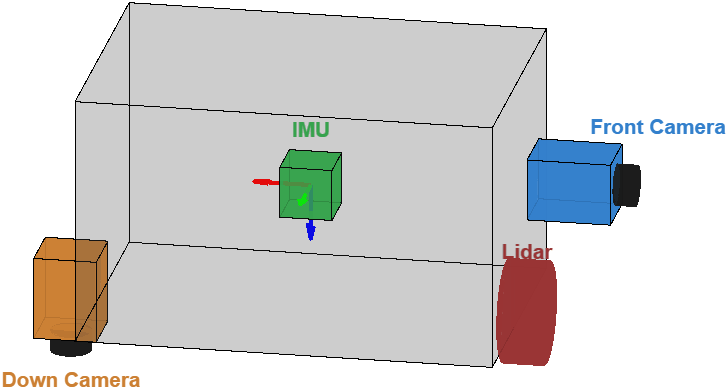
The calibration data includes:
Images of an 8-by-11 checkerboard with 70 mm square size for estimating camera intrinsics
Synchronized lidar point cloud and camera image pairs for estimating lidar-camera extrinsics using the same checkerboard
ROS bag recordings of camera and IMU data collected while moving in front of an AprilGrid target for estimating camera-IMU extrinsics
Calibration Workflow
This series of examples calibrates the multi-sensor system and organizes the final results into a multiSensorParameters object. The workflow is divided into the these examples:
Intrinsics Calibration
The Calibrate Multi-Sensor Intrinsics Using MUN-FRL Dataset example estimates camera intrinsic parameters for the front-facing and down-facing cameras using the Using the Single Camera Calibrator App app. The app estimates focal length, principal point, and lens distortion coefficients from multiple images of a calibration pattern captured at diverse viewpoints.
For the IMU, noise parameters including accelerometer and gyroscope noise densities and bias random walks are obtained from the sensor datasheet and stored as a factorIMUParameters (Navigation Toolbox) object.
The lidar uses factory-calibrated intrinsics, which are treated as fixed and do not require additional estimation.
Lidar-Camera Extrinsics Calibration
The Calibrate Lidar-Camera Extrinsics Using MUN-FRL Dataset example estimates the lidar-to-camera extrinsic transformation using the Get Started with Lidar Camera Calibrator (Point Cloud Toolbox) app with synchronized point cloud and image pairs. The Velodyne VLP-16's 16-beam resolution and limited overlapping field of view with the camera make this calibration challenging, requiring careful selection of data pairs where the target is well resolved in both sensors.
Camera-IMU Extrinsics Calibration
The Calibrate Camera-IMU Extrinsics Using MUN-FRL Dataset example estimates camera-to-IMU transforms for both cameras using the estimateCameraIMUTransform (Navigation Toolbox) function. This motion-based approach uses camera images of an AprilGrid target and synchronized IMU measurements recorded while the platform undergoes diverse rotational and translational motions.
Compose Pairwise Calibrations
The Create Multi-Sensor System from Pairwise Calibrations Using MUN-FRL Dataset example chains the pairwise extrinsic results into a unified multi-sensor coordinate system. It constructs a multiSensorParameters object with the IMU as the reference frame and visualizes the mounting poses of all sensors.
Validate Calibration
The Validate Calibration by Building a Colorized 3-D Map Using MUN-FRL Dataset example shows how to validate multi-sensor calibration by building a colorized 3-D map from the MUN-FRL flight data.
References
[1] Thalagala, Ravindu G., Oscar De Silva, Awantha Jayasiri, Arthur Gubbels, George KI Mann, and Raymond G. Gosine. "MUN-FRL: A visual-inertial-LiDAR dataset for aerial autonomous navigation and mapping." The International Journal of Robotics Research 43, no. 12 (2024): 1853-1866.
See Also
Topics
- Calibrate Multi-Sensor Intrinsics Using MUN-FRL Dataset
- Calibrate Lidar-Camera Extrinsics Using MUN-FRL Dataset
- Calibrate Camera-IMU Extrinsics Using MUN-FRL Dataset
- Create Multi-Sensor System from Pairwise Calibrations Using MUN-FRL Dataset
- Validate Calibration by Building a Colorized 3-D Map Using MUN-FRL Dataset

