uicaliper
R2026bDescription
The uicaliper object displays a caliper tool on an image object
that you create using the imageshow
function. You can use the caliper tool to interactively detect edges and measure distances in
the image.
Creation
Description
sets writable properties using one or more name-value arguments.hCaliper = uicaliper(hImage,PropertyName=Value)
For example, Width=10 specifies the width of the profile scan as 10
pixels.
Input Arguments
Input image, specified as an Image object. To create an
Image object, use the imageshow
function.
Properties
Profile center line position, in pixels, specified as a 2-by-2 numeric matrix of the form [x1 y1; x2 y2], where the [x1 , y1] and [x2 ,y2] are the first and last coordinates defining the line, respectively.
You can specify Position programmatically in the MATLAB Command
Window, or interactively by clicking a start point in the specified image
and dragging to your desired end point.hImage
Profile scan width, specified as a positive scalar. The width is the area within
which the uicaliper object computes profile scan lines measurements.
The caliper tool scans in lines orthogonal to the profile centerline and using these
measurements, computes a mean 1-D profile for gradient detection. If you specify
Width as 0, the caliper tool scans the profile
along a single line, with no additional sampling scan lines that smooth out the results.
By default, the profile scan width is 10% of the length of the caliper tool.
To interactively adjust the profile scan width, configure the caliper tool on a displayed image by dragging the tool between a start and end point. Once you release the tool, you can click and drag the handles perpendicular to the tool to adjust the scan width.
Edge transition type used in edge detection, specified as one of these options:
"rising"— Detect darker-to-brighter edge transitions."falling"— Detect brighter-to-darker edge transitions."both"— Detect both brighter-to-darker and darker-to brighter-edge transitions.
Tip
When you set the MeasurementMode property to "edge-pairs",
specify the edge transition with respect to the first edge in the profile scan line.
For example, to detect edge pairs in which the first edge is rising and the second
edge is falling, specify EdgeTransition as
"rising".
Gradient threshold for a gradient to be considered an edge, specified as a positive
scalar in range [0, 1]. The gradient at each scan point is the normalized average
gradient across the profile line width, . The Widthuicaliper object function
evaluates this value at each point along the scan line. Increase the gradient threshold
value to detect fewer false positive edges.
Measurement mode used to compute edge data, specified as
"edge-pair" or "single-edge". This argument
determines how the measurementData argument outputs
distance.
| Value | Edge Detection Mode |
|---|---|
"edge-pair" | Detect edge pairs of the type specified by the |
"single-edge" | Detect single edges of the type specified by the
EdgeTransition property. |
Standard deviation for Gaussian smoothing of the 1-D profile data, specified as a positive scalar. Increase this value to increase the amount of Gaussian smoothing and reduce measurement noise at the possible expense of lower accuracy in detecting edge positions.
Caliper tool color, specified as an RGB triplet, or a long or short color name.
Option to display 1-D profile scan lines, specified as a numeric or logical
1 (true) or 0
(false). By default, the uicaliper function
overlays the 1-D profile scan line over the displayed image.
Option to display the distance measurement value as text overlaid on the image,
specified as a numeric or logical 1 (true) or
0 (false).
This property is read-only.
Distance from each detected edge profile scan line origin, represented as a row vector.
This property is read-only.
Distance between the start and end of each edge pair, represented as a row vector.
This property is read-only.
Distance between edge pairs, represented as a row vector. The caliper tool measures this distance from the end of each edge pair to the start of the next edge pair.
This property is read-only.
Gradient value corresponding to each detected edge, represented as an
N-element row vector. Each element of the row vector is the
gradient value associated with each detected edge. N depends on the
MeasurementMode value.
"single-edge"— N is the number of total detected edges."edge-pair"— N is the number of edges that comprise edge pairs.
This property is read-only.
1-D profile data that determines detected edges, represented as an M-element numeric vector. M is the integer length of the profile scan, in pixels, and each element of the vector is the mean gradient value at each scan point.
This profile data determines the gradient values for each edge, stored in the
GradientValue property.
Note
Specify the amount of Gaussian smoothing of the profile data using the
Sigma property.
Examples
Load an image into the workspace.
I = imread("coins.png");Display the image using the imageshow function.
hIm = imageshow(I);
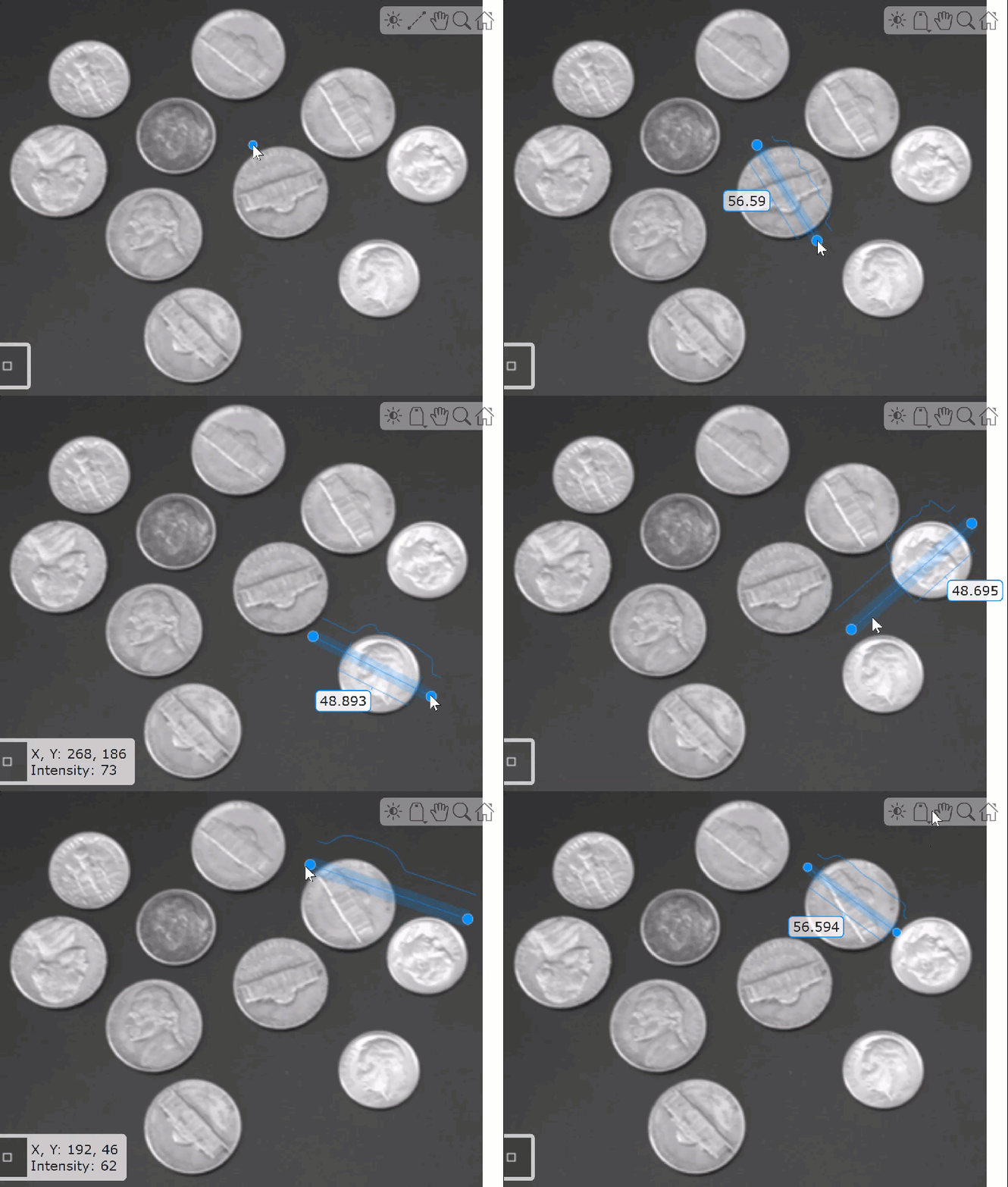
To interactively measure distances, configure the caliper tool on the displayed image using the uicaliper object. Click a start point in the image and drag the end point of the caliper tool to a desired location.
hCal = uicaliper(hIm)
This GIF shows how to perform multiple measurements by dragging the end points of the caliper tool to different positions on the image.
Version History
Introduced in R2025aStarting in R2026b, uicaliper is available
in the Visual Inspection
Toolbox™ product. In releases R2026a and before, uicaliper is available
in the Automated Visual Inspection Library for Computer Vision Toolbox™ add-on.
MATLAB Command
You clicked a link that corresponds to this MATLAB command:
Run the command by entering it in the MATLAB Command Window. Web browsers do not support MATLAB commands.
选择网站
选择网站以获取翻译的可用内容,以及查看当地活动和优惠。根据您的位置,我们建议您选择:。
您也可以从以下列表中选择网站:
如何获得最佳网站性能
选择中国网站(中文或英文)以获得最佳网站性能。其他 MathWorks 国家/地区网站并未针对您所在位置的访问进行优化。
美洲
- América Latina (Español)
- Canada (English)
- United States (English)
欧洲
- Belgium (English)
- Denmark (English)
- Deutschland (Deutsch)
- España (Español)
- Finland (English)
- France (Français)
- Ireland (English)
- Italia (Italiano)
- Luxembourg (English)
- Netherlands (English)
- Norway (English)
- Österreich (Deutsch)
- Portugal (English)
- Sweden (English)
- Switzerland
- United Kingdom (English)