How to get rid of angles in MATLAB world map?

3 次查看(过去 30 天)
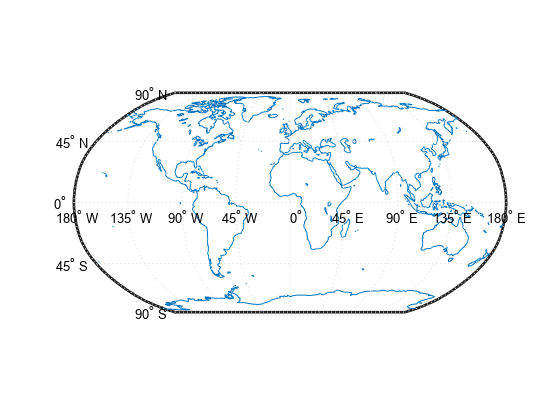
Suppose I have the map below (taken from here). Is there a way to get rid of the all the text (i.e 90N, 45N, ..., 180W, 135W, ...) from the map? I have tried going through the documentation on the webpage but couldn't find any useful information.
SetUpWorldMapAndDrawCoastlinesExample_01.png

采纳的回答

Mark Sherstan
Mark Sherstan 2018-11-19
Access the figure handle and set the angle labels to be a blank string. This code will do it for you:
close all
h = worldmap('world');
load coastlines
plotm(coastlat,coastlon)
for ii = 1:14
h.Children(ii).String = '';
end
There may be other more effcient methods but this is a quick fix for now.

  2 个评论
Muhammad Anas Imtiaz
This is exactly what I was looking for. Just a small change was needed since I was using scatterm instead of plotm:
ii = 2:15

请先登录,再进行评论。

更多回答(0 个)

产品


版本

R2018b

Community Treasure Hunt

Find the treasures in MATLAB Central and discover how the community can help you!

Start Hunting!

Translated by