Plotting Two Data Sets on a Figure
显示 更早的评论
I have two sets of data which can be plotted as a sets of discrete points given by (x,y) coordinates on a 2D plot. Is there some way that I can manually plot both sets of points, join the points to have two separate curves for the two data sets and then have a legend corresponding to the points used for the plotting? If easier, I could enter the data sets as arrays by creating the matrix and then plotting from it.
I did something similar before in this case it was something like a scatter diagram whereas here I need to join the points.
采纳的回答

Cris LaPierre
2020-3-24
Something like this?
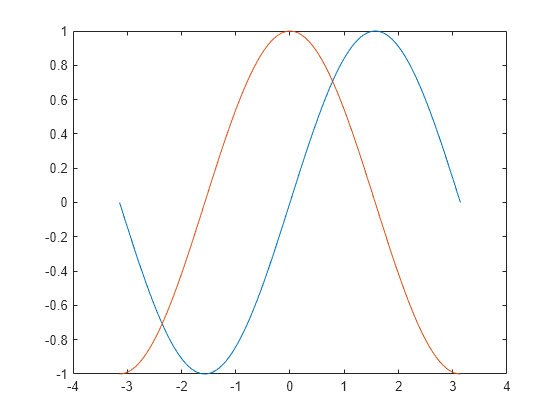
x = linspace(-pi,pi);
y1 = sin(x);
plot(x,y1)
hold on
y2 = cos(x);
plot(x,y2)
hold off
10 个评论
Cris LaPierre
2020-3-24
If you want to manually specify the format, adjust the plot command accordingly
plot(x,y1,'r*')
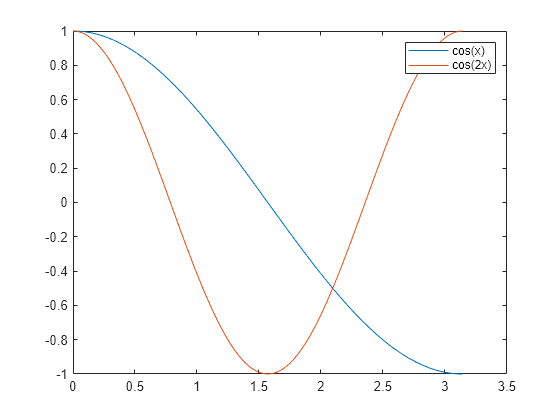
x = linspace(0,pi);
y1 = cos(x);
plot(x,y1)
hold on
y2 = cos(2*x);
plot(x,y2)
legend('cos(x)','cos(2x)')
Cris LaPierre
2020-3-24
You can learn about this and more in Chapter 9 of MATLAB Onramp. It's free, interactive, and self-paced.

Hollis Williams
2020-3-24
Cris LaPierre
2020-3-24
The legend appears correctly for me. The bigger issue is you can't see the points. They are too small. I'd suggest using a different marker. I'd write your code like this
plot(89,2.71, 'b*');
hold on
plot(89,2.71, 'rs');
plot(89,2.71, 'rd');
plot(87,2.71, 'r^');
hold off
legend('Model','Data');
Hollis Williams
2020-3-24
Cris LaPierre
2020-3-24
编辑:Cris LaPierre
2020-3-24
Yup. Your code isn't quite doing what you think it is. It might be helpful to open the plot browser to see what is going on (in the figure window menu, select View>Plot Browser.
You'll see that 5 separate series have been plotted on your figure. The legend command has assigned names to the first two. You think you are naming your series by assigning each plot to a variable. However, this is capturing a handle to the plot object. You don't need it. Legend names are assigned in the order the objects were plotted. So with your example, 'Model' is assigned to the first series (plot(1,6.27, 'b.')) and 'Data' is assigned to the second (plot(2,6.23, 'b.')).
Also, turn hold on once. After you are done plotting, turn hold off.
Take a few minutes and go through Chapter 9 of Onramp. You'll save yourself a lot of wasted time by learning how plotting works in MATLAB.
Hollis Williams
2020-4-3
Cris LaPierre
2020-4-3
It sounds like you want to specify a line style rather than a marker. You can see the available line style, marker and color options here. As a simple example, you could do this.
plot(2,6.23, 'b--')
Hollis Williams
2020-4-3
Cris LaPierre
2020-4-3
Bad example. Sorry. Yes, line styles don't apply if you are plotting the points one at a time. You'll need to use a marker. Check out the link I shared. That shows you the available marker styles.
更多回答(0 个)
类别
在 帮助中心 和 File Exchange 中查找有关 Graphics Object Properties 的更多信息
Community Treasure Hunt
Find the treasures in MATLAB Central and discover how the community can help you!
Start Hunting!
Translated by 

