更新的讨论

To track the current leader after each match, you can use cumulative scores. First, calculate the cumulative sum for each player across the matches. Then, after eaayer with the highest score.
Hint: Use cumsum(S, 1) to get cumulative scores along the rows (matches). Loop through each row to keep track of the leader. If multiple players tie, pick the lowest index.
Example:
If S = [5 3 4; 2 6 2; 3 5 7], after match 3, the cumulative scores are [10 14 13]. Player 2 leads with 14 hilbs.
This method keeps your code clean and avoids repeatedly summing rows.
In just one week, we have hit an amazing milestone: 500+ players registered and 5000+ solutions submitted! We’ve also seen fantastic Tips & Tricks articles rolling in, making this contest a true community learning experience.
And here’s the best part: you don’t need to be a top-ranked player to win. To encourage more casual and first-time players to jump in, we’re introducing new weekly prizes starting Week 2!
New Casual Player Prizes:
  • 5 extra MathWorks T-shirts or socks will be awarded every week.
  • All you need to qualify is to register and solve one problem in the Contest Problem Group.
Jump in, try a few problems, and don’t be shy to ask questions in your team’s channel. You might walk away with a prize!
Week 1 Winners:
Weekly Prizes for Contest Problem Group Finishers:
Weekly Prizes for Tips & Tricks Articles:
Week 1 winner for best Tips & Tricks Articles is @Vasilis Bellos.
Contest problems author @Matt Tearle commented:
We had a lot of people share useful tips (including some personal favorite MATLAB tricks). But Vasilis Bellos went *deep* into the Bridges of Nedsburg problem. Fittingly for a Creative Coder, his post was innovative and entertaining, while also cleverly sneaking in some hints on a neat solution method that wasn't advertised in the problem description.
Congratulations to all Week 1 winners! Prizes will be awarded after the contest ends. Let’s keep the momentum going!
Great material, examples and skillfully guided. And, of course, very useful.
Thanks!
Many MATLAB Cody problems involve solving congruences, modular inverses, Diophantine equations, or simplifying ratios under constraints. A powerful tool for these tasks is the Extended Euclidean Algorithm (EEA), which not only computes the greatest common divisor, gcd(a,b), but also provides integers x and y such that: a*x + b*y = gcd(a,b) - which is Bezout's identity.
Use of the Extended Euclidean Algorithm is very using in solving many different types of MATLAB Cody problems such as:
  • Computing modular inverses safely, even for very large numbers
  • Solving linear Diophantine equations
  • Simplifing fractions or finding nteger coefficients without using symbolic tools
  • Avoiding loops (EEA can be implemented recursively)
Below is a recursive implementation of the EEA.
function [g,x,y] = egcd(a,b)
% a*x + b*y = g [gcd(a,b)]
if b == 0
g = a; x = 1; y = 0;
else
[g, x1, y1] = egcd(b, mod(a,b));
x = y1;
y = x1 - floor(a/b)*y1;
end
end
Problem:
Given integers a and m, return the modular inverse of a (mod m).
If the inverse does not exist, return -1.
function inv = modInverse(a,m)
[g,x,~] = egcd(a,m);
if g ~= 1 % inverse doesn't exist
inv = -1;
else
inv = mod(x,m); % Bézout coefficient gives the inverse
end
end
%find the modular inverse of 19 (mod 5)
inv=modInverse(19,5)
inv = 4
A toaster that tells jokes
25%
Cinderalla's godmother for cleaning
25%
Humanoid cooks and washes dishes
29%
Oven door opens with wave of hand
4%
Mattress rocks you to sleep
12%
Mirror recommends healthy cosmetics
5%
120 个投票
Congratulations to all the Relentless Coders who have completed the problem set. I hope you weren't too busy relentlessly solving problems to enjoy the silliness I put into them.
If you've solved the whole problem set, don't forget to help out your teammates with suggestions, tips, tricks, etc. But also, just for fun, I'm curious to see which of my many in-jokes and nerdy references you noticed. Many of the problems were inspired by things in the real world, then ported over into the chaotic fantasy world of Nedland.
I guess I'll start with the obvious real-world reference: @Ned Gulley (I make no comment about his role as insane despot in any universe, real or otherwise.)
Extracting the digits of a number will be useful to solve many Cody problems.
Instead of iteratively dividing by 10 and taking the remainder, the digits of a number can be easily extracted using String operations.
%Extract the digits of N
N = 1234;
d = num2str(N)-'0';
d =
1 2 3 4
Welcome to the Cody Contest 2025 and the Relentless Coders team channel! 🎉
You never give up. When a problem gets tough, you dig in deeper. This is your space to connect with like-minded coders, share insights, and help your team win. To make sure everyone has a great experience, please keep these tips in mind:
  1. Follow the Community Guidelines: Take a moment to review our community standards. Posts that don’t follow these guidelines may be flagged by moderators or community members.
  2. Ask Questions About Cody Problems: When asking for help, show your work! Include your code, error messages, and any details needed to reproduce your results. This helps others provide useful, targeted answers.
  3. Share Tips & Tricks: Knowledge sharing is key to success. When posting tips or solutions, explain how and why your approach works so others can learn your problem-solving methods.
  4. Provide Feedback: We value your feedback! Use this channel to report issues or share creative ideas to make the contest even better.
Have fun and enjoy the challenge! We hope you’ll learn new MATLAB skills, make great connections, and win amazing prizes! 🚀
Instead of looping with if-statements, use logical indexing:
A(A < 0) = 0;
One line, no loops, full clarity.
Whenever a problem repeats in cycles (like indexing or angles), mod() keeps your logic clean:
idx = mod(i-1, n) + 1;
No if-else chaos!
Hi everyone!
I’m Kishen Mahadevan, Senior Product Manager at MathWorks, where I focus on controls and deep learning. I’m excited to be speaking at MATLAB EXPO this year!
In one of my sessions, I’ll share how AI-based reduced order models (ROMs) are transforming engineering workflows—using battery fast charging as an example—making it easier to reuse high-fidelity models for real-time control and deployment.
I’d love to have you join the conversation at the EXPO and right here in the community!
Feel free to drop any questions or thoughts ahead of the event.
Let's say MathWorks decides to create a MATLAB X release, which takes a big one-time breaking change that abandons back-compatibility and creates a more modern MATLAB language, ditching the unfortunate stuff that's around for historical reasons. What would you like to see in it?
I'm thinking stuff like syntax and semantics tweaks, changes to function behavior and interfaces in the standard library and Toolboxes, and so on.
(The "X" is for major version 10, like in "OS X". Matlab is still on version 9.x even though we use "R20xxa" release names now.)
What should you post where?
Wishlist threads (#1 #2 #3 #4 #5): bugs and feature requests for Matlab Answers
Frustation threads (#1 #2): frustrations about usage and capabilities of Matlab itself
Missing feature threads (#1 #2): features that you whish Matlab would have had
Next Gen threads (#1): features that would break compatibility with previous versions, but would be nice to have
@anyone posting a new thread when the last one gets too large (about 50 answers seems a reasonable limit per thread), please update this list in all last threads. (if you don't have editing privileges, just post a comment asking someone to do the edit)
Hi, what’s the best way to learn MATLAB, Simulink, and Simscape? Do you recommend a learning path? I work in the Electrical & Electronics area for automotive systems.
Hi Everyone!
As this is the most difficult question in problem group "Cody Contest 2025". To solve this problem, It is very important to understand all the hidden clues in the problem statement. Because everything is not directly visible.
For those who tried the problem, but were not able to solve. You might have missed any of the below hints -
  1. “The other players do not get to see which card has been shown, but they do know which three cards were asked for and that the player asked had one of them.” - Even when the card identity isn’t revealed (result = 0), you still gain partial knowledge — the asked player must have at least one of those three cards, meaning you can mark other players as not having all three simultaneously.
  2. "If it is your turn, you know the exact identity of that card" - You only know the exact shown card when result = 1, 2, or 3 — and it must be your turn. If someone else asked (even if you know result = 0), you don’t know which one was shown. So the meaning of result depends on whose turn it was, which is implicit — MATLAB code must assume that turns alternate 1→m→1, so your turn index is determined by (t-1) mod m + 1 == pnum.
  3. "Any leftover cards are placed face-up so that all players can see them" - These cards (commoncards) are not in anyone’s hand and cannot be in the envelope. So they’re not just visible — they’re logical constraints to eliminate from deduction.
  4. “It may be possible to determine the solution from less information than is given, but the information given will always be sufficient.”
  5. "Turn order is implied, not given explicitly" - Players take turns in order (1 to m, and back to 1).
On considering all the clues and constraints in the question, you will definitely be able to card for each category present in envelope.
I hope above clues will be useful for you.
Thank you, wishing you the success!
Regards,
Dev

Hi Everyone,

Require some guidance and pointers on model ee_pmlsm_drive please.
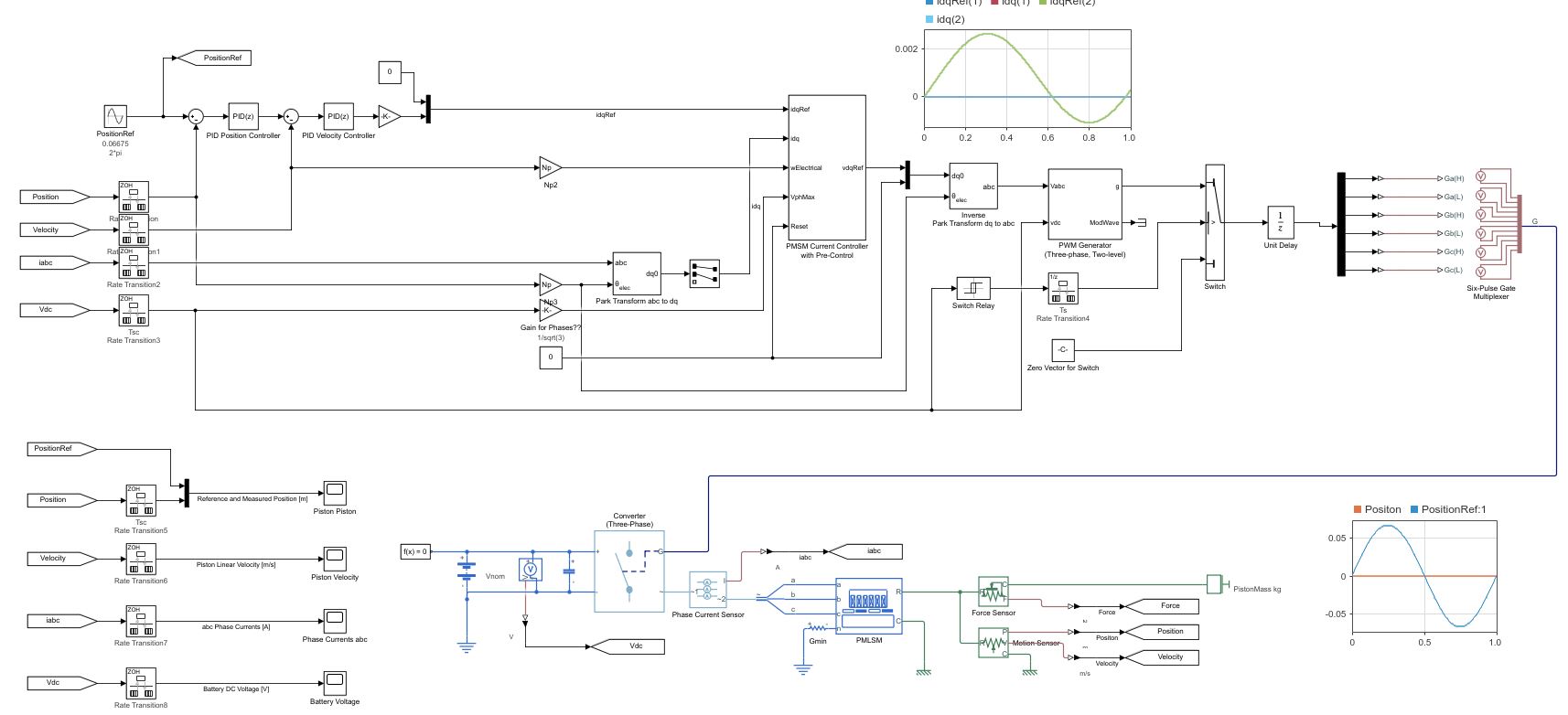
Its regarding a PMSM linear machine model, with a cascade (position and speed) outer loop and a current controller inner loop (Id and Iq currents).

The current Simulink model uses a low voltage DC supply (48v) and uses a step input to the system. My system uses a HV source (400v) and the input is sinusoidal position, with an operating frequency range of 0 to 20hz.

I have used the original model, re-created my own (to learn Simulink/Simscape) with a HV battery source (400v) and used machine parameters that match the application (peer reviewed publication).

As my power electronics background is limited, my background is mechanical, i am unable to tune the inner and outer loops, and am unsure in what order to tune. My project is to use the linear PMSM to drive (motoring) a linear piston for combustion and also use the linear piston to drive the PMSM (generating).

Using the built in PID tuner for the outer speed and position loops i am encountering an error (plant cannot be linearised). I am using a simple 1 hz sine wave to simulate the reference position set-point. With all PID values set to default i have no dq currents, however i have idq ref from the outer velocity controller loop.

Any help with resources and guidance as to how to tune the loops for my updated parameters on this model would be great.

Experimenting with Agentic AI
44%
I am an AI skeptic
0%
AI is banned at work
11%
I am happy with Conversational AI
44%
9 个投票
Instead of growing arrays inside a loop, preallocate with zeros(), ones(), or nan(). It avoids memory fragmentation and speeds up Cody solutions.
A = zeros(1,1000);
Cody often hides subtle hints in example outputs — like data shape, rounding, or format. Matching those exactly saves you a lot of debugging time.
When solving Cody problems, sometimes your solution takes too long — especially if you’re recomputing large arrays or iterative sequences every time your function is called.
The Cody work area resets between separate runs of your code, but within one Cody test suite, your function may be called multiple times in a single session.
This is where persistent variables come in handy.
A persistent variable keeps its value between function calls, but only while MATLAB is still running your function suite.
This means:
  • You can cache results to avoid recomputation.
  • You can accumulate data across multiple calls.
  • But it resets when Cody or MATLAB restarts.
Suppose you’re asked to find the n-th Fibonacci number efficiently — Cody may time out if you use recursion naively. Here’s how to use persistent to store computed values:
function f = fibPersistent(n)
import java.math.BigInteger
persistent F
if isempty(F)
F=[BigInteger('0'),BigInteger('1')];
for k=3:10000
F(k)=F(k-1).add(F(k-2));
end
end
% Extend the stored sequence only if needed
while length(F) <= n
F(end+1)=F(end).add(F(end-1));
end
f = char(F(n+1).toString); % since F(1) is really F(0)
end
%calling function 100 times
K=arrayfun(@(x)fibPersistent(x),randi(10000,1,100),'UniformOutput',false);
K(100)
ans = 1×1 cell array
{'563982230046568890902618956828002677439237127804414726979686441413745258166337260850508450357952871669760022932835205508650884432957132619548477681848951850249900098853578800502766453453321693488465782700659628264174757056271028413760264122292938046698234849427511943019674404460055307391183247077098238771593219759195361546550474847489454034087545485236581572021738623746876029952144698920606956981501906970107788143831844507572696523020854949377950584164671702209817937329138273107862450635272235829470591407489647002886722927663119075804284550987394985556133079386413055357606282374992498484308806888159999988894062720642359266610249180685549537651245402461171103020858571783996603386848039419656700597687469684534075920083663503623337165284634405944937809179503317603127766698557864519834438682815624108512662628659164318819211721788484510562704149517254432094419190323309859330458319203749328723347903942494042498481156385153413398528715754938381206379937482279105521608867050787631580424002980500346861332142946229358656510316436298104494540922341436539463379535760770882195633190667861276996489619134665056514210985714874297172396907228014612171439727292315001567764821061335577228917213918271255137714802428660758835259181668669987986012457471113553747414098971939000230951104638802770257722586728341096470806990469'}
The fzero function can handle extremely messy equations — even those mixing exponentials, trigonometric, and logarithmic terms — provided the function is continuous near the root and you give a reasonable starting point or interval.
It’s ideal for cases like:
  • Solving energy balance equations
  • Finding intersection points of nonlinear models
  • Determining parameters from experimental data

Example: Solving for Equilibrium Temperature in a Heat Radiation-Conduction Model
Suppose a spacecraft component exchanges heat via conduction and radiation with its environment. At steady state, the power generated internally equals the heat lost:
Given constants:
  • = 25 W
  • k = 0.5 W/K
  • ϵ = 0.8
  • σ = 5.67e−8 W/m²K⁴
  • A = 0.1
  • = 250 K
Find the steady-state temperature, T.
% Given constants
Qgen = 25;
k = 0.5;
eps = 0.8;
sigma = 5.67e-8;
A = 0.1;
Tinf = 250;
% Define the energy balance equation (set equal to zero)
f = @(T) Qgen - (k*(T - Tinf) + eps*sigma*A*(T.^4 - Tinf^4));
% Plot for a sense of where the root lies before implementing
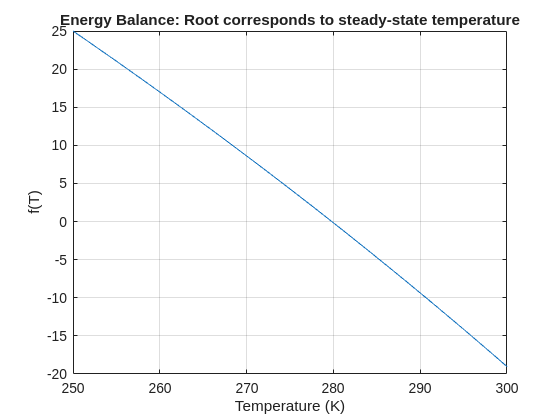
fplot(f, [250 300]); grid on
xlabel('Temperature (K)'); ylabel('f(T)')
title('Energy Balance: Root corresponds to steady-state temperature')
% Use fzero with an interval that brackets the root
T_eq = fzero(f, [250 300]);
fprintf('Steady-state temperature: %.2f K\n', T_eq);
Steady-state temperature: 279.82 K

关于 Discussions

Discussions is a user-focused forum for the conversations that happen outside of any particular product or project.

Get to know your peers while sharing all the tricks you've learned, ideas you've had, or even your latest vacation photos. Discussions is where MATLAB users connect!

更多社区版块

MATLAB Answers

提出和回答关于 MATLAB 和 Simulink 的问题!

File Exchange

下载或贡献用户提交的代码!

Cody

解题组,学习 MATLAB 并赢取徽章!

博客

MATLAB 和 Simulink 探秘!

AI Chat Playground

使用 AI 生成 MATLAB 代码初始草稿,并回答问题!