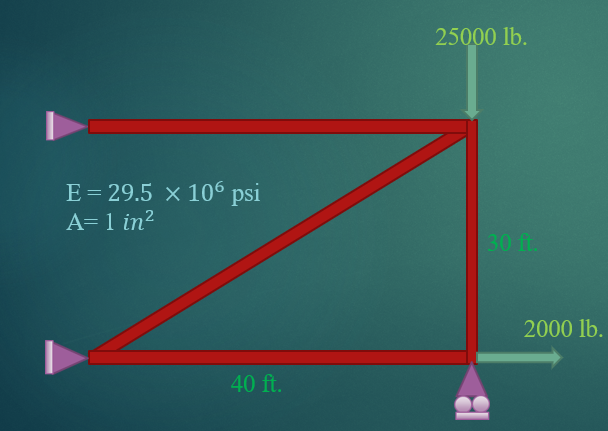
Solving Two-Dimensional Truss with MATLAB

Solving the truss using the stiffness method.

您现在正在关注此提交

The steps of solving the truss by the stiffness method:
  1. Numbering of nodes and elements
  2. Specifying the length of each element
  3. Obtaining sin and cosz
  4. Forming the stiffness matrix of each member
  5. Forming the total stiffness matrix
  6. Writing the relationship F = K U in matrix form
  7. Removing rows and columns that can be removed from the above matrix
  8. Solve the above matrix and get U or displacements
  9. Obtaining the stress in each member
  10. Obtaining support reactions
To use this code, just add the specifications of the truss you want to the Excel file and run the Truss2DD.m file.
Program outputs include:
  1. Stiffness matrix
  2. load vector
  3. Displacement
  4. Stress
  5. Reaction
  6. Truss Shape(black)
  7. ِDeformed Shape(red)
Outputs for 4Bar-Truss:
load =
0
0
2000
0
0
-25000
0
0
JointDisp =
0
0
0.0027
0
0.0056
-0.0222
0
0
Stress =
1.0e+04 *
0.2000
-2.1875
-0.5208
0.4167
Reaction =
1.0e+04 *
0.2167
0.3125
0.2000
2.1875
0.0000
-2.5000
-0.4167
0

引用格式

Mehdi Ghasri (2026). Solving Two-Dimensional Truss with MATLAB (https://ww2.mathworks.cn/matlabcentral/fileexchange/123260-solving-two-dimensional-truss-with-matlab), MATLAB Central File Exchange. 检索时间: .

标签

添加标签

Add the first tag.

一般信息

MATLAB 版本兼容性

  • 兼容任何版本

平台兼容性

  • Windows
  • macOS
  • Linux
版本 已发布 发行说明 Action
1.0.0