Train PyTorch Speech Command Recognition Model
R2026bIntroduction
In this example, you combine MATLAB® data processing and visualization capabilities with a Python® deep learning framework using co-execution to train a speech command recognition model. In this example, you:
Configure MATLAB to use a Python environment.
Ingest and preprocess audio data in MATLAB.
Augment the data set and extract features in MATLAB.
Call Python code from MATLAB to train a Torch-based speech command recognition model.
Export the trained model back to MATLAB for inference and evaluation.
Set Up Python Environment
To install a supported Python implementation, see Install and Configure Python for Use in MATLAB. To avoid library conflicts, use the External Languages side panel in MATLAB to create a Python virtual environment using the requirements_CoExecutionCommandRecognition.txt file. For details on the External Languages side panel, see Manage Python Environments Using External Languages Panel. For details on Python environment execution modes and debugging Python from MATLAB, see Python Coexecution.
If you already have a configured Python environment or want to validate its presence, call pyenv. This example was tested using Python 3.12.
pyenv(ExecutionMode="OutOfProcess")ans =
PythonEnvironment with properties:
Version: "3.12"
Executable: "C:\Users\user\AppData\Local\Programs\Python\Python312\python.EXE"
Library: "C:\Users\user\AppData\Local\Programs\Python\Python312\python312.dll"
Home: "C:\Users\user\AppData\Local\Programs\Python\Python312"
Status: Loaded
ExecutionMode: OutOfProcess
ProcessID: "23808"
ProcessName: "MATLABPyHost"
Use the helperCheckPyenv function to verify that the current PythonEnvironment contains the libraries listed in the requirements_CoExecutionCommandRecognition.txt file.
requirementsFile = "requirements_CoExecutionCommandRecognition.txt";
currentPyenv = helperCheckPyenv(requirementsFile,Verbose=true);
Checking Python environment Parsing requirements_CoExecutionCommandRecognition.txt Checking required package 'torch' Checking required package 'numpy' Checking required package 'onnx' Checking required package 'onnxscript' Required Python libraries are installed.
Import the supporting example Python module. The module is placed in your working directory when you open the example. The module defines the model architecture and includes an object to encapsulate the model, optimizer, and training logic.
pyMod = py.importlib.import_module("SpeechCommandCoExecutionExamplePyTorch");Ingest Data
Use the supporting function iIngestData to download and prepare the Google Speech Commands Dataset [1]. The function returns the training and validation data sets as audioDatastore objects, the labels for the classification test, and the class weights for balanced training.
[adsTrain,adsValidation,labels,labelWeights] = iIngestData();
Downloading data set (1.4 GB) ...
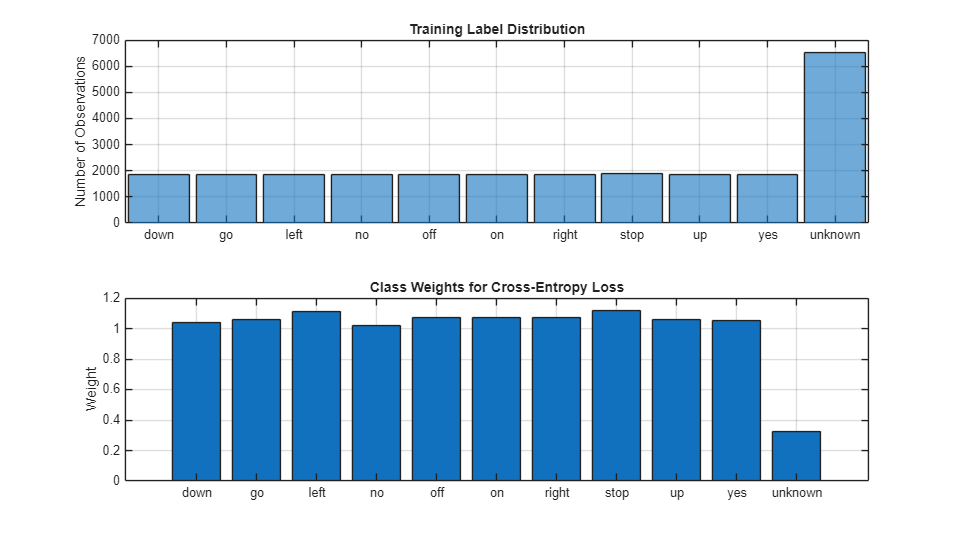
Visualize the training label distribution and weights.
figure(Units="normalized",Position=[0.2,0.2,0.5,0.5])

tiledlayout(2,1)

nexttile
histogram(adsTrain.Labels)
title("Training Label Distribution")
ylabel("Number of Observations")
grid on

nexttile
bar(labels,labelWeights)
title("Class Weights for Cross-Entropy Loss")
ylabel("Weight")
grid on
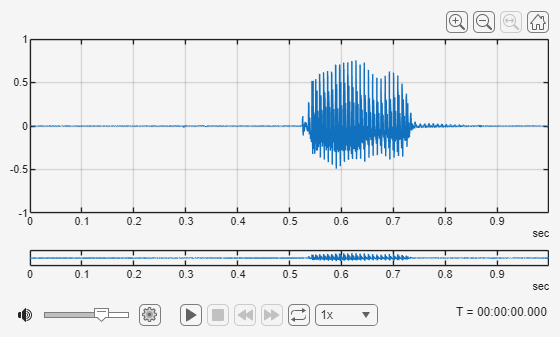
Use readfile to inspect an audio sample from the training set. Use Audio Viewer to display the waveform and listen to the audio.
[audioData,audioInfo] = readfile(adsTrain,1);
fs = audioInfo.SampleRate;
audioViewer(audioData,fs)
Create Python Trainer
Instantiate a deep learning trainer from the Python module. This object encapsulates the Torch model, optimizer, and training logic.
learnRate = 3e-4;

trainer = pyMod.trainer( ...
    device_index=1, ...
    learning_rate=learnRate, ...
    num_classes=numel(labels), ...
    class_weights=labelWeights)
trainer =
  Python trainer with properties:

    scheduler: [1×1 py.torch.optim.lr_scheduler.StepLR]
    criterion: [1×1 py.torch.nn.modules.loss.CrossEntropyLoss]
          cfg: [1×1 py.SpeechCommandCoExecutionExamplePyTorch.TrainerConfig]
        model: [1×1 py.SpeechCommandCoExecutionExamplePyTorch._SpeechCommandNet]
       device: [1×1 py.torch.device]
    optimizer: [1×1 py.torch.optim.adam.Adam]

    <SpeechCommandCoExecutionExamplePyTorch.trainer object at 0x0000021AA372E480>
Display the model architecture.
pyMod.info(trainer.model)
Model architecture:
_SpeechCommandNet(
  (features): Sequential(
    (0): Conv2d(1, 12, kernel_size=(3, 3), stride=(1, 1), padding=(1, 1))
    (1): BatchNorm2d(12, eps=1e-05, momentum=0.1, affine=True, track_running_stats=True)
    (2): ReLU(inplace=True)
    (3): MaxPool2d(kernel_size=3, stride=2, padding=1, dilation=1, ceil_mode=False)
    (4): Conv2d(12, 24, kernel_size=(3, 3), stride=(1, 1), padding=(1, 1))
    (5): BatchNorm2d(24, eps=1e-05, momentum=0.1, affine=True, track_running_stats=True)
    (6): ReLU(inplace=True)
    (7): MaxPool2d(kernel_size=3, stride=2, padding=1, dilation=1, ceil_mode=False)
    (8): Conv2d(24, 48, kernel_size=(3, 3), stride=(1, 1), padding=(1, 1))
    (9): BatchNorm2d(48, eps=1e-05, momentum=0.1, affine=True, track_running_stats=True)
    (10): ReLU(inplace=True)
    (11): MaxPool2d(kernel_size=3, stride=2, padding=1, dilation=1, ceil_mode=False)
    (12): Conv2d(48, 48, kernel_size=(3, 3), stride=(1, 1), padding=(1, 1))
    (13): BatchNorm2d(48, eps=1e-05, momentum=0.1, affine=True, track_running_stats=True)
    (14): ReLU(inplace=True)
    (15): Conv2d(48, 48, kernel_size=(3, 3), stride=(1, 1), padding=(1, 1))
    (16): BatchNorm2d(48, eps=1e-05, momentum=0.1, affine=True, track_running_stats=True)
    (17): ReLU(inplace=True)
    (18): MaxPool2d(kernel_size=(13, 1), stride=(13, 1), padding=0, dilation=1, ceil_mode=False)
    (19): Dropout2d(p=0.2, inplace=False)
  )
  (classifier): Linear(in_features=336, out_features=11, bias=True)
)

Total number of parameters: 58787
Confirm the device the trainer will use.
pyMod.printDevice(trainer)
Selected device: CPU
Data Augmentation
The data set used in this example represents clean speech. Your target deployment environment contains signal-correlated noise, which is common to speech communication systems. For the validation set, use the mnru function to add noise.
adsValidationAug = transform(adsValidation,@(x)mnru(x,fs,NoiseRatio=randi([5,35])));
For the training set, define an audioDataAugmenter to apply standard audio augmentations to effectively enlarge the training data, and also include MNRU in the pipeline to mimic the target environment.
augmenter = audioDataAugmenter(AddNoiseProbability=0, ...
    TimeStretchProbability=0.25, ...
    PitchShiftProbability=0.25);
augmenter.addAugmentationMethod("mnru", ...
    @(x,noiseRatio)mnru(x,fs,NoiseRatio=noiseRatio), ...
    AugmentationParameter="NoiseRatio", ...
    ParameterRange=[5,35], ...
    ParameterValue=15);
augmenter.mnruProbability = 1;
augmenter
augmenter =
  audioDataAugmenter with properties:

               AugmentationMode: 'sequential'
    AugmentationParameterSource: 'random'
               NumAugmentations: 1
         TimeStretchProbability: 0.2500
             SpeedupFactorRange: [0.8000 1.2000]
          PitchShiftProbability: 0.2500
             SemitoneShiftRange: [-2 2]
       VolumeControlProbability: 0.5000
                VolumeGainRange: [-3 3]
            AddNoiseProbability: 0
           TimeShiftProbability: 0.5000
                 TimeShiftRange: [-0.0050 0.0050]
                mnruProbability: 1
                NoiseRatioRange: [5 35]
Add the augmentation to the training data pipeline.
adsTrainAug = transform(adsTrain,@(x)augment(augmenter,x,fs).Audio{1});Feature Extraction
Define the parameters to extract auditory spectrograms from the audio input.
segmentDurationis the duration of each speech clip in seconds.frameDurationis the duration of each frame for spectrum calculation.hopDurationis the time step between each spectrum.numBandsis the number of filters in the auditory spectrogram.
segmentDuration = 1;
frameDuration = 0.025;
hopDuration = 0.01;

FFTLength = 512;
numBands = 50;

segmentSamples = round(segmentDuration*fs);
frameSamples = round(frameDuration*fs);
hopSamples = round(hopDuration*fs);
overlapSamples = frameSamples - hopSamples;
Create an audioFeatureExtractor object to perform the feature extraction.
afe = audioFeatureExtractor( ...
    SampleRate=fs, ...
    FFTLength=FFTLength, ...
    Window=hann(frameSamples,"periodic"), ...
    OverlapLength=overlapSamples, ...
    barkSpectrum=true);

setExtractorParameters(afe,"barkSpectrum", ...
    NumBands=numBands, ...
    WindowNormalization=false, ...
    ApplyLog=true);
Add the feature extraction to the training and validation pipelines. In both cases, use resize to ensure that features are extracted from 1 second signals.
adsTrainTF = transform(adsTrainAug,@(x)extract(afe,resize(x,fs,Pattern="reflect")));
adsValTF = transform(adsValidationAug,@(x)extract(afe,resize(x,fs,Pattern="reflect")));
Create arrayDatastore objects to contain labels associated with each observation.
groupNames = categories(adsTrain.Labels);
[~,yTrainIdx] = ismember(adsTrain.Labels,groupNames);
[~,yValIdx] = ismember(adsValidation.Labels,groupNames);

yTrainIdx = int64(yTrainIdx) - 1;
yValIdx   = int64(yValIdx) - 1;

dsYTrain = arrayDatastore(yTrainIdx);
dsYVal = arrayDatastore(yValIdx);
Combine the data and label pipelines.
dsTrainXY = combine(adsTrainTF,dsYTrain);
dsValXY = combine(adsValTF,dsYVal);
To perform mini-batch processing, use minibatchqueue (Deep Learning Toolbox). If you have access to Parallel Computing Toolbox™, perform the preprocessing steps in a parallel pool.
miniBatchSize = 128;

if canUseParallelPool
    preprocessingEnvironment = "parallel";
    gcp
else
    preprocessingEnvironment = "serial";
end
Starting parallel pool (parpool) using the 'Processes' profile ...
22-Dec-2025 12:08:38: Job Queued. Waiting for parallel pool job with ID 3 to start ...
22-Dec-2025 12:09:39: Job Queued. Waiting for parallel pool job with ID 3 to start ...
22-Dec-2025 12:10:40: Job Queued. Waiting for parallel pool job with ID 3 to start ...
22-Dec-2025 12:11:41: Job Queued. Waiting for parallel pool job with ID 3 to start ...
Connected to parallel pool with 6 workers.

ans =

 ProcessPool with properties:

            Connected: true
           NumWorkers: 6
                 Busy: false
              Cluster: Processes (Local Cluster)
        AttachedFiles: {}
    AutoAddClientPath: true
            FileStore: [1x1 parallel.FileStore]
           ValueStore: [1x1 parallel.ValueStore]
          IdleTimeout: Inf (no automatic shut down)
          SpmdEnabled: true
mbqTrain = minibatchqueue(dsTrainXY, ...
    MiniBatchSize=miniBatchSize, ...
    MiniBatchFcn=@(Xcell,Ycell)iPreprocessMiniBatch(Xcell,Ycell), ...
    PartialMiniBatch="discard", ...
    OutputEnvironment="cpu", ...
    OutputAsDlarray=false, ...
    PreprocessingEnvironment=preprocessingEnvironment);

mbqVal = minibatchqueue(dsValXY, ...
    MiniBatchSize=miniBatchSize, ...
    MiniBatchFcn=@(Xcell,Ycell)iPreprocessMiniBatch(Xcell,Ycell), ...
    PartialMiniBatch="discard", ...
    OutputEnvironment="cpu", ...
    OutputAsDlarray=false, ...
    PreprocessingEnvironment=preprocessingEnvironment);
Call next to inspect the size of the predictors returned.
[PredictorSample,TargetSample] = next(mbqTrain);
[miniBatchSize, numChan, timeSteps, featureVectorLength] = size(PredictorSample)
miniBatchSize =
98
numChan =
50
timeSteps =
128
featureVectorLength =
1
miniBatchSize = numel(TargetSample)
miniBatchSize =
128
Train Network
Define the maximum number of epochs for training and whether to step the learn rate.
stepLearnRate = false; % Set to true to apply learning rate schedule defined in torch model.
maxEpochs = 4;
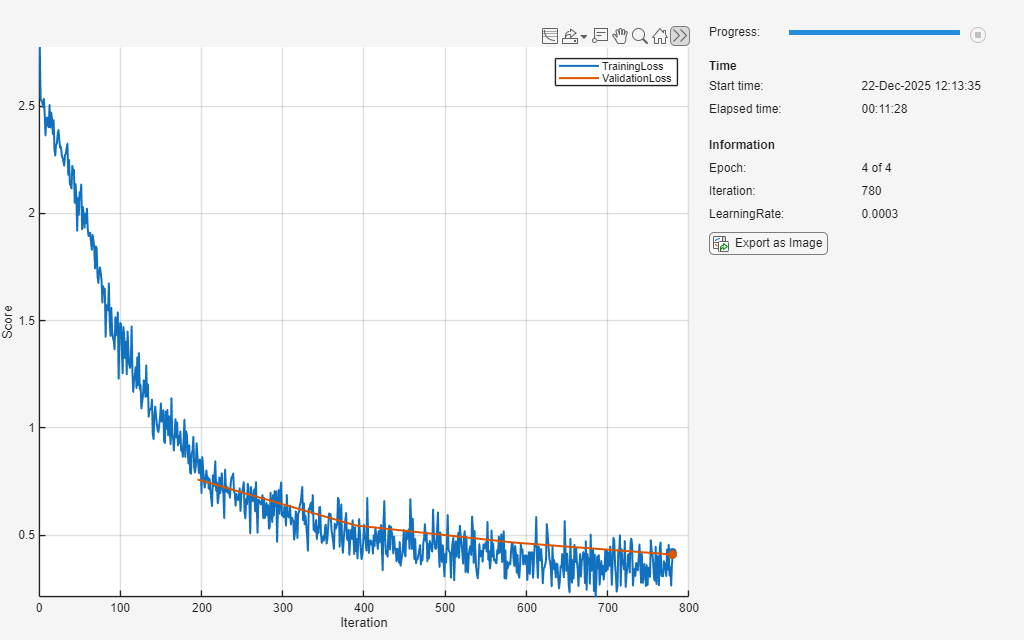
Define a trainingProgressMonitor (Deep Learning Toolbox) object and run the training loop.
monitor = trainingProgressMonitor( ...
    Metrics=["TrainingLoss","ValidationLoss"], ...
    Info=["Epoch","Iteration","LearningRate"], ...
    XLabel="Iteration");
groupSubPlot(monitor,Score=["TrainingLoss","ValidationLoss"])

iter = 0;
for epoch = 1:maxEpochs
    shuffle(mbqTrain)

    while hasdata(mbqTrain) && ~monitor.Stop
        iter = iter + 1;

        % Get next mini-batch
        [predictorBatch, targetBatch] = next(mbqTrain);

        if size(predictorBatch,3) ~= numel(targetBatch)
            fprintf("Skipping mismatched batch: Predictor=%d, Target=%d\n", ...
                size(predictorBatch,1), numel(targetBatch));
            continue;  % move on to the next batch
        end

        % Pass predictors and targets to torch model to perform one train step
        trainLoss = trainer.train_step(predictorBatch,targetBatch);

        % Update training progress monitor
        recordMetrics(monitor, iter, ...
            TrainingLoss=trainLoss);
        updateInfo(monitor, ...
            Epoch=epoch + " of " + maxEpochs, ...
            Iteration=iter, ...
            LearningRate=learnRate);
        monitor.Progress = min(100*(iter/(floor(numel(adsTrain.Labels)/miniBatchSize)*maxEpochs)),100);
    end

    % Evaluate loss on validation set and update progress monitor
    reset(mbqVal)
    valLoss = [];
    while hasdata(mbqVal)
        [predictorBatch, targetBatch] = next(mbqVal);
        valLoss(end+1) = trainer.eval_loss_step(predictorBatch,targetBatch); %#ok<SAGROW>
    end
    valLossAvg = mean(valLoss);
    recordMetrics(monitor,iter,ValidationLoss=valLossAvg);

    % If requested, step the learn rate scheduler
    if stepLearnRate
        learnRate = trainer.step_scheduler();
    end

    if monitor.Stop
        break
    end

end
Test Network
You can continue to use the pretrained network by calling to Python. Alternatively, you can integrate your model more completely into MATLAB by importing it using importNetworkFromONNX (Deep Learning Toolbox).
onnxPathpy = trainer.export_onnx( ...
    path="speech_cmd.onnx", ...
    opset=13, ...
    NumTimeSteps=timeSteps, ...
    FeatureVectorLength=afe.FeatureVectorLength);

onnxPath = string(onnxPathpy);
net = importNetworkFromONNX(onnxPath,InputDataFormats="BCSS");
Read the entire validation predictor-target combination.
PredictorTarget = readall(dsValXY,UseParallel=canUseParallelPool);
To calculate the final accuracy of the network on the training and validation sets, use minibatchpredict (Deep Learning Toolbox).
scores = minibatchpredict(net,dlarray(cat(4,PredictorTarget{:,1}),"SSCB"));Use scores2label (Deep Learning Toolbox) to convert the scores to labels.
predictionAll = scores2label(scores,labels,"auto");Isolate the target and convert to categorical.
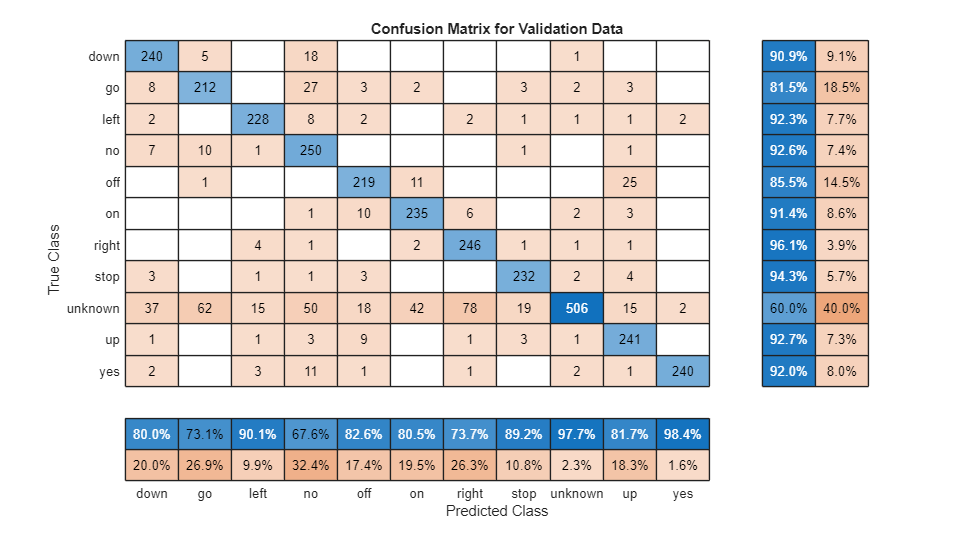
targetAll = categorical(labels(cat(2,PredictorTarget{:,2})+1))';To plot the confusion matrix for the validation set, use confusionchart (Deep Learning Toolbox). Display the precision and recall for each class by using column and row summaries.
figure(Units="normalized",Position=[0.2,0.2,0.5,0.5]);
cm = confusionchart(targetAll,predictionAll, ...
    Title="Confusion Matrix for Validation Data", ...
    ColumnSummary="column-normalized",RowSummary="row-normalized");
Spot check an audio sample of the validation set.
adsValidation = shuffle(adsValidation);
[x,xinfo] = read(adsValidation);
sound(x,fs)
target = xinfo.Label
target = categorical
     stop
predictor = extract(afe,resize(x,fs,Pattern="reflect"));
prediction = scores2label(predict(net,dlarray(predictor,"SSC")),labels,"auto")
prediction = categorical
     stop
Conclusion
This example demonstrates how to integrate Python-based model definition and training into MATLAB workflows, enabling feature extraction, augmentation, and analysis directly in MATLAB. To learn how to prepare a network for deployment, see Prune and Quantize Speech Command Recognition Network.
Supporting Functions
Preprocess Mini Batch
function [predictors, targets] = iPreprocessMiniBatch(predictorCell, targetCell)
%preprocessMiniBatch
%   Stack elements of minibatch cells into arrays
%
% Input:
%   predictorCell - (T x F) x B
%   targetCell - (1 x 1) x B
%
% Output:
%   predictors - T x F x B
%   targets - B x 1

predictors = cat(3, predictorCell{:});
targets = int64(cell2mat(targetCell(:)));
end
Ingest Data
function [adsTrain,adsValidation,labels,labelWeights] = iIngestData()
%iIngestData
%   Download and format data

url = 'https://ssd.mathworks.com/supportfiles/audio/google_speech.zip';
downloadFolder = pwd;
dataFolder = fullfile(downloadFolder,'google_speech');

if ~exist(dataFolder,'dir')
    disp('Downloading data set (1.4 GB) ...')
    unzip(url,downloadFolder)
end

% Train
adsTrainAll = audioDatastore(fullfile(dataFolder,"train"), ...
    IncludeSubfolders=true, FileExtensions=".wav", LabelSource="foldernames");

commands = categorical(["yes","no","up","down","left","right","on","off","stop","go"]);

% Label non-command files as "unknown". Keep only 20% of unknown to balance.
isCommand = ismember(adsTrainAll.Labels,commands);
isUnknown = ~isCommand;

includeFraction = 0.2; % Fraction of unknowns to include.
idx = find(isUnknown);
idx = idx(randperm(numel(idx),round((1-includeFraction)*sum(isUnknown))));
isUnknown(idx) = false;

adsTrainAll.Labels(isUnknown) = categorical("unknown");

adsTrain = subset(adsTrainAll, isCommand | isUnknown);
adsTrain.Labels = removecats(adsTrain.Labels);

labels = categories(adsTrain.Labels);

adsValAll = audioDatastore(fullfile(dataFolder,"validation"), ...
    IncludeSubfolders=true, FileExtensions=".wav", LabelSource="foldernames");

isCommand  = ismember(adsValAll.Labels, commands);
isUnknown = ~isCommand;

includeFraction = 0.2;
idx = find(isUnknown);
idx = idx(randperm(numel(idx),round((1-includeFraction)*sum(isUnknown))));
isUnknown(idx) = false;

adsValAll.Labels(isUnknown) = categorical("unknown");

adsValidation = subset(adsValAll,isCommand|isUnknown);
adsValidation.Labels = removecats(adsValidation.Labels);

% Lock category order across train/val
adsValidation.Labels = reordercats(adsValidation.Labels, labels);

% labels are imbalanced, compute the class weights for more robust
% training
labelWeights = 1./countcats(adsValidation.Labels);
labelWeights = labelWeights'/mean(labelWeights);
end
References
[1] Warden P. "Speech Commands: A public dataset for single-word speech recognition", 2017. Available from https://storage.googleapis.com/download.tensorflow.org/data/speech_commands_v0.01.tar.gz. Copyright Google 2017. The Speech Commands Dataset is licensed under the Creative Commons Attribution 4.0 license, available here: https://creativecommons.org/licenses/by/4.0/legalcode.

