assemble
R2026bSyntax
Description
Use the assemble function to assemble two components (parts)
by adding some physical coupling at their interfaces (physical ports). The function supports
rigid, compliant, and generalized couplings. You must first define the interfaces using the
addInterface
function
sysCon = assemble(sys1,sys2,Port1,Port2,Ki,Ci)sys
identified by Port1 and Port2.
Ki is the coupling stiffness and Ci is the
coupling damping. This corresponds to the internal force acting on Port1 with negative sign and
Port2 with positive sign, where δ = z1 –
z2 is the position mismatch between the coupled nodes. To add a compliant
coupling between Port1 and the ground, set Port2 =
"Ground".
sysCon = assemble(___,Method=assemblyMethod)"primal" or "dual".
The default is "dual". You use primal models only when most rows of
Hu and most columns of Hy are zero. Dense
Hu or Hy can lead to substantial fill-in in the
assembly model.
Examples
This example shows how to create a generalized coupling between two parts. For this example, you model a connection between inertia 1 and inertia 2 as a generalized torsional coupling. You can represent the system dynamics as follows.
Here:
and is the inertia of body 1 and 2, respectively.
and is the angular positions of body 1 and 2, respectively.
is the input torque and is the load torque.
is the coupling torque.
is the coupling inertia.
is the coupling stiffness.
is the coupling damping.
Define the model parameters.
J1 = 2;      % kg*m^2
J2 = 1;      % kg*m^2
Jc = 0.1;    % kg*m^2
bc = 0.1;    % N*m*s/rad
kc = 10;     % N*m/rad
Assembly of Individual Components
addInterface augments the inputs and outputs of the model to include the displacements as extra outputs and forces as extra inputs associated with a particular coupling interface.
These coupling dynamics model the action-reaction reaction forces between two parts. When you use the assembly interface, the software automatically handles the force balance between the two components. For this example, inertia 1 exerts a torque on inertia 2, while inertia 2 exerts a torque on inertia 1. Therefore, you can define the individual dynamics and coupling as follows.
Inertia 1
Inertia 2
Coupling
When you assemble parts using a generalized coupling, the software models the coupling dynamics as , where is obtained as the output of linear system driven by the gap .
Create the state-space model and define the interface for inertia 1.
E1 = [1 0; 0 J1];
A1 = [0 1; 0 0];
B1 = [0;1];
C1 = [0 1]; % output angular velocity w1
D1 = 0;
sys1 = dss(A1,B1,C1,D1,E1);
sys1.Name = "inertia1";
sys1.InputName = "Input Torque";
sys1.OutputName = "w1";
Hu1 = [0;1];
Hy1 = [1 0]; % z1 = theta1
sys1 = addInterface(sys1,"w1tow2",Hy1,Hu1)
sys1 =
  A =
       x1  x2
   x1   0   1
   x2   0   0

  B =
       Input Torque  inertia1:w1t
   x1             0             0
   x2             1             1

  C =
                 x1  x2
   w1             0   1
   inertia1:w1t   1   0

  D =
                 Input Torque  inertia1:w1t
   w1                       0             0
   inertia1:w1t             0             0

  E =
       x1  x2
   x1   1   0
   x2   0   2

Input groups:
        Name         Channels
   inertia1_w1tow2      2
Output groups:
        Name         Channels
   inertia1_w1tow2      2
Name: inertia1
Continuous-time state-space model.
Model Properties
The addInterface function adds an extra input and output to facilitate the coupling at this interface.
Similarly, define the interface for inertia 2.
E2 = [1 0; 0 J2];
A2 = [0 1; 0 0];
B2 = [0;1];
C2 = [0 1]; % output angular velocity w1
D2 = 0;
sys2 = dss(A2,B2,C2,D2,E2);
sys2.Name = "inertia2";
sys2.InputName = "Load Torque";
sys2.OutputName = "w2";
Hu2 = [0;1];
Hy2 = [1 0]; % z2 = theta2
sys2 = addInterface(sys2,"w2tow1",Hy2,Hu2)
sys2 =
  A =
       x1  x2
   x1   0   1
   x2   0   0

  B =
        Load Torque  inertia2:w2t
   x1             0             0
   x2             1             1

  C =
                 x1  x2
   w2             0   1
   inertia2:w2t   1   0

  D =
                  Load Torque  inertia2:w2t
   w2                       0             0
   inertia2:w2t             0             0

  E =
       x1  x2
   x1   1   0
   x2   0   1

Input groups:
        Name         Channels
   inertia2_w2tow1      2
Output groups:
        Name         Channels
   inertia2_w2tow1      2
Name: inertia2
Continuous-time state-space model.
Model Properties
Define the coupling and assemble the model components.
Q = tf([Jc bc kc],1);
asys = assemble(sys1,sys2,"inertia1:w1tow2","inertia2:w2tow1",Q,Method="primal");
Compare with Full Dynamics Model
You can represent the model that accounts for generalized torsional dynamics in the following state-space form.
Define the state-space matrices and create the model.
Ec = [ 1  0   0    0;
      0  1    0    0;
      0  0  J1+Jc  -Jc;
      0  0   -Jc   J2+Jc ];

Ac = [ 0  0   1    0;
      0  0   0    1;
    -kc kc -bc  bc;
     kc -kc  bc -bc ];

Bc = [ 0  0;
      0  0;
      1  0;
      0  1 ];
Cc = [0 0 1 0;
    0 0 0 1];
Dc = 0;
sysc = dss(Ac, Bc, Cc, Dc,Ec);
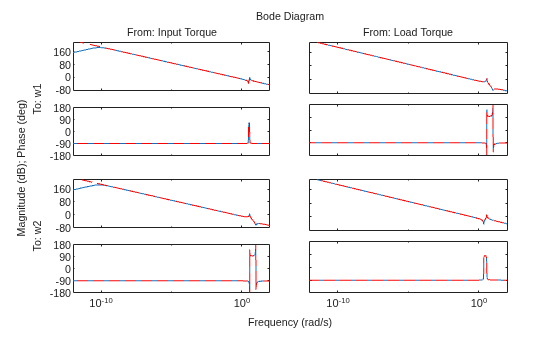
Comparing the Bode response of both models, you can see they are equivalent.
opt = bodeoptions;
opt.PhaseWrapping = "on";
bodeplot(asys,sysc,"r--",opt)
Simulate both models to a sinusoidal torque applied to inertia 1 and zero load torque .
t = 0:0.01:15;
u = [sin(t); zeros(size(t))];
ya = lsim(asys,u',t);
yc = lsim(sysc,u',t);
tiledlayout(2,1)
nexttile
plot(t,ya(:,1),t,yc(:,1),'r--');
title("\omega_1")
nexttile
plot(t,ya(:,2),t,yc(:,2),'r--');
title("\omega_2")
legend("Assembled model","Complete model")
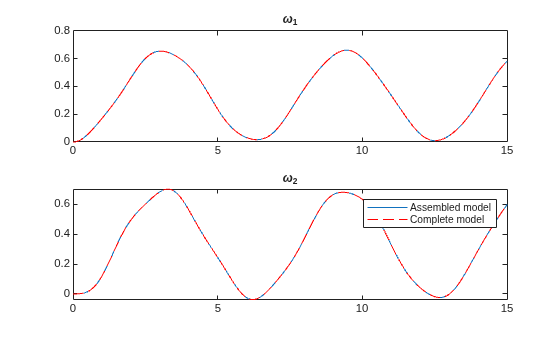
You can see that both approaches result in an equivalent model. Assembly of individual components is helpful when you want to couple several parts with some coupling dynamics.
This example shows how to create a mass-spring-damper model using compliant coupling between a mass and a wall.
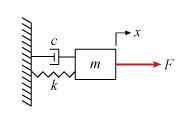
You can model this equation by:
In this coupling, the mass exerts a force on the wall, while the wall exerts a force on the mass. Modeling the mass and coupling dynamics separately, you get:
Since the mass is connected to a wall (ground), .
Define the model parameters.
m = 3;
c = 1;
k = 2;
Create the state-space model and define the coupling interface.
A = [0 1; 0 0];
B = [0; 1/m];
C = [1 0];
D = 0;
Hy = [1 0];
Hu = [0; 1/m];
sys = ss(A,B,C,D);
sys.Name = "mass";
sys.InputName = "force";
sys.OutputName = "displacement";
isys = addInterface(sys,"masstowall",Hy,Hu);
Since the mass is connected to a wall, connect the coupling interface port to the ground to create the assembled model.
asys = assemble(isys,"mass:masstowall","Ground",k,c);
Compare with Complete Model
The equation of motion that accounts for full dynamics is given by:
Create the state-space model.
Ac = [0 1; -k/m -c/m];
Bc = [0;1/m];
Cc = [1 0];
Dc = 0;
sysc = ss(Ac,Bc,Cc,Dc);
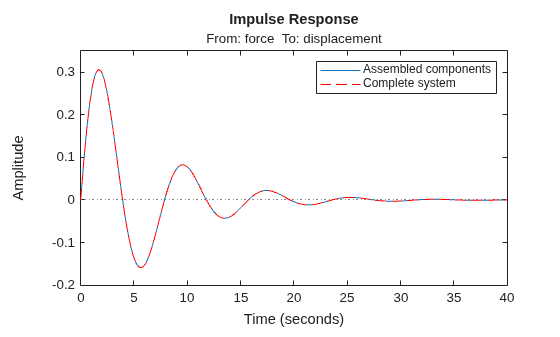
Simulating the impulse response of both models, you can see they are equivalent.
impulseplot(asys,sysc,"r--")
legend("Assembled components","Complete system")
This example shows how to couple a motor and a load using compliant coupling. The and motor and load are connected by a gearbox, with coupling stiffness and gear ratio .
You can define the equations for this system as follows:
Here:
is the motor inertia
is the load inertia
is the coupling torque
is the coupling stiffness
is the gear ratio, where motor rotates times faster than the load side
is the motor shaft angle
is the load shaft angle
Define the model parameters
Jm = 0.01;      % kg*m^2
Jl = 0.05;      % kg*m^2
kc = 10;        % N*m/rad
N  = 2;         % Gear ratio
Assembly of Individual Components
When you model this as an internal coupling, you can define the equations as follows.
Here, and the collocation gap is defined relative to the state values, with and .
Create the state-space model and define the coupling interface on the motor side.
Am = [0 1; 0 0];
Bm = [0; 1/Jm];
Cm = [1 0];
Dm = 0;
Hu1 = [0;1/Jm];
Hy1 = [1 0];   % z1 = theta_m
sysm = ss(Am,Bm,Cm,Dm);
sysm.Name = "motor";
sysm.InputName = "Input Torque";
sysm.OutputName = "Motor speed";
sysma = addInterface(sysm,"motortoload",Hy1,Hu1);
Similarly, define the coupling interface on the load side.
Al = [0 1; 0 0];
Bl = [0; -1/Jl];
Cl = [1 0];
Dl = 0;
Hu2 = [0;1/(Jl*N)];
Hy2 = [N 0];    % z2 = N*theta_l
sysl = ss(Al,Bl,Cl,Dl);
sysl.Name = "load";
sysl.InputName = "Load Torque";
sysl.OutputName = "Load speed";
sysla = addInterface(sysl,"loadtomotor",Hy2,Hu2);
Create the model assembly with compliant coupling with stiffness K = . When you do not specify a value for damping C, the software uses C = 0.
asys = assemble(sysma,sysla,"motor:motortoload","load:loadtomotor",kc);
Complete Model with Full Dynamics
You can define the model that accounts for full coupling dynamics in the state-space form as follows.
Create the state-space model.
Ac = [ 0,      1,      0,       0;
     -kc/Jm,   0,  (kc*N)/Jm,   0;
      0,       0,      0,       1;
   kc/(N*Jl),  0,   -kc/Jl,     0 ];

Bc = [ 0,      0;
      1/Jm,    0;
      0,       0;
      0,     -1/Jl ];

Cc = [1 0 0 0;
      0 0 1 0];
Dc = 0;
sysc = ss(Ac, Bc, Cc, Dc);
Compare Models
Simulate both models to a sinusoidal input torque and zero load torque.
t = 0:0.001:15;
u = [sin(t); zeros(size(t))];
yc = lsim(sysc,u',t);
ya = lsim(asys,u',t);
Compute the torsional deflection and plot the results.
ya_def = ya(:,1)-N.*ya(:,2);
yc_def = yc(:,1)-N.*yc(:,2);
plot(t,ya_def,t,yc_def,'r--');
title("Torsional Deflection")
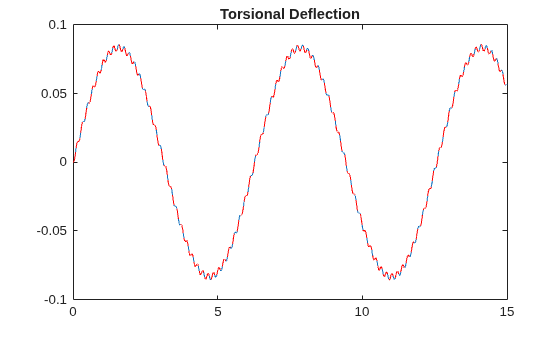
As you can see, both approaches result in an equivalent model. Notice the sustained oscillations in the torsional deflection. This the because there is no damping in the system.
For this example, consider a structural model that consists of two square plates connected with pillars at each vertex as depicted in the figure below. The lower plate is attached rigidly to the ground while the pillars are attached rigidly to each vertex of the square plate.
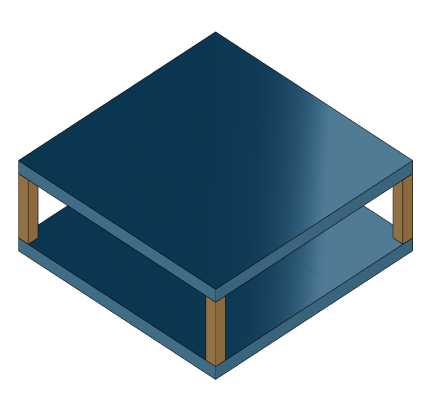
Load the finite element model matrices contained in platePillarModel.mat and create the sparse second-order model representing the above system.
load("platePillarModel.mat")Define interfaces.
Plate1 = mechss(M1,[],K1,B1,F1,Name="Plate1");
Plate2 = mechss(M2,[],K2,B2,F2,Name="Plate2");
Now, load the interfaced degree of freedom (DOF) index data from dofData.mat and use interface to create the physical connections between the two plates and the four pillars. dofs is a 6x7 cell array where the first two rows contain DOF index data for the first and second plates while the remaining four rows contain index data for the four pillars. By default, the function uses dual-assembly method of physical coupling.
load("dofData.mat","dofs")
for ct=1:4
    % Plates to pillars
    Plate1 = addInterface(Plate1,"Pillar"+ct,dofs{1,2+ct});
    Plate2 = addInterface(Plate2,"Pillar"+ct,dofs{2,2+ct});
end

P = cell(4,1);
for ct=1:4
    % Pillars to plates
    P{ct} = mechss(Mp,[],Kp,Bp,Fp,Name="Pillar"+ct);
    P{ct} = addInterface(P{ct},"TopMount",dofs{2+ct,1});
    P{ct} = addInterface(P{ct},"BottomMount",dofs{2+ct,2});
end
% Plate 2 to ground
Specify connection between the bottom plate and the ground.
Plate2 = addInterface(Plate2,"Ground",dofs{2,7});

% Assemble
model = append(Plate1,Plate2,P{:});
Use showStateInfo to confirm the physical interfaces.
showStateInfo(model)
The state groups are:

    Type        Name      Size
  ----------------------------
  Component    Plate1     2646
  Component    Plate2     2646
  Component    Pillar1     132
  Component    Pillar2     132
  Component    Pillar3     132
  Component    Pillar4     132
sysConDual = model;
for ct=1:4
    sysConDual = assemble(sysConDual, ...
        "Plate1:Pillar"+ct,"Pillar"+ct+":TopMount");
    sysConDual = assemble(sysConDual ...
        ,"Plate2:Pillar"+ct,"Pillar"+ct+":BottomMount");
end
sysConDual = assemble(sysConDual,"Plate2:Ground","Ground");
Use showStateInfo to confirm the physical interfaces.
showStateInfo(sysConDual)
The state groups are:

    Type                      Name                   Size
  -------------------------------------------------------
  Component                  Plate1                  2646
  Component                  Plate2                  2646
  Component                 Pillar1                   132
  Component                 Pillar2                   132
  Component                 Pillar3                   132
  Component                 Pillar4                   132
  Interface     Plate1:Pillar1-Pillar1:TopMount        12
  Interface    Plate2:Pillar1-Pillar1:BottomMount      12
  Interface     Plate1:Pillar2-Pillar2:TopMount        12
  Interface    Plate2:Pillar2-Pillar2:BottomMount      12
  Interface     Plate1:Pillar3-Pillar3:TopMount        12
  Interface    Plate2:Pillar3-Pillar3:BottomMount      12
  Interface     Plate1:Pillar4-Pillar4:TopMount        12
  Interface    Plate2:Pillar4-Pillar4:BottomMount      12
  Interface           Plate2:Ground-Ground              6
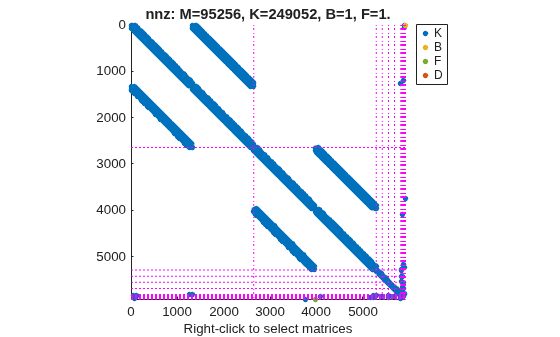
You can use spy to visualize the sparse matrices in the final model.
spy(sysConDual)
Now, specify physical connections using the primal-assembly method.
sysConPrimal = model;
for ct=1:4
    sysConPrimal = assemble(sysConPrimal, ...
        "Plate1:Pillar"+ct,"Pillar"+ct+":TopMount", ...
        method="primal");
    sysConPrimal = assemble(sysConPrimal, ...
        "Plate2:Pillar"+ct,"Pillar"+ct+":BottomMount", ...
        Method="primal");
end
sysConPrimal = assemble(sysConPrimal, ...
    "Plate2:Ground","Ground", ...
    Method="primal");
Use showStateInfo to confirm the physical interfaces.
showStateInfo(sysConPrimal)
The state groups are:

    Type       Name    Size
  -------------------------
  Component            5718
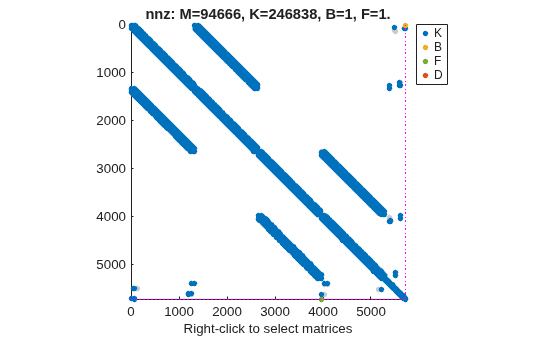
Primal assembly eliminates half of the redundant DOFs associated with the shared set of DOFs in the global finite element mesh.
You can use spy to visualize the sparse matrices in the final model.
spy(sysConPrimal)
The data set for this example was provided by Victor Dolk from ASML.
Input Arguments
Output Arguments
Algorithms
In general, you can represent physical couplings in a block diagram form as shown in the following figure. The coupling is characterized by the "Coupling Dynamics" block mapping δ = z1 − z2 (collocation gap) to the internal forces λ. Here, z1 and z2 denote the positions on each part of the nodes being coupled together.
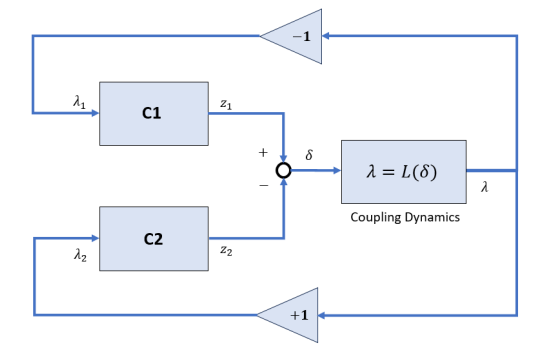
Using Control System Toolbox™, you can perform the following types of couplings between state-space models.
Rigid couplings, which correspond to δ = 0 and λ determined by the balance of forces. In this type of coupling, the positions, z1 and z2 match exactly (collocation) as if the two parts were welded together.
Compliant couplings, where . Here the coupling is modeled as a spring-damper connection and the two parts can move with respect to each other.
Generalized coupling, where λ = Q(s)δ. Here, you obtain λ as the output of a linear system driven by the gap δ. This can be used to model more complex coupling dynamics.
Version History
Introduced in R2026a

