主要内容

adversarialOptions

Options for finding adversarial examples for MATLAB deep neural networks

Since R2026a

    Description

    Add-On Required: This feature requires the AI Verification Library for Deep Learning Toolbox add-on.

    options = adversarialOptions(algorithmName) returns options for finding adversarial examples for MATLAB® deep neural networks using the algorithm specified by algorithmName. To find adversarial examples, use the adversarial options as an input argument to the findAdversarialExamples function.

    example

    options = adversarialOptions(algorithmName,Name=Value) returns adversarial options with additional options specified by one of more name-value arguments.

    Examples

    collapse all

    Create a set of options for finding adversarial examples using the BIM algorithm. Set the step size to 20, the number of iterations to 10, and the mini-batch size to 64.

    options = adversarialOptions("bim",StepSize=20,NumIterations=10,MiniBatchSize=64)
    options = 
      AdversarialOptionsBIM with properties:
    
                    StepSize: 20
               NumIterations: 10
               MiniBatchSize: 64
        ExecutionEnvironment: 'auto'
                     Verbose: 0


    Create a set of options for finding adversarial examples using the FGSM algorithm. Set the step size to 20 and the mini-batch size to 64.

    options = adversarialOptions("fgsm",StepSize=20,MiniBatchSize=64)
    options = 
      AdversarialOptionsFGSM with properties:
    
                    StepSize: 20
               MiniBatchSize: 64
        ExecutionEnvironment: 'auto'
                     Verbose: 0


    Load a pretrained network. This network has been trained to classify natural RGB images.

    rng("default")
    [net,classNames] = imagePretrainedNetwork;
    inputSize = net.Layers(1).InputSize(1:2);

    Load a test image and resize it to the expected network input size. This is an image of a golden retriever.

    img = imread("sherlock.jpg");
    img = imresize(img,inputSize);
    X = dlarray(single(img),"SSCB");
    
    label = categorical("golden retriever",classNames);

    Find the label predicted by the network.

    score = predict(net,X);
    YTest = scores2label(score,classNames)
    YTest = categorical
         golden retriever 


    This image has values in the range [0 255]. Generate lower and upper bounds with a maximum perturbation size of ∓10. Ensure that the values do not go below 0 or above 255.

    perturbationSize = 10;
    
    XLower = max(X-perturbationSize,0);
    XUpper = min(X+perturbationSize,255);

    The default step size is suitable for inputs with values between [0,1]. As this input has values with a maximum of 255, create an adversarial options object with a step size of 1 and number of iterations set to 2.

    options = adversarialOptions("bim",StepSize=1,NumIterations=2);
    [example,mislabel] = findAdversarialExamples(net,XLower,XUpper,label,Algorithm=options);

    View the original image and the adversarial example side-by-side. The adversarial example is misclassified even though the adversarial image appears very similar to the original image.

    figure
    tiledlayout(1,2); 
    
    nexttile(1);
    imshow(img);
    title({"Original Image (Class: " + string(label) + ")", ...
        "Predicted Class: " + string(YTest)});
    nexttile(2) 
    imshow(uint8(extractdata(example))); 
    title({"Adversarial Example", "Predicted Class: " + string(mislabel)});
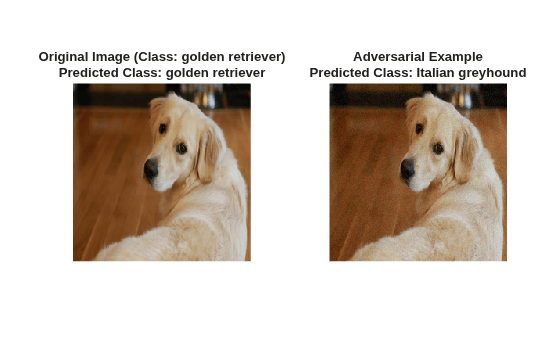
    Figure contains 2 axes objects. Hidden axes object 1 with title Original Image (Class: golden retriever) Predicted Class: golden retriever contains an object of type image. Hidden axes object 2 with title Adversarial Example Predicted Class: Italian greyhound contains an object of type image.

    Input Arguments

    collapse all

    Algorithm to generate adversarial examples, specified as a character vector or string scalar.

    • "bim" — Basic iterative method

    • "fgsm" — Fast gradient sign method

    For more information on the algorithms, see Adversarial Examples.

    Name-Value Arguments

    expand all

    Specify optional pairs of arguments as Name1=Value1,...,NameN=ValueN, where Name is the argument name and Value is the corresponding value. Name-value arguments must appear after other arguments, but the order of the pairs does not matter.

    Example: options = adversarialOptions("fgsm",MiniBatchSize=32) returns an AdversarialOptionsFGSM object with the MiniBatchSize property set to 32.

    General Options

    expand all

    Size of mini-batches to use for generating adversarial examples, specified as a positive integer. Larger mini-batch sizes require more memory, but can lead to faster performance.

    Data Types: single | double | int8 | int16 | int32 | int64 | uint8 | uint16 | uint32 | uint64

    Hardware resource for generating adversarial examples, specified as one of these values:

    • "auto" – Use a local GPU if one is available. Otherwise, use the local CPU.

    • "cpu" – Use the local CPU.

    • "gpu" – Use the local GPU.

    • "multi-gpu" – Use multiple GPUs on one machine, using a local parallel pool based on your default cluster profile. If there is no current parallel pool, the software starts a parallel pool with pool size equal to the number of available GPUs.

    • "parallel-auto" – Use a local or remote parallel pool. If there is no current parallel pool, the software starts one using the default cluster profile. If the pool has access to GPUs, then only workers with a unique GPU perform training computation and excess workers become idle. If the pool does not have GPUs, then training takes place on all available CPU workers instead.

    • "parallel-cpu" – Use CPU resources in a local or remote parallel pool, ignoring any GPUs. If there is no current parallel pool, the software starts one using the default cluster profile.

    • "parallel-gpu" – Use GPUs in a local or remote parallel pool. Excess workers become idle. If there is no current parallel pool, the software starts one using the default cluster profile.

    The "gpu", "multi-gpu", "parallel-auto", "parallel-cpu", and "parallel-gpu" options require Parallel Computing Toolbox™. To use a GPU for deep learning, you must also have a supported GPU device. For information on supported devices, see GPU Computing Requirements (Parallel Computing Toolbox). If you choose one of these options and Parallel Computing Toolbox or a suitable GPU is not available, then the software returns an error.

    For more information on when to use the different execution environments, see Scale Up Deep Learning in Parallel, on GPUs, and in the Cloud.

    Step size used to generate adversarial examples, specified as a positive scalar.

    For more information on the effect of the step size, see Adversarial Examples.

    Data Types: single | double | int8 | int16 | int32 | int64 | uint8 | uint16 | uint32 | uint64

    Option to enable verbose output, specified as a numeric or logical 1 (true) or 0 (false). When you set this input to 1 (true), the function returns its progress by indicating which mini-batch the function is processing and the total number of mini-batches. The function also returns the amount of time computation takes.

    Data Types: single | double | int8 | int16 | int32 | int64 | uint8 | uint16 | uint32 | uint64 | logical

    BIM Options

    expand all

    Number of iterations used to generate adversarial examples using the basic iterative method (BIM), specified as a positive integer.

    You can only specify this option if you set the algorithmName argument to "bim".

    Data Types: int8 | int16 | int32 | int64 | uint8 | uint16 | uint32 | uint64

    Output Arguments

    collapse all

    Adversarial options, returned as an AdversarialOptionsFGSM or AdversarialOptionsBIM object. To generate adversarial examples, use the adversarial options as an input argument to the findAdversarialExamples function.

    Version History

    Introduced in R2026a