Denoise Complex-Valued Signal Using Multilayer Perceptron
R2026bThis example shows how to create and train a complex-valued neural network for denoising complex-valued signals.
Signal denoising is a fundamental task in signal processing, with applications ranging from communications and radar systems to biomedical signal analysis and audio enhancement. Signals are often corrupted by noise during acquisition or transmission, making it essential to recover the underlying clean signal for accurate analysis and interpretation.
In many applications, signals are represented as complex numbers. In this example, first generate a set of synthetic, complex-valued, noisy signals. Then, create and train a deep learning network that takes a noisy, complex-valued signal and returns a denoised, complex-valued signal.
For an example showing how to train a real-valued neural network to make predictions on complex-valued data by first splitting the signal into its real and imaginary parts, see Train Network with Complex-Valued Data.
Generate Data
Generate a synthetic dataset of 10,000 complex sinusoids.
numSamples = 10000;
signalLength = 100;
For each signal, randomly generate frequency, phase, and amplitude.
frequency = 0.1 + 5*rand(numSamples,1);
phase = 2*pi*rand(numSamples,1);
amplitude = 1 + 10*rand(numSamples,1);
Create time t and noiseless signals cleanSignal.
t = linspace(0,1,signalLength);
cleanSignal = amplitude .* exp(1i*(2*pi*frequency*t + phase));
To create the corresponding noisy signals, add random noise to each signal. Make the noise complex by using the like name-value argument of the randn function.
noiseToAmplitudeRatio = 0.2;
noise = noiseToAmplitudeRatio * amplitude * randn(size(t),like=1j);
noisySignal = cleanSignal + noise;
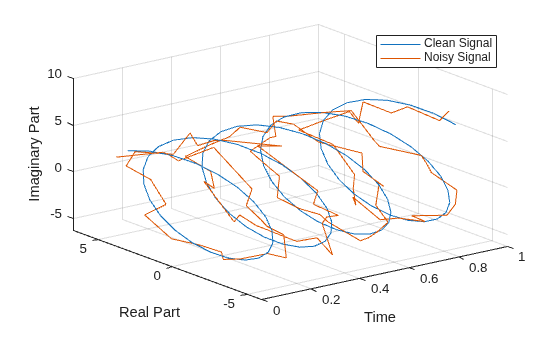
Illustrate a sample clean signal and its corresponding noisy signal by creating a 3-D line plot using the plot3 function.
figure
idx = 1;
hold on
plot3(t,real(cleanSignal(idx,:)),imag(cleanSignal(idx,:)))
plot3(t,real(noisySignal(idx,:)),imag(noisySignal(idx,:)))
legend(["Clean Signal","Noisy Signal"])
xlabel("Time")
ylabel("Real Part")
zlabel("Imaginary Part")
hold off
grid on
view(3)
Divide the data into training, validation, and testing data sets by using the trainingPartitions function, which is attached to this example as a supporting function.
[idxTrain,idxValidation,idxTest] = trainingPartitions(numSamples,[0.7,0.15,0.15]);

XTrain = noisySignal(idxTrain,:);
TTrain = cleanSignal(idxTrain,:);

XValidation = noisySignal(idxValidation,:);
TValidation = cleanSignal(idxValidation,:);

XTest = noisySignal(idxTest,:);
TTest = cleanSignal(idxTest,:);
Define Network Architecture
Define a complex-valued multi-layer perceptron architecture. Alternate complexFullyConnectedLayer objects with 512 hidden units with complexReluLayer objects. To output signals, end the network with a complex fully connected layer with output size signalLength.
hiddenSize = 512;
layers = [
    featureInputLayer(signalLength)
    complexFullyConnectedLayer(hiddenSize)
    complexReluLayer
    complexFullyConnectedLayer(hiddenSize)
    complexReluLayer
    complexFullyConnectedLayer(hiddenSize)
    complexReluLayer
    complexFullyConnectedLayer(signalLength)
    ];
net = dlnetwork(layers);
Specify Training Options
Specify the training options. Choosing training options requires empirical analysis. To explore different training option configurations by running experiments, you can use the Experiment Manager app. For this example:
Train using the Adam solver.
Train for 10 epochs.
Shuffle the training data every epoch.
Specify the validation data.
Display the training progress in a plot.
Disable the verbose output.
options = trainingOptions("adam", ...
    MaxEpochs=10, ...
    Shuffle="every-epoch", ...
    ValidationData={XValidation,TValidation}, ...
    Plots="training-progress", ...
    Verbose=false);
Train Network
Train the neural network by using the trainnet function.
net = trainnet(XTrain,TTrain,net,"mse",options);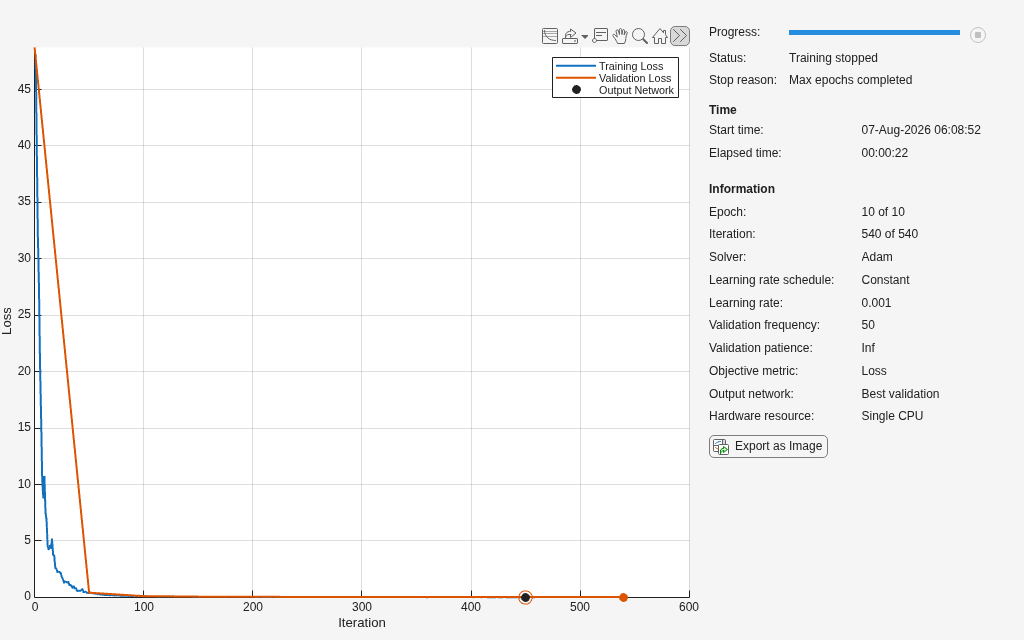
Test Network
Test the network by using the testnet function. Evaluate the mean squared error of the predictions on the test dataset.
mseTrainedNetwork = testnet(net,XTest,TTest,"mse")mseTrainedNetwork = 0.0239
Compare the mean squared error to the mean amplitude of the signals in the test set.
meanAmplitude = mean(amplitude(idxTest));
relativeError = mseTrainedNetwork/meanAmplitude
relativeError =
0.0040
If the network performs well, the relative error is small.
Plot Denoised Signal
Choose a sample signal from the test set.
idx = 1;
noisySample = XTest(idx,:);
cleanSample = TTest(idx,:);
Denoise the signal by using the trained network.
denoisedSample = predict(net,noisySample);
Extract and plot the real and imaginary parts of the clean, noisy, and denoised signals by using the plotTestSample function, which is defined at the bottom of this example.
plotTestSample(t,cleanSample,noisySample,denoisedSample);
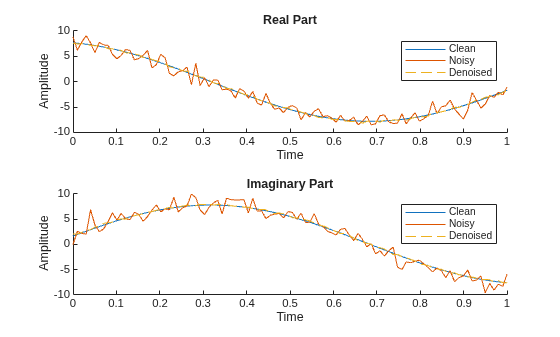
The denoised signal is very similar to the original clean signal.
Supporting Functions
The plotTestSample function extracts and plots the real and imaginary parts of the clean, noisy, and denoised signals.
function plotTestSample(t,cleanSample,noisySample,denoisedSample)
realCleanSignal = real(cleanSample);
imagCleanSignal = imag(cleanSample);

realNoisySignal = real(noisySample);
imagNoisySignal = imag(noisySample);

realDenoisedSignal = real(denoisedSample);
imagDenoisedSignal = imag(denoisedSample);

figure
tiledlayout

nexttile
hold on
plot(t,realCleanSignal);
plot(t,realNoisySignal);
plot(t,realDenoisedSignal,"--");
hold off
legend("Clean","Noisy","Denoised");
xlabel("Time");
ylabel("Amplitude");
title("Real Part");

nexttile
hold on
plot(t,imagCleanSignal);
plot(t,imagNoisySignal);
plot(t,imagDenoisedSignal,"--");
hold off
legend("Clean","Noisy","Denoised");
xlabel("Time");
ylabel("Amplitude");
title("Imaginary Part");
end
See Also
complexFullyConnectedLayer | complexReluLayer | zreluLayer | complexToRealLayer | realToComplexLayer | trainnet | testnet

