Choose Fixed- or Floating-Point Data Types When Generating HDL Code
R2026bWhen generating HDL code, you can choose whether the design under test (DUT) uses fixed-point data types, floating-point data types, or a mixture of the two data types. Floating-point data types are double-precision, single-precision, and half-precision floating-point numbers. Fixed-point data types include signedness, word length, and fraction length. For more information on creating fixed-point data types in MATLAB® and Simulink®, see Fixed-Point Data in MATLAB and Simulink.
Fixed-point designs typically use less hardware area, have lower latency, and consume less power. However, fixed-point designs might require a longer design cycle timeline due to fixed-point quantization and verification. In contrast, floating-point designs typically use more hardware area, have greater latency, and consume more power. However, floating-point designs have higher dynamic range and greater precision, and the design cycle timeline is typically shorter.
You can also use a mixture of floating-point and fixed-point data types. Use floating-point data types in sections of the design where you cannot constrain range by scaling without overflow or resolution loss, such as high dynamic range computations or hard-to-quantize feedback loops. Use fixed-point for the rest of the design.
Compare Resource Use of Fixed-Point and Floating-Point Designs
In this example, you analyze how the choice of data type affects the absolute error, hardware resource use, and timing requirements of a scaling algorithm.
You first analyze a double-precision and single-precision floating-point DUT. You then use fixed-point data types for the entire DUT. You then identify which part of the DUT has high dynamic range, and use floating-point data types for those operations.
In the ScaleWithReciprocal model, you can change the inputs of the DUT and the Numerator and Clamp blocks to use either floating-point data or fixed-point data. In the ScaleWithReciprocalMixed model, you can change the data type of the inputs to the Divide block to use fixed-point data types of different word lengths or floating-point data types while the rest of the DUT remains in fixed-point.
To compare how the choice of data type affects the absolute error, both ScaleWithReciprocal and ScaleWithReciprocalMixed use the same DUT inputs, and you use the output of the double‑precision floating‑point implementation of the DUT in ScaleWithReciprocal as the baseline for comparison throughout the example. You can use the Simulink Data Inspector to compare the output of each DUT to the output of the double‑precision floating‑point implementation of the DUT in ScaleWithReciprocal. For more information on using Simulink Data Inspector to compare data, see Compare Simulation Data.
Generate HDL Code Using Only Floating-Point Data Types
Open the ScaleWithReciprocal model. The Input and Offset blocks generate signals in double-precision floating-point data. The Convert Input and Convert Offset blocks can convert the data type of the input. By default, they output the signals as double-precision, floating-point data.
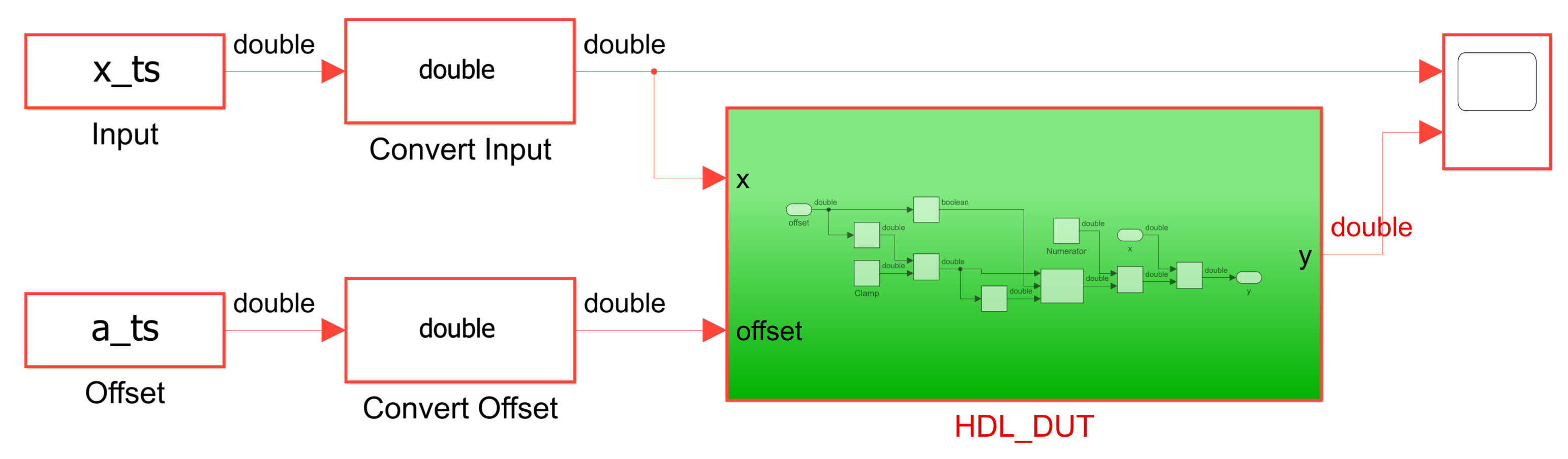
In the DUT, HDL_DUT, the Numerator and Clamp blocks take double-precision data by default. If you change the data type of the DUT input signals, change the data type of these blocks to match the data types of the inputs.
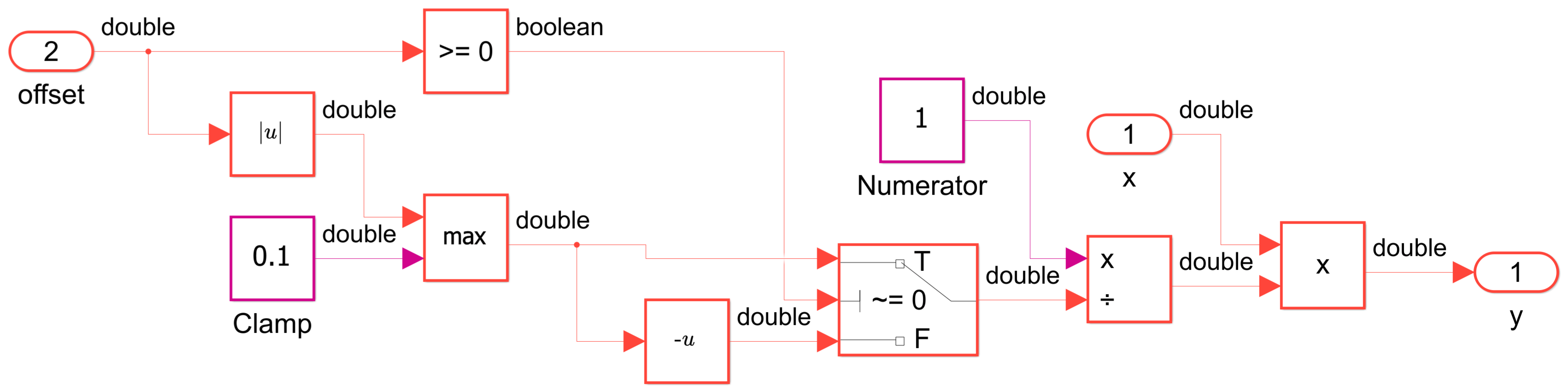
Generate HDL code for the HDL_DUT subsystem.
load_system("ScaleWithReciprocal");
makehdl("ScaleWithReciprocal/HDL_DUT");
### Begin compilation of the model 'ScaleWithReciprocal'...
### Working on the model ScaleWithReciprocal
### Generating HDL for ScaleWithReciprocal/HDL_DUT
### Using the config set for model ScaleWithReciprocal for HDL code generation parameters.
### Running HDL checks on the model 'ScaleWithReciprocal'.
### Working on the model 'ScaleWithReciprocal'...
### The code generation and optimization options you have chosen have introduced additional pipeline delays.
### The delay balancing feature has automatically inserted matching delays for compensation.
### The DUT requires an initial pipeline setup latency. Each output port experiences these additional delays.
### Output port 1: 75 cycles.
### Working on... GenerateModel
### Begin model generation 'gm_ScaleWithReciprocal'...
### Rendering DUT with optimization related changes (IO, Area, Pipelining)...
### Model generation complete.
### Generated model saved at hdl_prj_double\hdlsrc\ScaleWithReciprocal\gm_ScaleWithReciprocal.slx
### Delay absorption obstacles can be diagnosed by running this script: hdl_prj_double\hdlsrc\ScaleWithReciprocal\highlightDelayAbsorption.m
### To clear highlighting, click the following MATLAB script: hdl_prj_double\hdlsrc\ScaleWithReciprocal\clearhighlighting.m
### Begin VHDL Code Generation for 'ScaleWithReciprocal'.
### Working on... Traceability
### Working on ScaleWithReciprocal/HDL_DUT/nfp_abs_double as hdl_prj_double\hdlsrc\ScaleWithReciprocal\nfp_abs_double.vhd.
### Working on ScaleWithReciprocal/HDL_DUT/nfp_relop_double as hdl_prj_double\hdlsrc\ScaleWithReciprocal\nfp_relop_double.vhd.
### Working on ScaleWithReciprocal/HDL_DUT/nfp_mul_double as hdl_prj_double\hdlsrc\ScaleWithReciprocal\nfp_mul_double.vhd.
### Working on ScaleWithReciprocal/HDL_DUT/nfp_uminus_double as hdl_prj_double\hdlsrc\ScaleWithReciprocal\nfp_uminus_double.vhd.
### Working on ScaleWithReciprocal/HDL_DUT/nfp_relop_double as hdl_prj_double\hdlsrc\ScaleWithReciprocal\nfp_relop_double_block.vhd.
### Working on ScaleWithReciprocal/HDL_DUT/nfp_div_double as hdl_prj_double\hdlsrc\ScaleWithReciprocal\nfp_div_double.vhd.
### Working on ScaleWithReciprocal/HDL_DUT as hdl_prj_double\hdlsrc\ScaleWithReciprocal\HDL_DUT.vhd.
### Generating package file hdl_prj_double\hdlsrc\ScaleWithReciprocal\HDL_DUT_pkg.vhd.
### Code Generation for 'ScaleWithReciprocal' completed.
### Generating HTML files for code generation report at index.html
### Creating HDL Code Generation Check Report HDL_DUT_report.html
### HDL check for 'ScaleWithReciprocal' complete with 0 errors, 0 warnings, and 1 messages.
### HDL code generation complete.
Next, generate HDL code for HDL_DUT by using single precision floating-point data types.
Programmatically change the data type for the Convert Input, Convert Offset, Numerator, and Clamp blocks from double- to single-precision floating-point data, specify a new project folder and target directory, and generate HDL code.
set_param("ScaleWithReciprocal/Convert Input", "OutDataTypeStr", "single");
set_param("ScaleWithReciprocal/Convert Offset", "OutDataTypeStr", "single");
set_param("ScaleWithReciprocal/HDL_DUT/Clamp", "OutDataTypeStr", "single");
set_param("ScaleWithReciprocal/HDL_DUT/Numerator", "OutDataTypeStr", "single");

hdlset_param("ScaleWithReciprocal", "ProjectFolder", "hdl_prj_single");
hdlset_param("ScaleWithReciprocal", "TargetDirectory", "hdl_prj_single\hdlsrc");

makehdl("ScaleWithReciprocal/HDL_DUT");
### Begin compilation of the model 'ScaleWithReciprocal'...
### Working on the model ScaleWithReciprocal
### Generating HDL for ScaleWithReciprocal/HDL_DUT
### Using the config set for model ScaleWithReciprocal for HDL code generation parameters.
### Running HDL checks on the model 'ScaleWithReciprocal'.
### Working on the model 'ScaleWithReciprocal'...
### The code generation and optimization options you have chosen have introduced additional pipeline delays.
### The delay balancing feature has automatically inserted matching delays for compensation.
### The DUT requires an initial pipeline setup latency. Each output port experiences these additional delays.
### Output port 1: 45 cycles.
### Working on... GenerateModel
### Begin model generation 'gm_ScaleWithReciprocal'...
### Rendering DUT with optimization related changes (IO, Area, Pipelining)...
### Model generation complete.
### Generated model saved at hdl_prj_single\hdlsrc\ScaleWithReciprocal\gm_ScaleWithReciprocal.slx
### Delay absorption obstacles can be diagnosed by running this script: hdl_prj_single\hdlsrc\ScaleWithReciprocal\highlightDelayAbsorption.m
### To clear highlighting, click the following MATLAB script: hdl_prj_single\hdlsrc\ScaleWithReciprocal\clearhighlighting.m
### Begin VHDL Code Generation for 'ScaleWithReciprocal'.
### Working on... Traceability
### Working on ScaleWithReciprocal/HDL_DUT/nfp_abs_single as hdl_prj_single\hdlsrc\ScaleWithReciprocal\nfp_abs_single.vhd.
### Working on ScaleWithReciprocal/HDL_DUT/nfp_relop_single as hdl_prj_single\hdlsrc\ScaleWithReciprocal\nfp_relop_single.vhd.
### Working on ScaleWithReciprocal/HDL_DUT/nfp_mul_single as hdl_prj_single\hdlsrc\ScaleWithReciprocal\nfp_mul_single.vhd.
### Working on ScaleWithReciprocal/HDL_DUT/nfp_uminus_single as hdl_prj_single\hdlsrc\ScaleWithReciprocal\nfp_uminus_single.vhd.
### Working on ScaleWithReciprocal/HDL_DUT/nfp_relop_single as hdl_prj_single\hdlsrc\ScaleWithReciprocal\nfp_relop_single_block.vhd.
### Working on ScaleWithReciprocal/HDL_DUT/nfp_div_single as hdl_prj_single\hdlsrc\ScaleWithReciprocal\nfp_div_single.vhd.
### Working on ScaleWithReciprocal/HDL_DUT as hdl_prj_single\hdlsrc\ScaleWithReciprocal\HDL_DUT.vhd.
### Generating package file hdl_prj_single\hdlsrc\ScaleWithReciprocal\HDL_DUT_pkg.vhd.
### Code Generation for 'ScaleWithReciprocal' completed.
### Generating HTML files for code generation report at index.html
### Creating HDL Code Generation Check Report HDL_DUT_report.html
### HDL check for 'ScaleWithReciprocal' complete with 0 errors, 0 warnings, and 1 messages.
### HDL code generation complete.
Absolute Error and FPGA Synthesis Results for ScaleWithReciprocal Using Floating-Point Data Types
To ensure register-to-register timing paths and to define a clear timing boundary for static timing analysis, the model has an input and output pipeline at the design interface. For the HDL_DUT subsystem, the HDL block properties InputPipeline and OutputPipeline are 1:
hdlset_param("ScaleWithReciprocal/HDL_DUT", "InputPipeline", 1);
hdlset_param("ScaleWithReciprocal/HDL_DUT", "OutputPipeline", 1);
This example uses Xilinx Vivado as the synthesis tool. The target is an AMD Zynq SoC with a target frequency of 125 MHz. The model configuration parameter settings for the model are:
hdlset_param("ScaleWithReciprocal", "SynthesisTool", "Xilinx Vivado");
hdlset_param("ScaleWithReciprocal", "SynthesisToolChipFamily", "Zynq");
hdlset_param("ScaleWithReciprocal", "SynthesisToolDeviceName", "xc7z010");
hdlset_param("ScaleWithReciprocal", "SynthesisToolPackageName", "clg225");
hdlset_param("ScaleWithReciprocal", "SynthesisToolSpeedValue", "-1");
hdlset_param("ScaleWithReciprocal", "TargetFrequency", 125);
Synthesize the generated HDL code for the double- and single-precision floating-point design. This example uses MATLAB R2026a and AMD Vivado 2024.1. For more information on FPGA synthesis, see HDL Code Generation and FPGA Synthesis from Simulink Model.
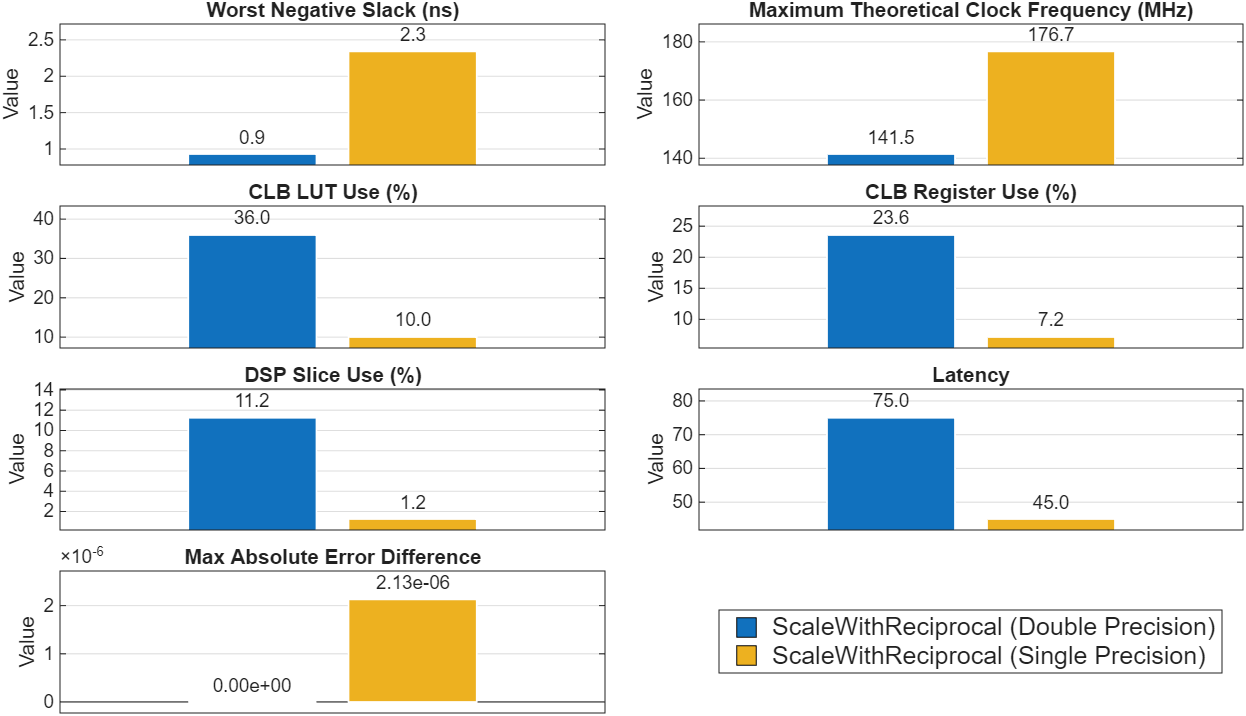
This figure compares the synthesis results and absolute error between the two designs. The double-precision DUT uses more resources and has less slack than the single-precision DUT, with an absolute error difference of 2.13e-6 according to Simulink Data Inspector.
Reduce Resources Using Fixed-Point Data Types
To reduce hardware resource use, you can use fixed-point data types. The DSP48 slice on a Zynq XC7Z010 SoC multiplies inputs with a maximum length of 25-by-18 bits. To map the Product block to a single DSP48 slice, you can use the Convert Input and Convert Output blocks to convert the double-precision floating-point inputs to fixed-point data. Define the fixed-point data types by using the fixdt function.
To map the Product block to a DSP48 slice, use a fixed-point data type of word length 25 for Convert Input and a fixed-point data type of word length 18 for Convert Offset.
For the Clamp block, set the word length to 18, where the integer word length is zero. For the Numerator block, set the word length to a fixed-point value of fixdt(0,1,0), which represents 1. Set the output data type of the Divide block to be the same data type as its input.
Use the same fixed-point word length as Convert Offset for Clamp, yet the word length is composed entirely by fractional bits. Use the smallest fixed-point data type to represent 1 for Numerator. Fix the output of the Divide block to be the same fixed-point data type as the input to the Divide block.
set_param("ScaleWithReciprocal/Convert Input", "OutDataTypeStr", "fixdt(1,25,21)");
set_param("ScaleWithReciprocal/Convert Offset", "OutDataTypeStr", "fixdt(1,18,13)");
set_param("ScaleWithReciprocal/HDL_DUT/Clamp", "OutDataTypeStr", "fixdt(0,18,18)");
set_param("ScaleWithReciprocal/HDL_DUT/Numerator", "OutDataTypeStr", "fixdt(0, 1, 0)");
set_param("ScaleWithReciprocal/HDL_DUT/Divide","OutDataTypeStr","fixdt(1,18,13)");
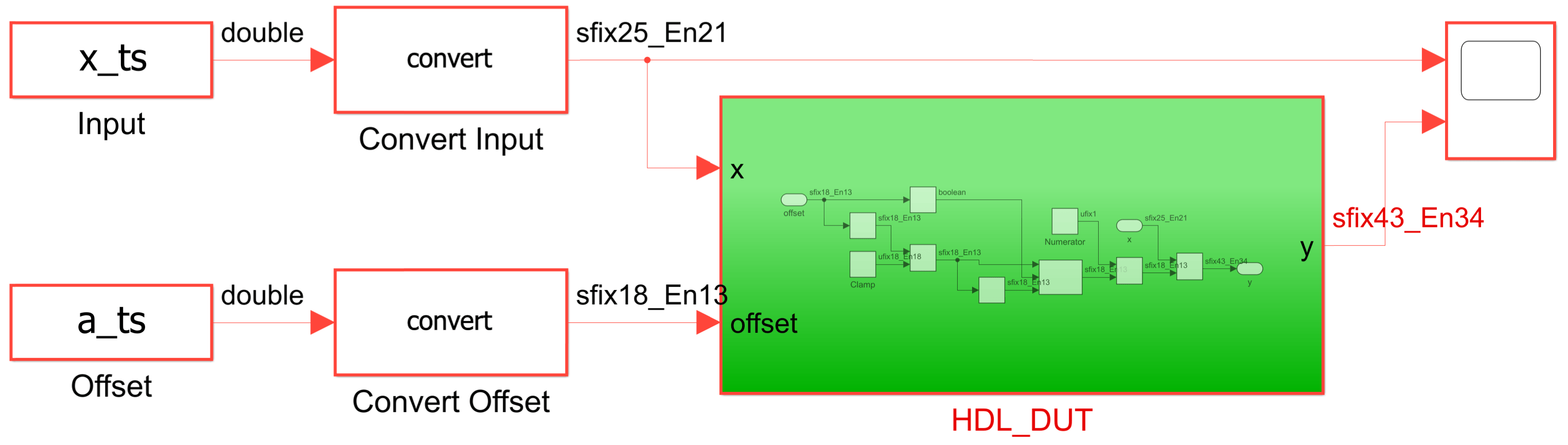
Designs that use any fixed-point data types can reduce the critical path and area by using adaptive pipelining to insert delays. Enable adaptive pipelining.
hdlset_param("ScaleWithReciprocal", "AdaptivePipelining", "on");
Specify a new project folder and target directory and generate HDL code for HDL_DUT.
hdlset_param("ScaleWithReciprocal", "ProjectFolder", "hdl_prj_fixedDSP");
hdlset_param("ScaleWithReciprocal", "TargetDirectory", "hdl_prj_fixedDSP\hdlsrc");
makehdl("ScaleWithReciprocal/HDL_DUT");
### Begin compilation of the model 'ScaleWithReciprocal'...
### Working on the model ScaleWithReciprocal
### Generating HDL for ScaleWithReciprocal/HDL_DUT
### Using the config set for model ScaleWithReciprocal for HDL code generation parameters.
### Running HDL checks on the model 'ScaleWithReciprocal'.
### Working on the model 'ScaleWithReciprocal'...
### The code generation and optimization options you have chosen have introduced additional pipeline delays.
### The delay balancing feature has automatically inserted matching delays for compensation.
### The DUT requires an initial pipeline setup latency. Each output port experiences these additional delays.
### Output port 1: 54 cycles.
### Working on... GenerateModel
### Begin model generation 'gm_ScaleWithReciprocal'...
### Rendering DUT with optimization related changes (IO, Area, Pipelining)...
### Model generation complete.
### Generated model saved at hdl_prj_fixedDSP\hdlsrc\ScaleWithReciprocal\gm_ScaleWithReciprocal.slx
### Delay absorption obstacles can be diagnosed by running this script: hdl_prj_fixedDSP\hdlsrc\ScaleWithReciprocal\highlightDelayAbsorption.m
### To clear highlighting, click the following MATLAB script: hdl_prj_fixedDSP\hdlsrc\ScaleWithReciprocal\clearhighlighting.m
### Begin VHDL Code Generation for 'ScaleWithReciprocal'.
### Working on... Traceability
### Working on ScaleWithReciprocal/HDL_DUT/Divide as hdl_prj_fixedDSP\hdlsrc\ScaleWithReciprocal\Divide.vhd.
### Working on ScaleWithReciprocal/HDL_DUT as hdl_prj_fixedDSP\hdlsrc\ScaleWithReciprocal\HDL_DUT.vhd.
### Generating package file hdl_prj_fixedDSP\hdlsrc\ScaleWithReciprocal\HDL_DUT_pkg.vhd.
### Code Generation for 'ScaleWithReciprocal' completed.
### Generating HTML files for code generation report at index.html
### Creating HDL Code Generation Check Report HDL_DUT_report.html
### HDL check for 'ScaleWithReciprocal' complete with 0 errors, 0 warnings, and 2 messages.
### HDL code generation complete.
Absolute Error and FPGA Synthesis Results for ScaleWithReciprocal Using Double Precision and Fixed-Point Data Types
Synthesize the generated HDL code for the DUT that uses fixed-point data types.
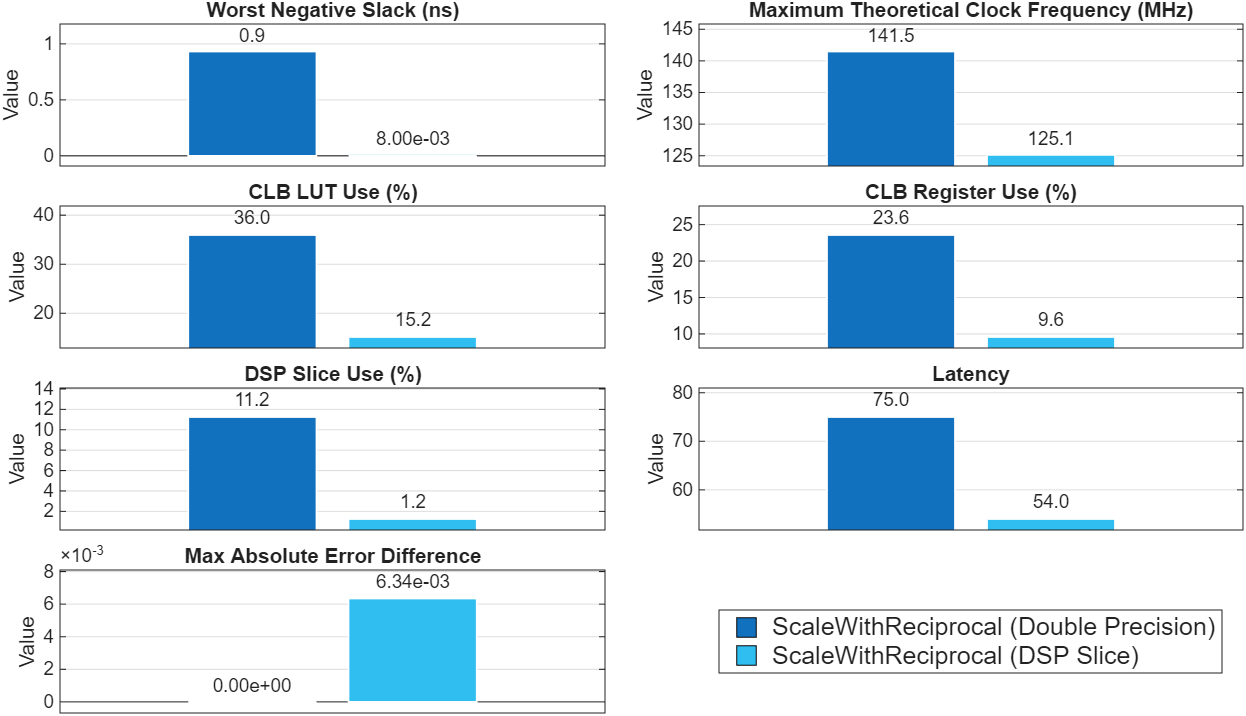
This figure compares the synthesis results and absolute error between the versions of the ScaleWithReciprocal DUT that use double-precision and fixed-point data types. Compared to the double-precision DUT, the fixed-point DUT reduces resource use and maintains a small absolute error of 6.34e-3, but has less slack.
Reduce Error Using Different Fixed-Point Word Lengths for the Divide Block
Open the ScaleWithReciprocalMixed model. In the scaling algorithm, the Divide block is a region of high dynamic range. To test the effect of word length for a region of high dynamic range on error, resource use, and timing, ScaleWithReciprocalMixed selectively changes the data type for the reciprocal operation by wrapping the Divide block between two Data Type Conversion blocks, Convert In and Convert Out.
By default, ScaleWithReciprocalMixed uses the same fixed-point data types as ScaleWithReciprocal to map the Product block to a DSP48 slice. However, to provide extra bits for the reciprocal operation, Convert In converts the input to the Divide block from a fixed-point data type of word length 18 to a word length of 32. Convert Out converts the output of the Divide block to a fixed-point data type with a word length of 18, which is required to map the Product block to a DSP48 slice.

load_system("ScaleWithReciprocalMixed");Generate HDL code for HDL_DUT by using a fixed-point data type with a word length of 32 for Convert In.
By default, ScaleWithReciprocalMixed uses adaptive pipelining to insert delays to reduce the critical path and area.
hdlset_param("ScaleWithReciprocalMixed", "AdaptivePipelining", "on");
makehdl("ScaleWithReciprocalMixed/HDL_DUT");### Begin compilation of the model 'ScaleWithReciprocalMixed'... ### Working on the model ScaleWithReciprocalMixed ### Generating HDL for ScaleWithReciprocalMixed/HDL_DUT ### Using the config set for model ScaleWithReciprocalMixed for HDL code generation parameters. ### Running HDL checks on the model 'ScaleWithReciprocalMixed'. ### Working on the model 'ScaleWithReciprocalMixed'... ### The code generation and optimization options you have chosen have introduced additional pipeline delays. ### The delay balancing feature has automatically inserted matching delays for compensation. ### The DUT requires an initial pipeline setup latency. Each output port experiences these additional delays. ### Output port 1: 73 cycles. ### Working on... GenerateModel ### Begin model generation 'gm_ScaleWithReciprocalMixed'... ### Rendering DUT with optimization related changes (IO, Area, Pipelining)... ### Model generation complete. ### Generated model saved at hdl_prj_fixed32\hdlsrc\ScaleWithReciprocalMixed\gm_ScaleWithReciprocalMixed.slx ### Delay absorption obstacles can be diagnosed by running this script: hdl_prj_fixed32\hdlsrc\ScaleWithReciprocalMixed\highlightDelayAbsorption.m ### To clear highlighting, click the following MATLAB script: hdl_prj_fixed32\hdlsrc\ScaleWithReciprocalMixed\clearhighlighting.m ### Begin VHDL Code Generation for 'ScaleWithReciprocalMixed'. ### Working on... Traceability ### Working on ScaleWithReciprocalMixed/HDL_DUT/Divide as hdl_prj_fixed32\hdlsrc\ScaleWithReciprocalMixed\Divide.vhd. ### Working on ScaleWithReciprocalMixed/HDL_DUT as hdl_prj_fixed32\hdlsrc\ScaleWithReciprocalMixed\HDL_DUT.vhd. ### Generating package file hdl_prj_fixed32\hdlsrc\ScaleWithReciprocalMixed\HDL_DUT_pkg.vhd. ### Code Generation for 'ScaleWithReciprocalMixed' completed. ### Generating HTML files for code generation report at index.html ### Creating HDL Code Generation Check Report HDL_DUT_report.html ### HDL check for 'ScaleWithReciprocalMixed' complete with 0 errors, 0 warnings, and 2 messages. ### HDL code generation complete.
To provide more bits for the reciprocal operation, generate HDL code for HDL_DUT by using a fixed-point data type with a word length of 64 for Convert In.
Programmatically change the data type for Convert In to a fixed-point data type with a word length of 64, specify a new project folder and target directory, and generate HDL code.

set_param("ScaleWithReciprocalMixed/HDL_DUT/Convert In", "OutDataTypeStr", "fixdt(1,64,46)");
hdlset_param("ScaleWithReciprocalMixed", "ProjectFolder", "hdl_prj_fixed64");
hdlset_param("ScaleWithReciprocalMixed", "TargetDirectory", "hdl_prj_fixed64\hdlsrc");

makehdl("ScaleWithReciprocalMixed/HDL_DUT");
### Begin compilation of the model 'ScaleWithReciprocalMixed'...
### Working on the model ScaleWithReciprocalMixed
### Generating HDL for ScaleWithReciprocalMixed/HDL_DUT
### Using the config set for model ScaleWithReciprocalMixed for HDL code generation parameters.
### Running HDL checks on the model 'ScaleWithReciprocalMixed'.
### Working on the model 'ScaleWithReciprocalMixed'...
### The code generation and optimization options you have chosen have introduced additional pipeline delays.
### The delay balancing feature has automatically inserted matching delays for compensation.
### The DUT requires an initial pipeline setup latency. Each output port experiences these additional delays.
### Output port 1: 137 cycles.
### Working on... GenerateModel
### Begin model generation 'gm_ScaleWithReciprocalMixed'...
### Rendering DUT with optimization related changes (IO, Area, Pipelining)...
### Model generation complete.
### Generated model saved at hdl_prj_fixed64\hdlsrc\ScaleWithReciprocalMixed\gm_ScaleWithReciprocalMixed.slx
### Delay absorption obstacles can be diagnosed by running this script: hdl_prj_fixed64\hdlsrc\ScaleWithReciprocalMixed\highlightDelayAbsorption.m
### To clear highlighting, click the following MATLAB script: hdl_prj_fixed64\hdlsrc\ScaleWithReciprocalMixed\clearhighlighting.m
### Begin VHDL Code Generation for 'ScaleWithReciprocalMixed'.
### Working on... Traceability
### Working on ScaleWithReciprocalMixed/HDL_DUT/Divide as hdl_prj_fixed64\hdlsrc\ScaleWithReciprocalMixed\Divide.vhd.
### Working on ScaleWithReciprocalMixed/HDL_DUT as hdl_prj_fixed64\hdlsrc\ScaleWithReciprocalMixed\HDL_DUT.vhd.
### Generating package file hdl_prj_fixed64\hdlsrc\ScaleWithReciprocalMixed\HDL_DUT_pkg.vhd.
### Code Generation for 'ScaleWithReciprocalMixed' completed.
### Generating HTML files for code generation report at index.html
### Creating HDL Code Generation Check Report HDL_DUT_report.html
### HDL check for 'ScaleWithReciprocalMixed' complete with 0 errors, 0 warnings, and 2 messages.
### HDL code generation complete.
Absolute Error and FPGA Synthesis Results Between ScaleWithReciprocal and ScaleWithReciprocalMixed Models
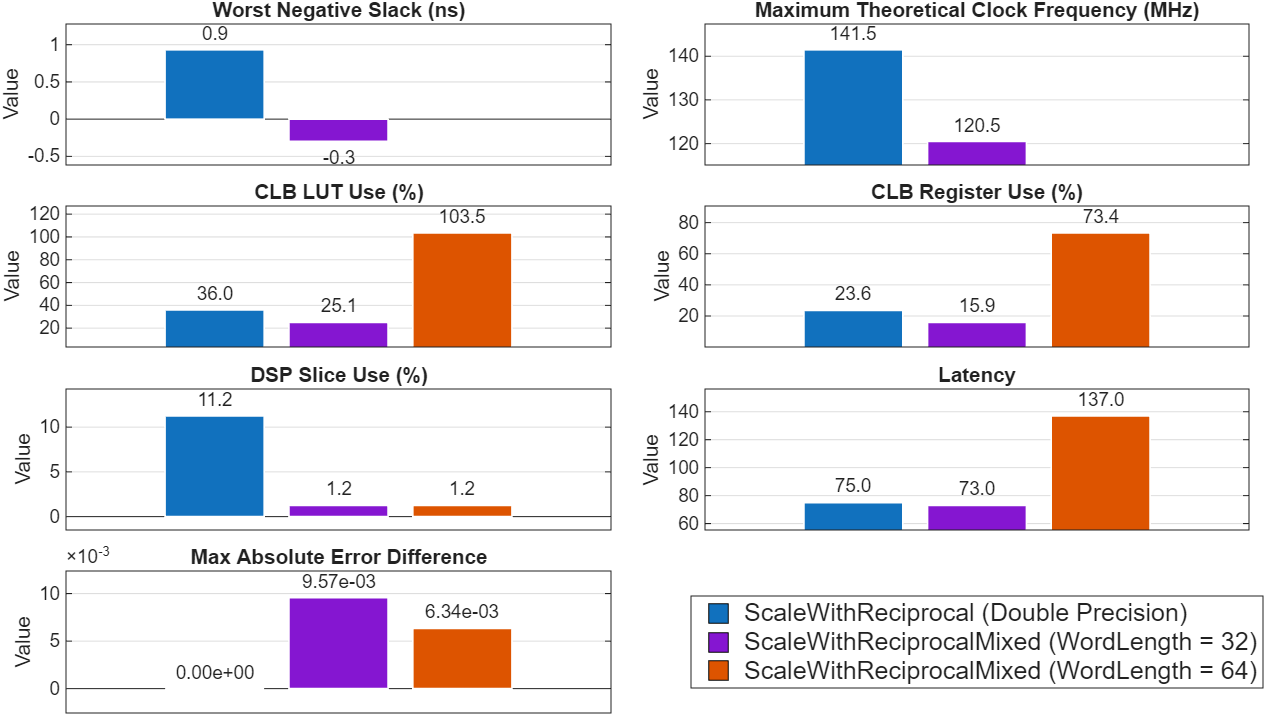
Synthesize the generated HDL code for the ScaleWithReciprocalMixed DUT by using a word length of 32 and 64 and then compare the results with the ScaleWithReciprocal DUT that uses double-precision floating-point data types.
This figure compares the synthesis results and absolute error between the two models. The ScaleWithReciprocalMixed DUT reduces resource use and maintains a small absolute error of 9.57e-3, but does not meet the timing requirements. Increasing the word length to 64 exceeds the available resources on the AMD Zynq XC7Z010 SoC, which results in FPGA implementation failing. However, the absolute error is only 6.34e-3, due to the additional bits available for the reciprocal operation.
Reduce Error and Resources Using Floating-Point for Divide Block
Lastly, use both floating- and fixed-point data types in the DUT. Because floating-point data types have a wider numeric range, use single-precision floating-point data types for the Divide block.
Programmatically change the data type for Convert In and Numerator to a single-precision floating-point data type and generate HDL code.

set_param("ScaleWithReciprocalMixed/HDL_DUT/Convert In", "OutDataTypeStr", "single");
set_param("ScaleWithReciprocalMixed/HDL_DUT/Numerator", "OutDataTypeStr", "single");
hdlset_param("ScaleWithReciprocalMixed", "AdaptivePipelining", "off");

hdlset_param("ScaleWithReciprocalMixed", "ProjectFolder", "hdl_prj_fixedfloat");
hdlset_param("ScaleWithReciprocalMixed", "TargetDirectory", "hdl_prj_fixedfloat\hdlsrc");

makehdl("ScaleWithReciprocalMixed/HDL_DUT");
### Begin compilation of the model 'ScaleWithReciprocalMixed'...
### Working on the model ScaleWithReciprocalMixed
### Generating HDL for ScaleWithReciprocalMixed/HDL_DUT
### Using the config set for model ScaleWithReciprocalMixed for HDL code generation parameters.
### Running HDL checks on the model 'ScaleWithReciprocalMixed'.
### Working on the model 'ScaleWithReciprocalMixed'...
### The code generation and optimization options you have chosen have introduced additional pipeline delays.
### The delay balancing feature has automatically inserted matching delays for compensation.
### The DUT requires an initial pipeline setup latency. Each output port experiences these additional delays.
### Output port 1: 46 cycles.
### Working on... GenerateModel
### Begin model generation 'gm_ScaleWithReciprocalMixed'...
### Rendering DUT with optimization related changes (IO, Area, Pipelining)...
### Model generation complete.
### Generated model saved at hdl_prj_fixedfloat\hdlsrc\ScaleWithReciprocalMixed\gm_ScaleWithReciprocalMixed.slx
### Delay absorption obstacles can be diagnosed by running this script: hdl_prj_fixedfloat\hdlsrc\ScaleWithReciprocalMixed\highlightDelayAbsorption.m
### To clear highlighting, click the following MATLAB script: hdl_prj_fixedfloat\hdlsrc\ScaleWithReciprocalMixed\clearhighlighting.m
### Begin VHDL Code Generation for 'ScaleWithReciprocalMixed'.
### Working on... Traceability
### Working on ScaleWithReciprocalMixed/HDL_DUT/nfp_convert_sfix_18_En13_to_single as hdl_prj_fixedfloat\hdlsrc\ScaleWithReciprocalMixed\nfp_convert_sfix_18_En13_to_single.vhd.
### Working on ScaleWithReciprocalMixed/HDL_DUT/nfp_convert_single_to_sfix_18_En13 as hdl_prj_fixedfloat\hdlsrc\ScaleWithReciprocalMixed\nfp_convert_single_to_sfix_18_En13.vhd.
### Working on ScaleWithReciprocalMixed/HDL_DUT/nfp_div_single as hdl_prj_fixedfloat\hdlsrc\ScaleWithReciprocalMixed\nfp_div_single.vhd.
### Working on ScaleWithReciprocalMixed/HDL_DUT as hdl_prj_fixedfloat\hdlsrc\ScaleWithReciprocalMixed\HDL_DUT.vhd.
### Generating package file hdl_prj_fixedfloat\hdlsrc\ScaleWithReciprocalMixed\HDL_DUT_pkg.vhd.
### Code Generation for 'ScaleWithReciprocalMixed' completed.
### Generating HTML files for code generation report at index.html
### Creating HDL Code Generation Check Report HDL_DUT_report.html
### HDL check for 'ScaleWithReciprocalMixed' complete with 0 errors, 0 warnings, and 1 messages.
### HDL code generation complete.
Absolute Error and FPGA Synthesis Results for Mixed-Precision DUT
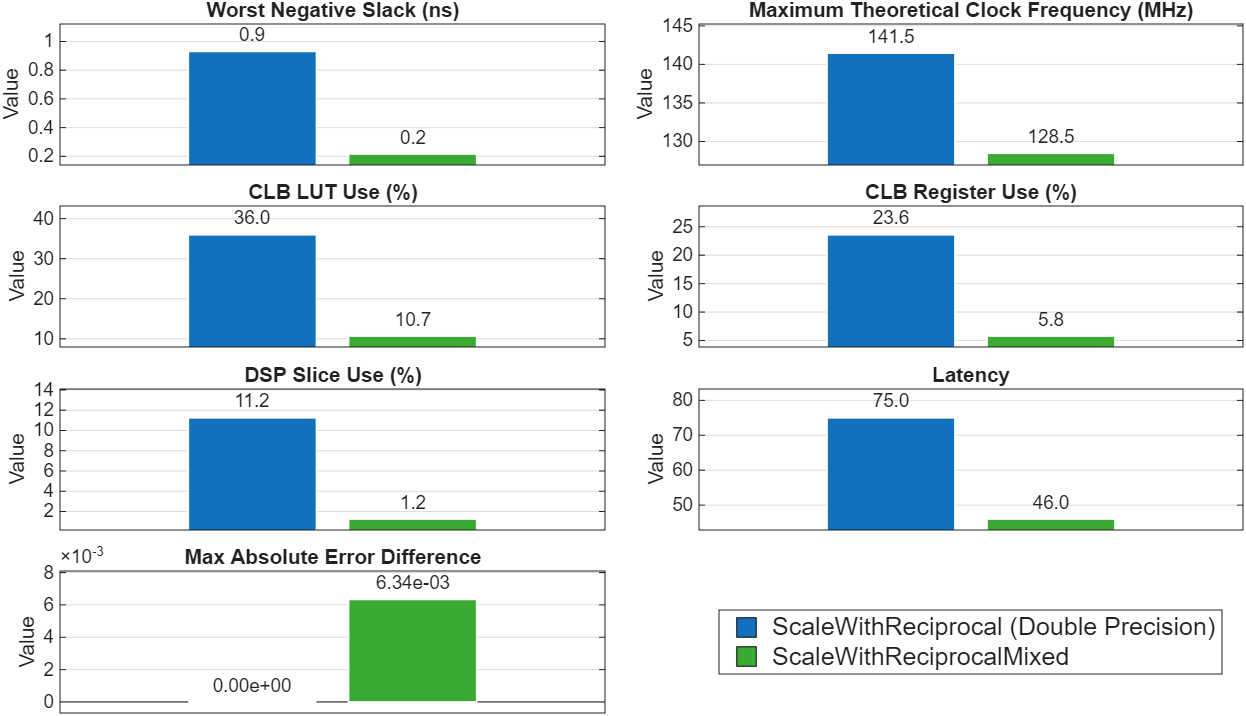
Synthesize the generated HDL code for the ScaleWithReciprocalMixed DUT using both fixed- and floating-point data types, and then compare with the ScaleWithReciprocal DUT using double precision floating-point data types.
This figure compares the synthesis results and absolute error between the ScaleWithReciprocal DUT that uses double-precision data types and the ScaleWithReciprocalMixed DUT that uses single-precision floating-point for the Divide block and fixed-point values for the remainder of the DUT. Compared to the double-precision DUT, the mixed-precision DUT reduces resource use, maintains a small absolute error of 6.34e-3, and has increased slack compared to the pure fixed-point DUTs.
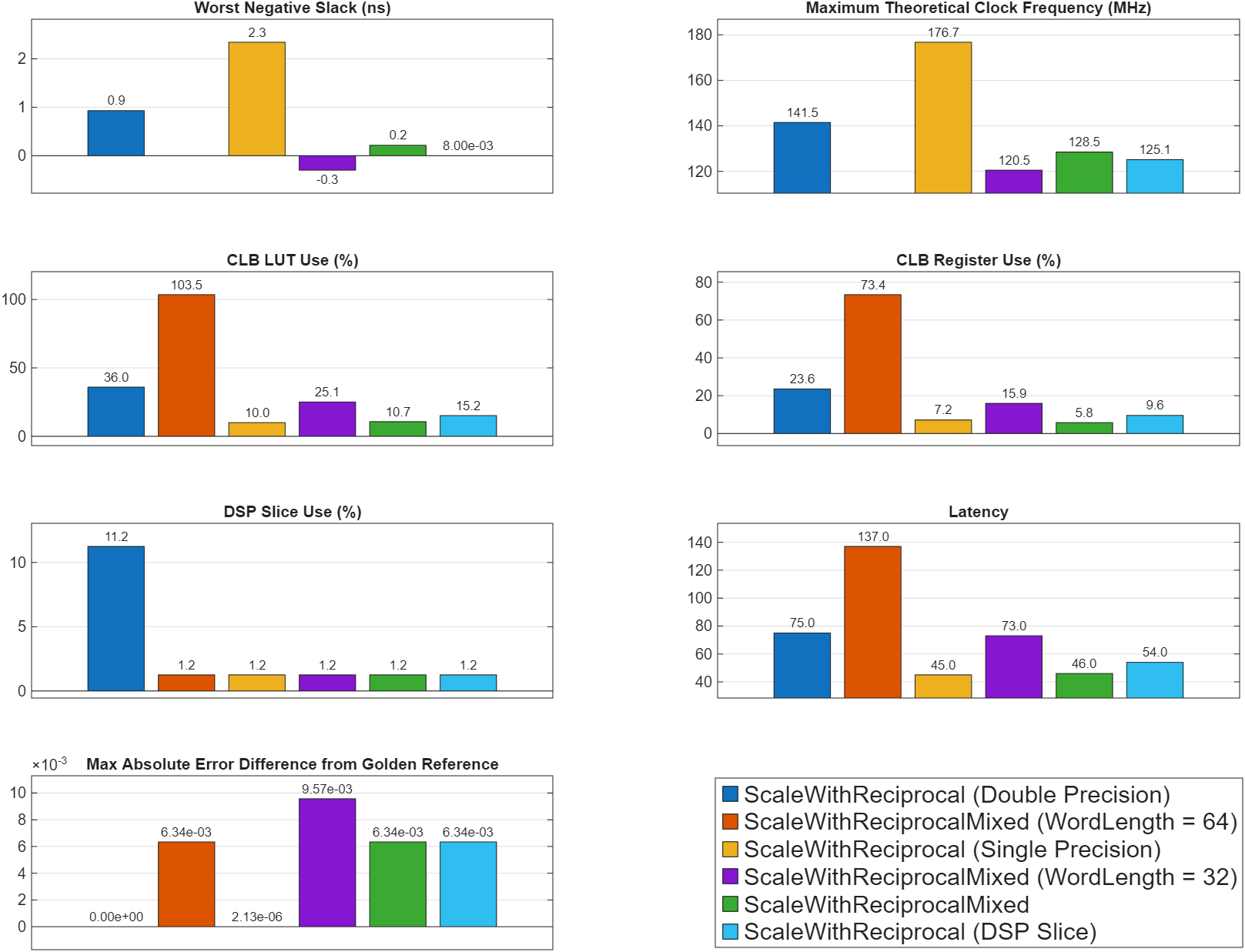
This graphic summarizes the FPGA synthesis results and absolute error between the four versions of the model.
See Also
Topics
- Getting Started with HDL Coder Native Floating-Point Support
- Generate Target-Independent HDL Code with Native Floating-Point
- Generate HDL Code for Vendor-Specific FPGA Floating-Point Target Libraries
- Modeling with Native Floating Point
- Optimize Feedback Loop Design and Maintain High Data Precision for HDL Code Generation
- Fixed-Point Numbers

