Create HDL- or HLS-Compatible MATLAB Algorithms
R2026bIn this example you create a MATLAB® algorithm that is compatible with and ready for HDL code generation. To create a Simulink model for HDL code generation, see Create HDL-Compatible Simulink Model.
To generate HDL code from a compatible MATLAB algorithm, see Generate HDL Code from MATLAB Algorithms.
Develop a MATLAB Algorithm
The MATLAB function mlhdlc_counter is a model of a 4-bit
synchronous up counter.
The function demonstrates these best practices for writing MATLAB code for HDL and HLS code generation:
Use only supported functions for HDL and HLS code generation. For more information, see Functions Supported for HDL and HLS Code Generation.
Initialize persistent variables to a specific value. In this example, an
ifstatement and theisemptyfunction initialize the persistent variable. If you do not initialize the persistent variable, then you cannot generate HDL and HLS code.Inside a function, read persistent variables before they are modified so that the persistent variables are inferred as registers.
Create a new MATLAB function in your current working directory named
mlhdlc_counter.m. Copy the MATLAB algorithm into the function:Review the MATLAB function. The persistent variable
count_valhas an initial value of zero that represents the current value of the count. The function uses twoifstatements to determine the value of the count based on the input argumentenable_ctr. Whenenable_ctris a nonzero value, the function increments the count register,count_val, by one. The function increases the counter until the count reaches 15, or 4 bits. Then, the function resets the counter to zero.%#codegen function count = mlhdlc_counter(enable_ctr) persistent count_val; if isempty(count_val) count_val = 0; end if enable_ctr count_val = count_val + 1; if count_val > 15 count_val = 0; end end count = count_val; end
Create a MATLAB Test Bench
A MATLAB test bench provides input data to your MATLAB algorithm and checks the algorithm output against an expected result. For more information on test bench requirements and best practices, see Using Test Benches With HDL and HLS Code Generation.
In this example, you create a test bench to test whether the
mlhdlc_counter function is suitable for code generation.
The test bench generates an expected counter output using a MATLAB
for loop, and the actual counter algorithm output using
the mlhdlc_counter function, and then compares the outputs
graphically.
Create a new MATLAB script in your current working directory named
mlhdlc_counter_tb.m. Copy the MATLAB code into the MATLAB script:Review the variable-initialization portion of the test bench. The test bench initializes the
expected_outputandactual_outputarrays with zeros. Each array has a length of 40. The script then clears the persistent variables associated withmlhdlc_counter.expected_output = zeros(1, 40); actual_output = zeros(1, 40); clear mlhdlc_counterReview the portion of the test bench that generates the expected output of the counter algorithm using a
forloop. Aforloop iterates 40 times, incrementingcounter_valueunless the loop indexiis a multiple of 5. Ifcounter_valueexceeds 15, it is reset to 0. The value ofcounter_valuefor each iteration is stored in theexpected_outputarray.counter_value = 0; for i = 1:40 if mod(i, 5) ~= 0 counter_value = counter_value + 1; if counter_value > 15 counter_value = 0; end end expected_output(i) = counter_value; end
Review the portion of the test bench that generates the actual output by calling the MATLAB algorithm for HDL code generation. Another
forloop iterates 40 times, callingmlhdlc_counterwith atrueorfalseargument based on whether the loop indexiis a multiple of 5. The result of each iteration is stored in theactual_outputarray.for i = 1:40 if mod(i, 5) == 0 actual_output(i) = mlhdlc_counter(false); else actual_output(i) = mlhdlc_counter(true); end end
Review the portion of the test bench that plots the outputs. The code creates a tiled layout with two plots: one for
actual_outputand one forexpected_output. Then, the code comparesexpected_outputwithactual_outputto check for equivalency.t = tiledlayout(2,1); nexttile plot(1:40,actual_output,LineWidth=2) title("Actual Output") nexttile plot(1:40,expected_output,LineWidth=2,Color="#D95319") title("Expected Output") ylabel(t,"Count Value") xlabel(t,"Input") if isequal(expected_output, actual_output) disp("Test passed. The actual output matches the expected output."); else disp("Test failed. The actual output does not match the expected output."); disp("Expected Output:"); disp(expected_output); disp("Actual Output:"); disp(actual_output); end
Run and Verify Algorithm Functionality
To test the mlhdlc_counter function, run the
mlhdlc_counter_tb test bench.
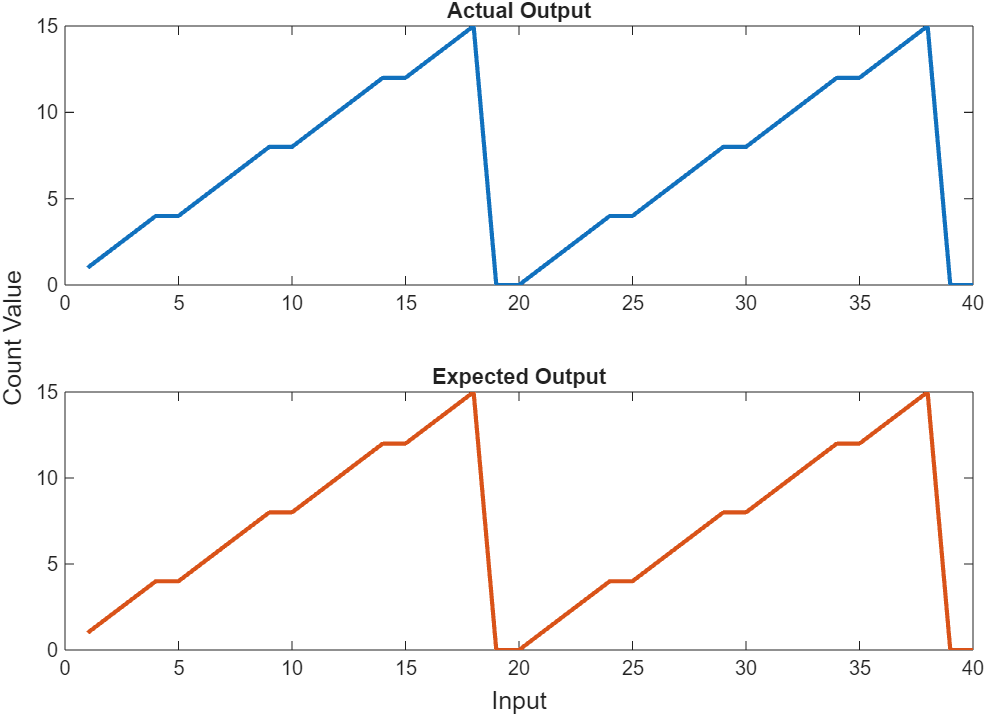
The test bench results show that the output of
mlhdlc_counter matches the simulated output, which
verifies that the mlhdlc_counter function logic matches the
test bench counter algorithm.
After you validate the MATLAB algorithm, you can generate HDL code from the function. For more information about generating HDL or HLS code from a compatible MATLAB algorithm, see Generate HDL Code from MATLAB Algorithms.

