主要内容

FPGA Board Manager

Create and manage custom FPGA boards for FPGA-in-the-loop workflows

Description

Create and manage custom FPGA boards.

The FPGA Board Manager tool enables you to manage FPGA boards for use with HDL Verifier™ and HDL Coder™ workflows. Use this tool to:

  • Create new FPGA board definition files.

  • Edit or clone existing board configurations.

  • Import boards from XML definition files.

  • Download and manage FPGA board support packages.
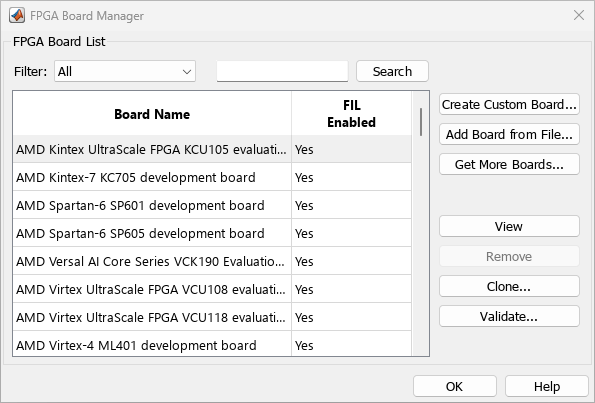
FPGA Board Manager

Open the FPGA Board Manager

  • MATLAB® command prompt: Enter fpgaBoardManager.

  • FPGA-in-the-Loop Wizard: Click Launch Board Manager on the first page.

  • HDL Workflow Advisor (when using HDL Coder): In Step 1.1 select FPGA-in-the-Loop and click Launch Board Manager.

Parameters

expand all

Choose one of the following views:

  • All boards

  • Only those boards that were preinstalled with HDL Verifier or HDL Coder

  • Only custom boards

Start the New FPGA Board Wizard. You can find the process for creating a board definition file in Create Custom FPGA Board Definition.

Import a board definition file (.xml).

Download FPGA board support packages for use with FIL

  1. Click Get more boards.

  2. Follow the prompts in the Support Package Installer to download an FPGA board support package.

  3. When the download is complete, you can see the new boards in the board list in the FPGA Board Manager.

Tips

You can install an FPGA board support package without an internet connection. See Install Support Package Offline.

View board configurations and modify the information. You can view a read-only file but not edit it. See FPGA Board Editor.

Dependencies

You can edit a configuration file only if it is saved with write permissions. Otherwise it is only available for viewing.

Remove custom board from the list. This action does not delete the board definition XML file.

Create a copy of an existing board for further modification.

Run validation tests for FIL. For more information see Validation.

Version History

Introduced in R2012b