Valve Section with Detached Shaft (IL-PB)
R2026bValve Section with Detached Shaft (IL-PB) block

To add a block to a model, double-click the canvas and start typing the block name. Then, select the block from the list.
Libraries:
Simscape /
Fluids /
Isothermal Liquid /
Valves & Orifices /
Hydromechanical Valves
Description
The Valve Section with Detached Shaft (IL-PB) block represents a section of a valve with a detached shaft. The valve section has rigid spacing along the valve body and flexible spacing along the moving spool.
Port Relations
Ports F and B are hydromechanical valve
composite ports that have valve_body, spool,
and fluid nodes, where:
The position of
F.valve_bodyrelative toB.valve_bodyis equal to the value of the Valve body section length parameter.The position of
F.spoolrelative toB.spoolis the gap length. When the gap length is0a hard stop engages.When you clear Valve section contains liquid, the valve section does not contain liquid and does not use the nodes
B.fluidandF.fluid.When you select Valve section contains liquid, the block models liquid flow inside the valve section and:
The liquid volume is where L is the gap length and A is the value of the Liquid cross-sectional area in valve section parameter.
You can enable the isothermal liquid port Af, which models a branching flow path, by selecting Enable port Af for the liquid in the valve section.
Block Sub-Components
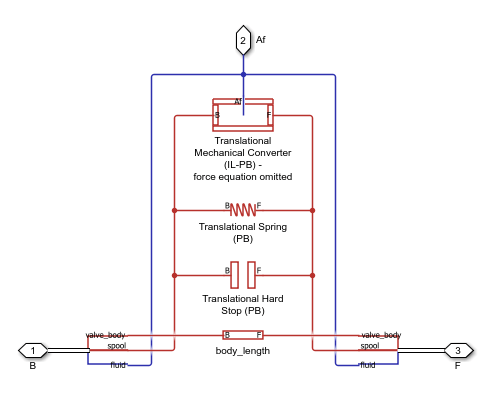
The Valve Section with Detached Shaft (IL-PB) block is equivalent to a composite component that comprises these Simscape Foundation and Fluids library blocks:
Translational Spring (PB), if you select Enable spring between spool at B and F.
Translational Mechanical Converter (IL-PB) or Reservoir (IL). However, this block does not use the force equations from the Translational Mechanical Converter (IL-PB) block.
This image shows the equivalent diagram when you select Enable spring between spool at B and F and Valve section contains liquid:
This image shows the equivalent diagram when you select Enable spring between spool at B and F and clear Valve section contains liquid:

Variables
To set the priority and initial target values for the block variables prior to simulation, use the Initial Targets section in the block dialog box or Property Inspector. For more information, see Set Priority and Initial Target for Block Variables.
Nominal values provide a way to specify the expected magnitude of a variable in a model. Using system scaling based on nominal values increases the simulation robustness. Nominal values can come from different sources, one of which is the Nominal Values section in the block dialog box or Property Inspector. For more information, see Modify Nominal Values for a Block Variable.
Ports
Conserving
Parameters
Programmatic Use: Add Block
To add the block programmatically, use the add_block function with one of these library block paths as the source.
"SimscapeFluids_lib/Isothermal Liquid/Valves & Orifices/Hydromechanical Valves/Valve Section with Detached Shaft (IL-PB)"
Example: add_block("SimscapeFluids_lib/Isothermal Liquid/Valves & Orifices/Hydromechanical Valves/Valve Section with Detached Shaft (IL-PB)","myModel/myBlock",MakeNameUnique="on")
For information about programmatic access to individual block parameters, see the Programmatic Use section of parameter descriptions on this page.
Extended Capabilities
Version History
Introduced in R2026b

