主要内容

afclient

Create PI Asset Framework client

Since R2026a

    Description

    The Asset Framework (AF) client object provides access to a PI AF server so that you can browse the AF database and retrieve attribute values.

    Note

    You must install the AF SDK library to connect to a PI AF server from MATLAB®. For more information, see AF SDK Overview.

    Creation

    Description

    afClientObj = afclient(serverName) creates an AF client object and connects to the default database of the PI AF server hosted at the specified serverName.

    afClientObj = afclient(serverName,Name=Value) associates the client with a specific AF database, Windows® credentials or domain using optional name-value arguments.

    Credential information is used only to connect to the PI AF server and is not retained in the AF client object properties.

    example

    Input Arguments

    expand all

    Name of the AF server, specified as a string or character vector. You can also specify the alias name of the AF server or the IP address of the host machine.

    Example: Obj = afclient("af-host-55");

    Data Types: char | string

    Name-Value Arguments

    expand all

    Specify optional pairs of arguments as Name1=Value1,...,NameN=ValueN, where Name is the argument name and Value is the corresponding value. Name-value arguments must appear after other arguments, but the order of the pairs does not matter.

    Example: afClientObj = afclient("af-host",Database="MyDB",Username="MyUserID",Password="MyPassword",Domain="MY-NET3")

    Name of an AF database on the connected AF server, specified as a string or character vector.

    Example: Obj = afclient("af-host-55",Database="OSIDemo_PG_HydroPlant");

    Data Types: char | string

    Windows login name for explicit connection to the AF server, specified as a string or character vector. When you specify a Username, you must also specify the corresponding Password.

    Example: Obj = afclient("af-host-55",Database="OSIDemo_PG_HydroPlant",Username="matlab_user",Password=getSecret("LoginPassword"));

    Data Types: char | string

    Windows login password for explicit connection to the AF server, specified as a string or character vector. Use the setSecret and getSecret functions to securely store and retrieve the password from your MATLAB vault. When you specify a Password, you must also specify the corresponding Username.

    Example: Obj = afclient("af-host-55",Database="OSIDemo_PG_HydroPlant",Username="matlab_user",Password=getSecret("LoginPassword"));

    Data Types: char | string

    Name of domain associated with user credentials, specified as a string or character vector. You can use this option if the credentials pertain to a domain different from the local machine. When you specify a Domain, you must also specify the corresponding user credentials using Username and Password.

    Example: afClientObj = afclient("af-host",Database="MyDB",Username="MyUserID",Password="MyPassword",Domain="MY-NET3")

    Data Types: char | string

    Output Arguments

    expand all

    AF client, returned as an icomm.af.Client object, with properties such as server name, database, server time zone, and domain. For more information, see Properties.

    Properties

    expand all

    This property is read-only.

    Name of the connected AF server, represented as a string. This property takes its value from the serverName input argument to afclient.

    Example: "SIM-AF32"

    Data Types: string

    This property is read-only.

    Name of the connected AF database, represented as a string.

    Example: "OSIDemo_PG_HydroPlant"

    Data Types: string

    This property is read-only.

    Time zone of the AF server location, represented as a string.

    Example: "UTC+05:30:00"

    Data Types: string

    This property is read-only.

    Name of the domain associated with user credentials, represented as a string.

    Example: "MY-NET3"

    Data Types: string

    Object Functions

    listDatabasesList available databases in connected AF server
    selectDatabaseConnect AF client to specified database
    getRootElementsGet root elements of AF database
    browseElementsGraphically browse element hierarchy and select attributes from Asset Framework database
    findElementByNameFind element by name in AF database
    findElementByPathFind elements by path in AF server
    findElementByTemplateFind elements by template on AF server
    findAttributeByPathFind attributes by path in AF server

    Examples

    collapse all

    Create an AF client object and connect to the OSIDemo_PG_HydroPlant database of the PI AF server on host EVS-Hydroplant.

    afClientObj = afclient("EVS-Hydroplant",Database="OSIDemo_PG_HydroPlant")
    afclientObj = 
    
      Client with properties:
    
            ServerName: "EVS-Hydroplant"
                Domain: "EVS"
        ServerTimeZone: "UTC+05:30:00"
              Database: "OSIDemo_PG_HydroPlant"

    You can now use afClientObj to explore databases and retrieve data stored on the server. See Get Started with Accessing Data from AVEVA PI Asset Framework.

    Explicit connection with a PI AF server requires Windows credentials. Use the setSecret and getSecret functions to securely store and retrieve the Windows login password from your MATLAB vault.

    setSecret("LoginPassword")
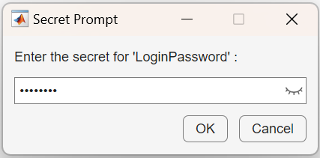
    password prompt for PI

    Create a client object and connect to the PI AF server on host af-host-55 using Windows credentials.

    af = afclient("af-host-55",Username="myID",...
                  Password=getSecret("LoginPassword"));

    Version History

    Introduced in R2026a