Invoke Method Node Using OPC UA Explorer
R2026bYou can call a method node in the address space using the OPC UA Explorer
app. The app represents method nodes with a function symbol  . When you select a method node in the
Address Space, the Node Information panel
on the right displays the properties of the node.
. When you select a method node in the
Address Space, the Node Information panel
on the right displays the properties of the node.
Before you call a method node, configure and connect to the server. For more information, see Configure Server Connection in OPC UA Explorer App.
To invoke a method node:
Select the node from the Address Space. You can invoke only one node at a time.
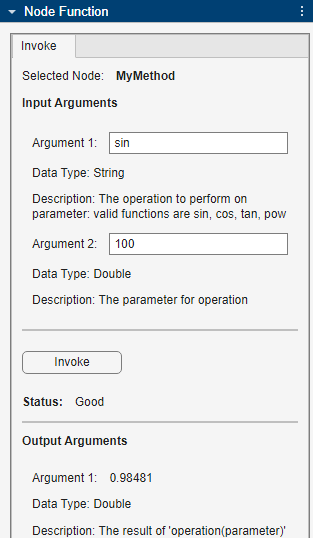
In the Invoke tab of the Node Function panel, specify the required input arguments for the method node in the Input Arguments section. Check the Data Type and Description fields for information about each argument. The Description field is empty if no description is available for the argument on the server.
Click Invoke. The app updates the Status parameter to reflect the status of the function call. If the function call fails, the app returns the status as
Badfollowed by a reason for the failure.After the invoke operation is complete, the app displays any output parameters in the Output Arguments section.
This example executes the MyMethod node with input arguments as
sin and 100.