Generate Script from OPC UA Explorer Session
R2026bYou can generate a MATLAB® live script from your OPC UA Explorer session. The generated script contains your client configuration, current node subscriptions, and cleanup tasks. It also includes commented sections for read, write, and invoke operations.
Before you generate script for the current OPC UA Explorer session, configure and connect to the server. For more information, see Configure Server Connection in OPC UA Explorer App.
To generate a script from your OPC UA Explorer session, click Generate Script on the toolstrip. The app generates a script for the current session and presents it as a live script in MATLAB Editor. To save the generated script, use the editor’s save function.
This example outlines the main sections of a generated script.
Create OPC UA Client — This section creates the OPC UA client object using your specified configuration properties.

Connect OPC UA Client — This section connects the client to the
OPC UA server using the user identity token selected for connection in the app. For a
non-anonymous connection, the app uses MATLAB vault functions, such as getSecret
and setSecret
to handle sensitive user information.

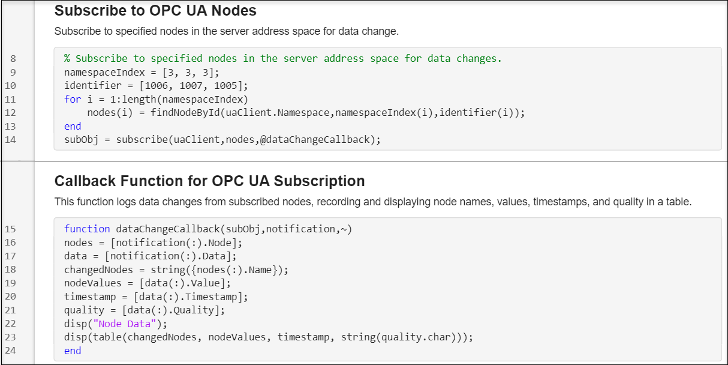
Subscribe to Nodes for Data Change — This section monitors nodes
for data change notifications. The nodes list contains only the nodes
currently in the Node Monitoring Table. In this example, the client subscribes to three
nodes.
Perform Node Read Operations — This section provides commented
code for node operations from the session, such as reading current values, historical
data, and processed data. To perform node read operations, select nodes from the server
address space using the graphical interface triggered by the browseNamespace function. If you know the node information, you can
modify the code to select a node using the findNodeByName or findNodeById functions. Update the input arguments for these sections
based on your intended operations, such as time range for historical reads, and
aggregate function and interval for processed reads.

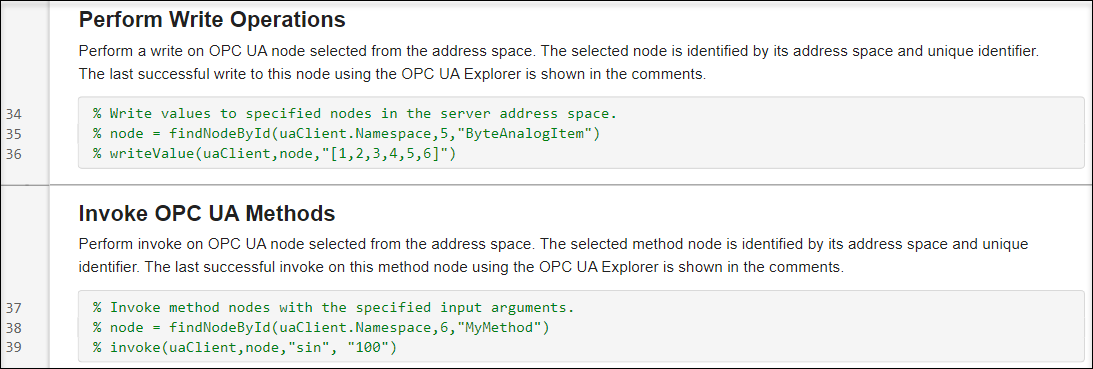
Perform Node Write Operations — This section shows the most
recent OPC UA write or invoke operation from the session. To prevent unexpected changes
to node values on the server, these sections are commented. Uncomment these lines to
write a value to a node or invoke a method node. This code selects a node based on node
information specified using the findNodeById function. If you do not know the exact node information,
you can use the browseNamespace function to open a
graphical interface that allows you to select a node from the server address
space.
Clean Up — This section of the generated script disconnects the OPC UA client and clears the client and subscription objects.


