主要内容

updateSemiDiameters

Update semi-diameters of surfaces in optical system

Since R2026a

Description

Add-On Required: This feature requires the Optical Design and Simulation Library for Image Processing Toolbox add-on.

[constraintResult,maxFieldAngle] = updateSemiDiameters(opsys,constraintType,constraintValue) updates the semi-diameters of each surface of the optical system opsys using the constraint value constraintValue of type constraintType.

example

[___] = updateSemiDiameters(___,Name=Value) specifies options using one or more name-value arguments in addition to the arguments from the previous syntax. For example, ApertureStopSurfaceIndex=4 specifies to update the semi-diameter of the aperture surface at index 4 of the optical system.

Examples

collapse all

Create an empty optical system.

opsys = opticalSystem;

To create a doublet lens, create the three refractive surfaces of the doublet using the addRefractiveSurface object function.

addRefractiveSurface(opsys,Radius=10,SemiDiameter=2,DistanceToNext=4,Material="N-BK7")
addRefractiveSurface(opsys,Radius=-10,SemiDiameter=2,DistanceToNext=2,Material="F2")
addRefractiveSurface(opsys)

Create a gap using the addGap object function, and add an image plane using the addImagePlane object function.

addGap(opsys,18.67);
addImagePlane(opsys);

Define a target working f-number, targetFNum, as a constraint for updating the semi-diameters of the optical system surfaces.

targetFNum = 2.3045;

Create a copy of the optical system.

opsysCopy = copy(opsys);

Update the semi-diameters of the optical system surfaces using the target f-number constraint.

[actualFNum,actualFA] = updateSemiDiameters(opsysCopy,"WorkingFNumber",targetFNum)
actualFNum = 
2.3045
actualFA = 
12.6672

Display a 2-D visualization of the optical system using the view2d object function.

view2d(opsysCopy,Title="F-number=" + actualFNum);
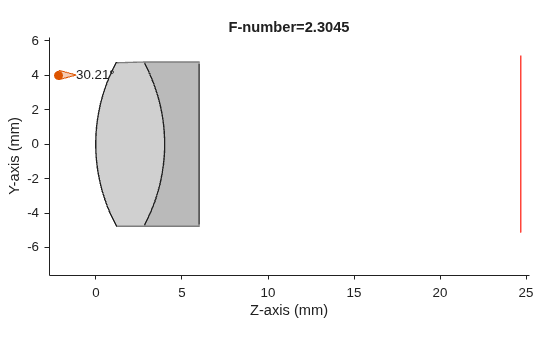
Figure contains an object of type optics.ui.opticalsystemviewer2d. The chart of type optics.ui.opticalsystemviewer2d has title F-number=2.3045.

Input Arguments

collapse all

Optical system in which to update the component semi-diameters, specified as an opticalSystem object.

Note

If the optical system contains a rectangular surface, the updateSemiDiameters object function updates its shape to a circle by circumscribing the rectangle.

Type of constraint, specified as one of these options.

constraintType ValueDescription
"DiaphragmRadius"

Update the semi-diameters of the optical system components, constrained to a target aperture radius of the diaphragm.

"WorkingFNumber"

Update the semi-diameters of the optical system components, constrained to a target working f-number.

"EntryPupilRadius"

Update the semi-diameters of the optical system components, constrained to a target entry pupil radius.

Target value of the constraint, specified as a positive numeric scalar.

Name-Value Arguments

collapse all

Specify optional pairs of arguments as Name1=Value1,...,NameN=ValueN, where Name is the argument name and Value is the corresponding value. Name-value arguments must appear after other arguments, but the order of the pairs does not matter.

Example: updateSemiDiameters(ApertureStopSurfaceIndex=4) specifies to update the semi-diameter of the aperture surface at index 4 of the optical system.

Index of the aperture surface, specified as a positive integer in the range [1, numel(opsys.Surfaces)].

By default, the ApertureStopSurfaceIndex value is the index of the first diaphragm surface, or the first surface of any kind if the optical system does not contain a diaphragm.

Note

If the optical system contains multiple diaphragms, the default ApertureStopSurfaceIndex value is the index of the first surface of the first diaphragm.

Target field angle of the updated optical system, in degrees, specified as a positive numeric scalar in the range [0, 180]. This value is the maximum angle from the optical axis at which the chief ray reaches the final surface of the system.

The default value is halfFieldOfView(opsys), or the half field of view (HFOV) of the optical system opsys.

Option to update the image plane size or semi-diameter, specified as a numeric or logical 1 (true) or 0 (false).

Note

The updateSemiDiameters object function updates the image plane size when the image plane size computed using the constraints is larger than the initial image plane size.

Output Arguments

collapse all

Actual value of the constraint, returned as a positive numeric scalar. Depending on the value of ConstraintType that you specify, the constraintResult value is the updated diaphragm radius, working f-number, or entry pupil radius.

Maximum field angle of the updated optical system, returned as a positive numeric scalar.

More About

collapse all

Tips

  • Verify the output constraint value constraintResult and the maximum field angle maxFieldAngle against the specified constraint and target field angle. The updateSemiDiameters object function updates the surfaces of the elements of the optical system opsys to best match the specified constraints, but, depending on the initial system and constraints, it might not match them identically.

Version History

Introduced in R2026a