focus
R2026bDescription
Add-On Required: This feature requires the Optical Design and Simulation Library for Image Processing Toolbox add-on.
minSpot = focus(opsys)
Note
This functionality requires the Optical Design and Simulation Library for Image Processing Toolbox™. You can install the Optical Design and Simulation Library for Image Processing Toolbox from Add-On Explorer. For more information about installing add-ons, see Get and Manage Add-Ons.
minSpot = focus(opsys,Name=Value)Wavelengths=[455 678] places the image plane at a position that
minimizes the RMS spot size at the 455 and 678 nanometer wavelengths.
Examples
Create an empty optical system.
opsys = opticalSystem;
To create a doublet lens, add the three refractive surfaces of the doublet to the optical system using the addRefractiveSurface object function.
addRefractiveSurface(opsys,Radius=10,DistanceToNext=4,Material="N-BK7")
addRefractiveSurface(opsys,Radius=-10,DistanceToNext=2,Material="F2")
addRefractiveSurface(opsys,DistanceToNext=10)
addRefractiveSurface(opsys,Radius=10,DistanceToNext=4,Material="N-BK7")
addRefractiveSurface(opsys,Radius=-10)
Create a gap using the addGap object function, and add an image plane using the addImagePlane object function.
addGap(opsys,2)
addImagePlane(opsys)
Display a 2-D visualization of the initial optical system by using the view2d object function.
view2d(opsys,Title="Initial Doublet");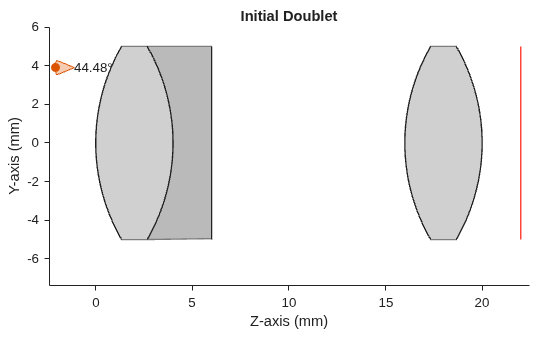
Create a copy of the initial optical system opsys.
opsys2 = copy(opsys);
Focus the copied optical system by shifting the image plane to a position where the RMS spot size is minimal. Display a 2-D visualization of the optical system by using the view2d object function. Trace rays and add them to the visualization using the addRays function.
sp = focus(opsys2);
hv = view2d(opsys2,Title="Focused Doublet");
addRays(hv)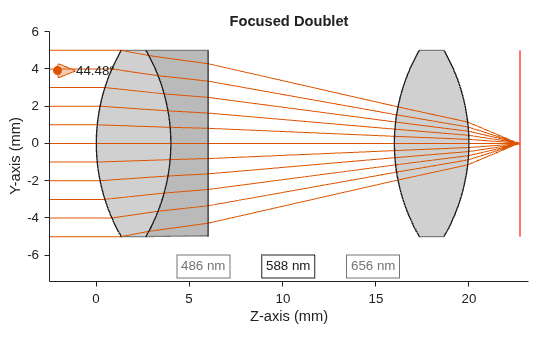
Compute the spot diagram of the initial optical system and the spot diagram of the focused system by using the spot object function.
spotBefore = spot(opsys);
spotAfter = spot(opsys2);
Display the spot diagrams by using the spotDiagram object function.
spotDiagram(spotBefore,Title="Initial Spot");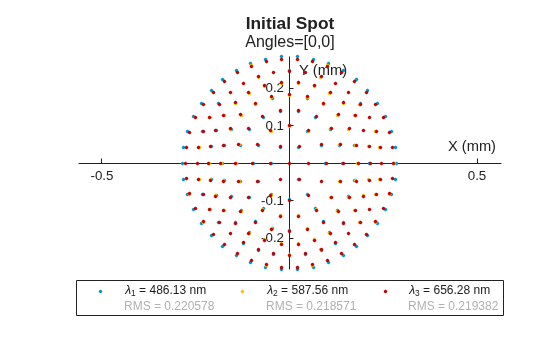
spotDiagram(spotAfter,Title="Focused Spot");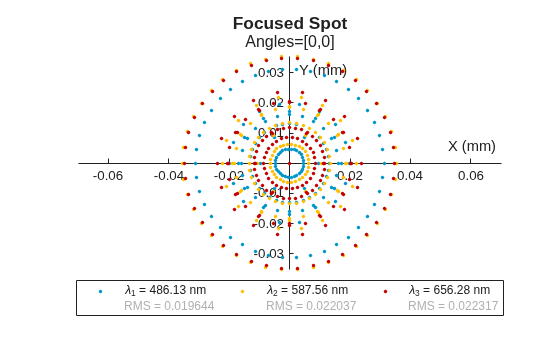
Input Arguments
Name-Value Arguments
Output Arguments
References
[1] #DevOptical Part 19: A Quick Focus Algorithm.” Accessed December 12, 2024. https://www.thepulsar.be/article/-devoptical-part-19--a-quick-focus-algorithm.
Version History
Introduced in R2026a
See Also
opticalSystem | spot | fieldPoint | halfFieldOfView | traceRays

