addRefractiveSurface
Description
Add-On Required: This feature requires the Optical Design and Simulation Library for Image Processing Toolbox add-on.
addRefractiveSurface( adds a default
circular refractive surface to the optical system opsys)opsys. When you create
a surface using this function, you create a Surface object.
You must add at least two refractive surfaces for a lens component before this function
adds them to the optical system. To complete a component, you must add a closing surface
with an unspecified or ambient Material value.
addRefractiveSurface(
specifies properties of the refractive surface using one or more name-value arguments. For
example, opsys,Name=Value)addRefractiveSurface(Radius=-50) specifies the radius of
curvature of the surface as -50, in millimeters.
Examples
Create an empty optical system.
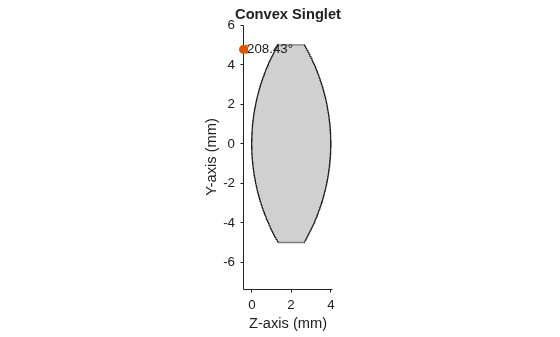
opsys = opticalSystem(Name="Convex Singlet");To add a lens component to the optical system, create the first refractive surface of the lens. Specify a positive radius of curvature using the Radius name-value argument, the thickness of the lens using the DistanceToNext name-value argument, and the glass material type using the Material name-value argument.
addRefractiveSurface(opsys,Radius=10,DistanceToNext=4,Material="N-BK7")Create the second refractive surface of the lens. This exit surface is the outside surface of the lens that contacts the ambient material. To create a convex lens, specify a negative radius of curvature for the second surface using the Radius name-value argument.
addRefractiveSurface(opsys,Radius=-10)
Display the first Surface object created by the addRefractiveSurface object function.
opsys.Surfaces(1)
ans =
Surface with properties:
Name: [0×0 string]
Shape: [1×1 optics.shape.Circular]
Radius: 10
ConicConstant: 0
NormalizationRadius: 1
Aspherics: [0 0 0 0 0 0 0 0 0 0 0 0 0 0 0 0 0 0 0 0]
EvenAspherics: [0 0 0 0 0 0 0 0 0 0]
Coating: [0×0 opticalCoating]
Position: [0 0 0]
TiltAngles: [0 0 0]
Display the LensElement object, which represents the lens component, created by the addRefractiveSurface object function. The Surfaces property of this object specifies the two surfaces.
opsys.Components(1)
ans =
LensElement with properties:
Name: [0×0 string]
Materials: [1×1 opticalMaterial]
Thickness: 4
Surfaces: [1×2 optics.surface.Surface]
Shape: [1×2 optics.shape.Circular]
Coatings: [0×0 opticalCoating]
Position: [0 0 0]
TiltAngles: [0 0 0]
Display a 2-D visualization of the optical system using the view2d function.
view2d(opsys)
ans =
OpticalSystemViewer2D with properties:
Title: "Convex Singlet"
OpticalSystem: [1×1 opticalSystem]
Labels: "none"
FieldPoints: "on"
Rays: [0×0 optics.ui.Rays2D]
Parent: [1×1 Figure]
Show all properties
Create an empty optical system.
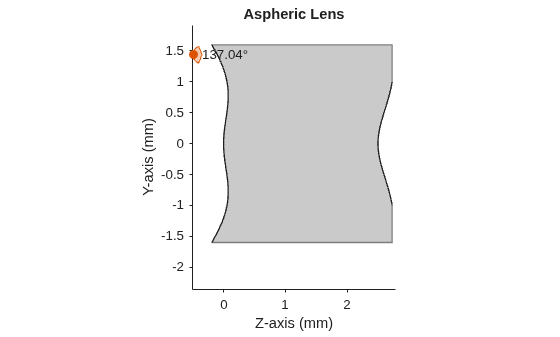
opsys = opticalSystem(Name="Aspheric Lens");Create the first aspheric surface, and specify the even aspheric coefficients using the EvenAspherics name-value argument. Specify the conic shape of the lens as parabolic using the ConicConstant name-value argument. Specify the surface semi-diameter using the SemiDiameter name-value argument, and specify the refractive index as 1.545 and the Abbe number as 56 using the Material name-value argument. Specify the lens thickness as 2.5 millimeters using the DistanceToNext name-value argument.
addRefractiveSurface(opsys,Radius=1.7349, ... EvenAspherics=[0 -3.35772e-1 9.43709e-2 5.16187e-2 -7.01966e-2 3.50377e-2 -9.52759e-3 1.47430e-3 -1.21780e-4 4.16141e-6], ... ConicConstant=-1,SemiDiameter=1.6,Material=[1.545 56],DistanceToNext=2.5)
Create the second aspheric surface, and specify the even aspheric coefficients using the EvenAspherics name-value argument.
addRefractiveSurface(opsys,Radius=1.0513, ... EvenAspherics=[0 -4.10700e-1 2.52834e-1 -1.22801e-1 4.26734e-2 -1.02969e-2 1.69864e-3 -1.83493e-4 1.16681e-5 -3.29217e-7], ... ConicConstant=-1,SemiDiameter=1)
Display a 2-D visualization of the aspheric lens using the view2d function.
view2d(opsys)
ans =
OpticalSystemViewer2D with properties:
Title: ""
OpticalSystem: [1×1 opticalSystem]
Labels: "none"
FieldPoints: "on"
Rays: [0×0 optics.ui.Rays2D]
Parent: [1×1 Figure]
Show all properties
Input Arguments
Optical system to which to add the refractive surface, specified as an opticalSystem object.
Name-Value Arguments
Specify optional pairs of arguments as
Name1=Value1,...,NameN=ValueN, where Name is
the argument name and Value is the corresponding value.
Name-value arguments must appear after other arguments, but the order of the
pairs does not matter.
Example: addRefractiveSurface(Radius=-50) specifies the radius of
curvature of the refractive surface as -50, in
millimeters.
Glass material of the refractive surface, specified as one of these values:
Material Value | Description |
|---|---|
| string scalar or character vector | Specify the name of a glass material. For example, specify
Tip To search for a material in the default glass library, use the
|
opticalMaterial object | Specify a custom material by configuring the properties of an
|
| 2-element row vector | Index of refraction and Abbe number of the glass material, specified as a 2-element row vector of the form [Nd Vd], where Nd and Vd are the index of refraction and Abbe number, respectively. |
When you specify one or more refractive surfaces with a non-ambient material, such
as the surface of a lens, you must add a second, closing refractive surface with
Material unspecified, or specified as the value of the
AmbientMaterial property of the optical system
opsys.
For example, to create a singlet lens that contains two surfaces, you must specify
the Material value only for the first surface.
Distance to the next surface, in millimeters, specified as a positive scalar. For
the first surface you create, specify DistanceToNext to set the
lens thickness.
For the second surface you create, specify DistanceToNext to
set the gap width to the next surface or component that is added to the optical
system.
Note
You must specify DistanceToNext as a nonzero value for any
surface with a non-ambient material property, except the entrance surface. If
required for your application, the entrance surface of an optical system can have
zero thickness.
Surface optical coating, specified as an opticalCoating object. The addRefractiveSurface function
applies the coating to the front of the surface where incident rays hit. If the
surface is followed by an ambient material, the addRefractiveSurface
function applies the coating to the back of the surface.
Radius of curvature of the refractive surface, specified as a numeric scalar. For a set of two refractive surfaces, such as the opposite surfaces of a lens component, specify the radius of the refractive surface based on these criteria.
First refractive surface (R1) — Specify
a positive Radius value for the first surface (facing the light
source) if the center of curvature is on the same side as the incoming light, and a
negative Radius value if it is on the opposite side.
Second refractive surface (R2) — Specify
a positive Radius value for the second surface (facing away from
the light source) if the center of curvature is on the opposite side of the incoming
light, and a negative Radius value if it is on the same
side.
Surface semi-diameter, specified as a positive scalar. The semi-diameter is the distance, along the positive y-axis, from the center of the optical surface to the edge of the usable optical area, describing the aperture through which light enters. This quantity is half the full diameter of the surface or aperture through which light can pass. By default, the surface is circular with a semi-diameter of 5.
Note
For a rectangular surface, use the RectangleSize name-value
argument to specify the surface size, instead.
Rectangular surface size of the aperture through which light can pass, specified as a 2-element row vector. The vector is of the form [Width Height], where Width and Height are the width and height of the rectangular surface, respectively. By default, the surface is circular with a semi-diameter of 5.
Note
For a circular surface, use the SemiDiameter name-value
argument to specify the surface size, instead.
Aspheric coefficients of the refractive surface, specified as a 20-element row
vector. The aspheric coefficients describe the aspheric profile of the refractive
surface. By default, both the even-powered and odd-powered aspheric coefficients are
equal to zero, and the aspheric surface is a purely conic section without any
higher-order deviations. The conic surface shape depends on the magnitude and sign of
the conic constant specified by the ConicConstant name-value
argument.
Even-powered aspheric coefficients of the refractive surface, specified as a 10-element row vector.
Conic constant that defines the conic shape of the aspheric surface profile, specified as a numeric scalar. Depending on the value of the conic constant K, the aspheric surface has these conic shapes.
ConicConstant Value | Conic Shape |
|---|---|
K = | Sphere |
K in range
| Ellipse |
K = | Parabola |
K in range
| Hyperbola |
Normalization radius, specified as a positive scalar. The
addRefractiveSurface function uses the normalization radius to
non-dimensionalize the higher-order terms in the polynomial describing the aspheric
surface.
Tip
To represent the maximum radial extent of the aspheric surface as the
semi-diameter, specify the normalization radius as equal to the value of the
SemiDiameter name-value argument.
Tip
If the surface curvature is a factor and aspheric deviations are relatively small compared to the overall curvature, you can specify the normalization radius as the base radius of curvature (the radius of the best-fit sphere to the aspheric surface).
Name of refractive surface, specified as a string scalar or character vector.
Version History
Introduced in R2026a
MATLAB Command
You clicked a link that corresponds to this MATLAB command:
Run the command by entering it in the MATLAB Command Window. Web browsers do not support MATLAB commands.
选择网站
选择网站以获取翻译的可用内容,以及查看当地活动和优惠。根据您的位置,我们建议您选择:。
您也可以从以下列表中选择网站:
如何获得最佳网站性能
选择中国网站(中文或英文)以获得最佳网站性能。其他 MathWorks 国家/地区网站并未针对您所在位置的访问进行优化。
美洲
- América Latina (Español)
- Canada (English)
- United States (English)
欧洲
- Belgium (English)
- Denmark (English)
- Deutschland (Deutsch)
- España (Español)
- Finland (English)
- France (Français)
- Ireland (English)
- Italia (Italiano)
- Luxembourg (English)
- Netherlands (English)
- Norway (English)
- Österreich (Deutsch)
- Portugal (English)
- Sweden (English)
- Switzerland
- United Kingdom (English)