Surface
R2026bDescription
Add-On Required: This feature requires the Optical Design and Simulation Library for Image Processing Toolbox add-on.
A Surface object specifies the properties of a surface in an
optical system, such as its shape and radius of curvature.
Creation
Create a Surface object using these options.
Use the
addRefractiveSurfaceobject function. Use this function to add at least two refractive surfaces, which constitute a lens element, as the next component of an optical system. You can specify their properties, such as shape, material, and aspheric coefficients, using name-value arguments. When you add two or more surfaces usingaddRefractiveSurface, you create aLensElementobject.Use the
addDiaphragmobject function. Use this function to add a diaphragm, which contains a surface, as the next component to an optical system. You can specify its properties, such as shape and semi-diameter, using name-value arguments.Use the
addMirrorobject function. Use this function to add a mirror, which contains a surface, as the next component to an optical system. You can specify its properties, such as shape, radius, and aspheric coefficients, using name-value arguments.Use the
addImagePlaneobject function. Use this function to add an image plane, which contains a surface, as the next component to an optical system. You can specify its properties, such as semi-diameter, using name-value arguments.Use the
addImageSensorobject function. Use this function to add an image sensor, which contains a surface, as the next component to an optical system. You can specify its properties using name-value arguments.Use the
optics.surface.Surfacefunction described here. Use this function when you want to create a surface without adding it to the optical system, or modify the properties of a surface already in the system. After creating the object, you can specify the surface properties by modifying the properties of the object.
Description
rsurf = optics.surface.SurfaceSurface object with default properties.
rsurf = optics.surface.Surface(PropertyName=Value)
Example: optics.surface.Surface(Radius=10) creates a
Surface object representing a surface with a radius of
10.
Properties
Examples
Create an empty optical system.
opsys = opticalSystem(Name="Lens");Create two lens surfaces using the optics.surface.Surface function. Specify the radius of curvature of the surfaces using the Radius property.
surf1 = optics.surface.Surface(Radius=2);
surf2 = optics.surface.Surface(Radius=-2);
Create a LensElement object, which represents a lens element, using the optics.component.LensElement function. Specify the two lens surfaces to the Surfaces property of the component object. Specify the thickness of the lens as 2.5 millimeters using the Thickness property of the LensElement object.
lens = optics.component.LensElement(Surfaces=[surf1,surf2],Thickness=2.5)
lens =
  LensElement with properties:

          Name: [0×0 string]
     Materials: [1×1 opticalMaterial]
     Thickness: 2.5000
      Surfaces: [1×2 optics.surface.Surface]
         Shape: [1×2 optics.shape.Circular]
      Coatings: [0×0 opticalCoating]
      Position: [0 0 0]
    TiltAngles: [0 0 0]
Add the lens element component to the optical system using the add function.
add(opsys,lens)
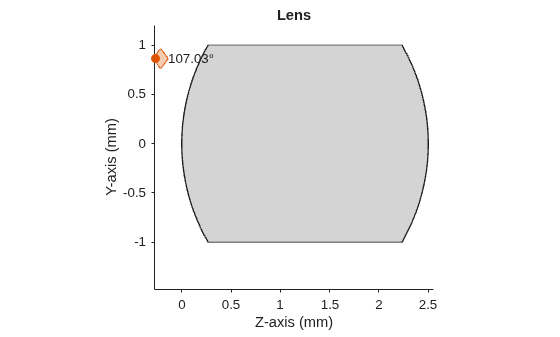
Display a 2-D visualization of the optical system using the view2d function.
view2d(opsys)
ans =
  OpticalSystemViewer2D with properties:

            Title: ""
    OpticalSystem: [1×1 opticalSystem]
           Labels: "none"
      FieldPoints: "on"
             Rays: [0×0 optics.ui.Rays2D]
           Parent: [1×1 Figure]

  Show all properties

