addMirror
R2026bDescription
Add-On Required: This feature requires the Optical Design and Simulation Library for Image Processing Toolbox add-on.
addMirror(
also specifies properties of the mirror using one or more name-value arguments.
For example, opsys,Name=Value)Radius=-50 specifies the radius of curvature of
the mirror as -50 millimeters.
Examples
Create a default optical system and display its properties.
opsys = opticalSystem
opsys =
  opticalSystem with properties:

   Main properties
                      Name: "Optical System"
         PrimaryWavelength: 587.5618
               Wavelengths: [486.1340 587.5618 656.2810]
         WavelengthWeights: [1 1 1]
               FieldPoints: [1×1 optics.fieldpoint.FieldAngle]
         FieldPointWeights: 1
                Components: [0×1 optics.component.Component]
       FlattenedComponents: [0×1 optics.component.Component]
                 Materials: [0×0 opticalMaterial]
                  Surfaces: [0×0 optics.surface.Surface]
              SurfaceTable: [0×0 table]

   Extended properties
                  UserData: []
               ObjectPlane: [1×1 optics.component.ObjectPlane]
    PrimaryWavelengthIndex: 2
           AmbientMaterial: [1×1 opticalMaterial]
                  Coatings: [0×0 opticalCoating]
         ConstructionFrame: [4×4 double]
                  Position: [0 0 0]
                TiltAngles: [0 0 0]
Add a gap using the addGap object function.
addGap(opsys,10)
To add a mirror component to the optical system, use the addMirror function. Specify a tilt angle, using the TiltAngle name-value argument, that tilts the flat mirror 45 degrees clockwise along the x-direction. Specify the center thickness of the mirror, in millimeters, using the DistanceToNext name-value argument. The function automatically adds the specified 10 millimeter gap along the reflected optical axis, which now reflects in the positive y-direction (upwards).
addMirror(opsys,SemiDiameter=4,TiltAngles=45,DistanceToNext=10)
Add another mirror with a tilt angle of the new mirror such that the rays travel parallel to the positive z-axis. This tilt angle is -45 degrees counterclockwise relative to the positive x- axis, starting from the upward-oriented optical axis.
addMirror(opsys,SemiDiameter=4,TiltAngles=-45)
Add a gap between the mirror and the next optical component using the addGap object function.
addGap(opsys,10)
Add an image plane using the addImagePlane object.
addImagePlane(opsys,SemiDiameter=2)
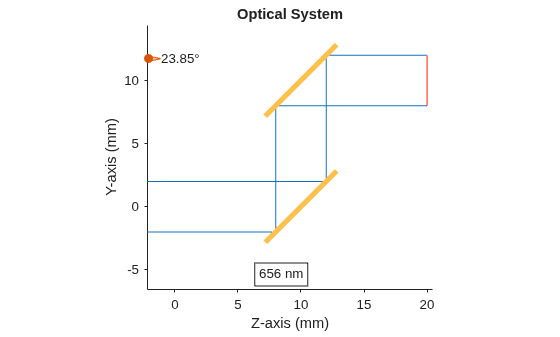
Trace marginal rays through the optical system using the traceMarginalRays function, and display the optical system in 2-D using the view2d function. Add the traced rays to the visualization by using the addRays function.
hv = view2d(opsys);
mr = traceMarginalRays(opsys,Wavelengths=656.261);
addRays(hv,mr)
Input Arguments
Name-Value Arguments
Version History
Introduced in R2026aSee Also
opticalSystem | Mirror | addRefractiveSurface | addDiaphragm | addImagePlane

