主要内容

traceMarginalRays

Trace marginal rays through optical system

Since R2026a

Description

Add-On Required: This feature requires the Optical Design and Simulation Library for Image Processing Toolbox add-on.

marginalRays = traceMarginalRays(opsys) traces marginal rays through the optical system opsys. Marginal rays are rays that pass through the edge of the entrance pupil of an optical system.

example

marginalRays = traceMarginalRays(opsys,Name=Value) specifies options for tracing marginal rays using one or more name-value arguments in addition to the argument from the previous syntax. For example, FieldPoints=fieldPoint(Position=[1 0 1]) traces marginal rays from a light source at the position (1,0,1) in the global reference frame.

Examples

collapse all

Create an optical system that contains a double Gauss lens using the createDoubleGauss helper function. The function is attached to this example as a supporting file.

opsys = createDoubleGauss;

Define a field point representation of two light sources using the fieldPoint function. The light sources are located at an infinite distance away from the first surface of the optical system, at 10 and 15 degrees below the optical axis in the *yz-*plane.

fp = fieldPoint(Angles=[10 0; 15 0]);

Trace rays through the optical system using the traceRays object function. Specify the ray wavelength as the Fraunhofer d line using the Wavelength name-value argument, and the sampling surface as the entrance pupil using the SamplingSurface name-value argument.

rb = traceRays(opsys,FieldPoints=fp,Wavelength=587.5618,SamplingSurface="entrance-pupil");

Trace marginal rays through the optical system using the traceMarginalRays object function.

mr = traceMarginalRays(opsys,FieldPoints=fp,Wavelength=587.5618);

Display the optical system using the view2d object function, and visualize the traced rays through the system using the addRays object function. The marginal and sample rays are visualized in green and red, respectively.

hv = view2d(opsys);
addRays(hv,rb,Color="r")
addRays(hv,mr,Color="g")
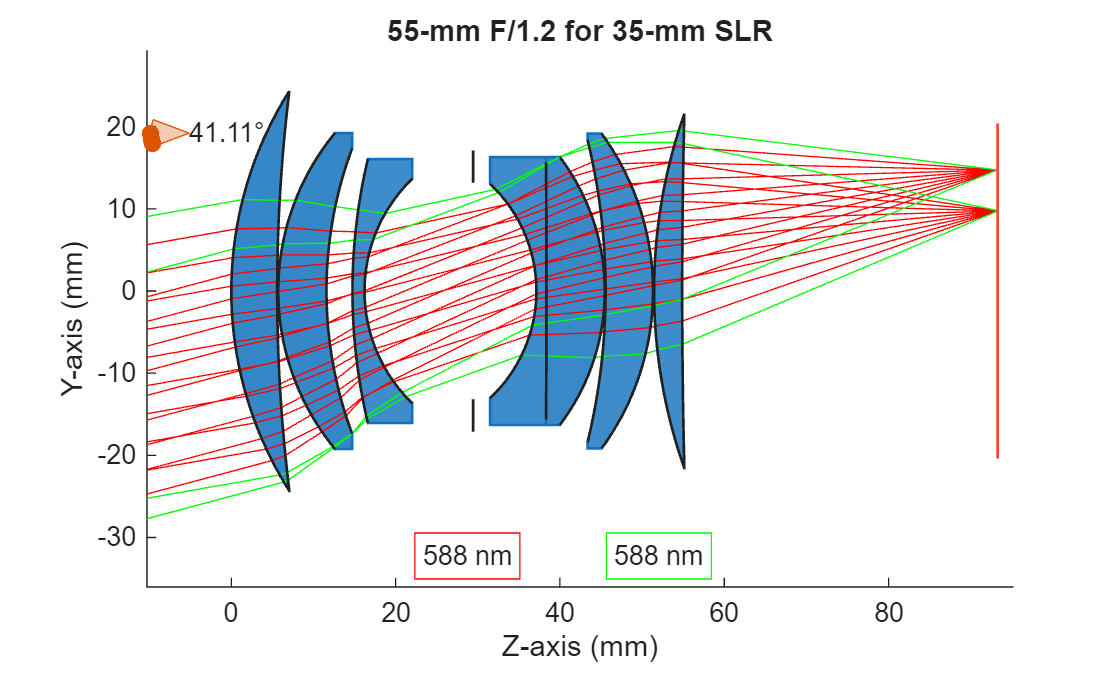
Figure contains an object of type optics.ui.opticalsystemviewer2d. The chart of type optics.ui.opticalsystemviewer2d has title 55-mm F/1.2 for 35-mm SLR.

Input Arguments

collapse all

Optical system for which to trace marginal rays, specified as an opticalSystem object.

By default, the traceMarginalRays function traces the marginal rays from the field points specified by the FieldPoints property of the opticalSystem object, at the operational wavelengths specified by the Wavelengths property of the opticalSystem object.

Name-Value Arguments

collapse all

Specify optional pairs of arguments as Name1=Value1,...,NameN=ValueN, where Name is the argument name and Value is the corresponding value. Name-value arguments must appear after other arguments, but the order of the pairs does not matter.

Example: traceMarginalRays(FieldPoints=fieldPoint(Position=[1 0 1])) traces marginal rays from a light source at the position (1,0,1) in the global reference frame.

Field point representation of a light source or light sources, specified as one of these options:

FieldPoints valueLight Source Type

Array of FieldAngle objects

Field points represent light sources that are at an infinite distance from the first surface of the optical system.

Array of FieldPosition objects

Field points represent light sources that are at a finite distance from the first surface of the optical system.
Array of FieldPosition and FieldAngle objectsField points represent two types of light sources, either at an infinite distance and at a finite distance from the first surface of the optical system.

By default, the value of FieldPoints is set by the FieldPoints property of the optical system opsys.

Additional ray properties to compute, specified as one or more of these values.

The traceMarginalRays function returns the specified ray properties as additional fields in the RayData property of each RayBundle object in marginalRays. Each value of RayProperties, except "All", creates a field of the same name in RayData.

RayProperties ValueField Value in RayData

"HitNormal"

Surface normal vectors at ray intersection points, represented as a NumRays-by-MaxRayLength-by-3 array. NumRays is the number of traced rays, and MaxRayLength is the maximum number of straight-line ray segments that any single ray can have as it passes through the optical system.

The normal vector is oriented such that it points toward the incident ray direction.

"IncidentAngle"

Angle of incidence between the incoming ray and the surface normal at each intersection, represented as a NumRays-by-MaxRayLength matrix. Angles are in degrees.

"OpticalPathLength"

Optical path length (OPL), represented as a NumRays-by-MaxRayLength matrix. Each element of the matrix is the cumulative OPL from the ray origin to a specific surface for a specific ray. Units are in millimeters.

"LocalHitPoints"

Coordinates of the intersection point between a ray and a surface in the local surface coordinate system, represented as a NumRays-by-MaxRayLength-by-3 array.

"All"

Adds all additional ray properties to RayData.

For more information about the global and local coordinate systems, see Coordinate Systems in Optical Design.

Wavelengths for which to trace rays, specified as an M-element numeric vector. M is the number of wavelengths. Each element of the vector is a wavelength, in nanometers, specified as a positive scalar.

Output Arguments

collapse all

Marginal rays traced through the optical system, returned as an N-by-M matrix of RayBundle objects. N is the number of field points, and M is the number of wavelengths for which the chief ray is traced. Each element of the matrix is a RayBundle object.

Marginal rays are the outermost rays that can pass through the system to the image plane, and define the boundary of the light cone entering the system as they pass through the edges of the major and minor axes of the entrance pupil ellipse.

Version History

Introduced in R2026a