traceRays
Description
Add-On Required: This feature requires the Optical Design and Simulation Library for Image Processing Toolbox add-on.
specifies options for ray tracing using one or more name-value arguments. For example,
rb = traceRays(opsys,Name=Value)FieldPoints=fieldPoint(Angle=[15 0]) specifies to trace rays from
light source in the yz-plane at 15 degrees below the optical axis,
located at an infinite distance away from the first surface in the optical system.
Examples
Create an optical system that contains a double Gauss lens using the createDoubleGauss helper function. The function is attached to this example as a supporting file.
opsys = createDoubleGauss;
Define a field point representation of two light sources using the fieldPoint function. The light sources are located at an infinite distance away from the first surface of the optical system, at 10 and 15 degrees below the optical axis in the *yz-*plane.
fp = fieldPoint(Angles=[10 0; 15 0]);
Trace rays through the optical system using the traceRays object function. Specify the ray wavelength as the Fraunhofer d line using the Wavelength name-value argument, and the sampling surface as the entrance pupil using the SamplingSurface name-value argument.
rb = traceRays(opsys,FieldPoints=fp,Wavelength=587.5618,SamplingSurface="entrance-pupil");Trace marginal rays through the optical system using the traceMarginalRays object function.
mr = traceMarginalRays(opsys,FieldPoints=fp,Wavelength=587.5618);
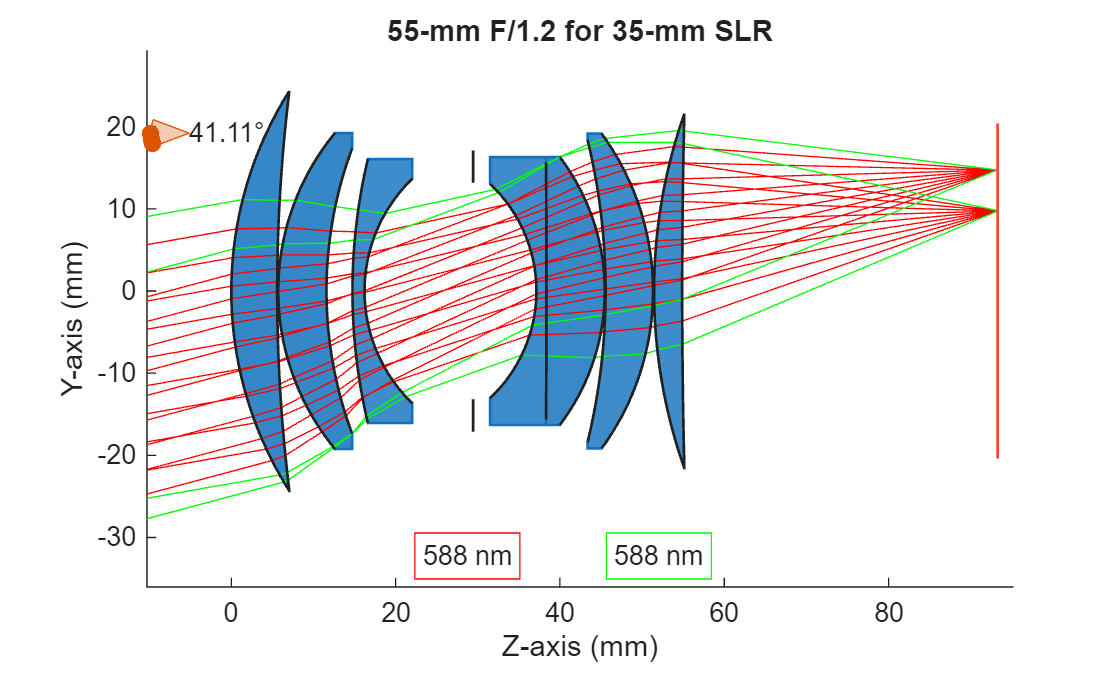
Display the optical system using the view2d object function, and visualize the traced rays through the system using the addRays object function. The marginal and sample rays are visualized in green and red, respectively.
hv = view2d(opsys); addRays(hv,rb,Color="r") addRays(hv,mr,Color="g")
Create an optical system that contains a fisheye lens using the createWideAngle helper function. The function is attached to this example as a supporting file.
opsys = createWideAngle;
Define a field angle representation of a light source at infinity, with a field angle of 20 degrees from the z-axis, using the fieldPoint function.
fp = fieldPoint(Angles=[20 0]);
Trace a chief ray through the optical system using the traceChiefRay object function.
cr = traceChiefRay(opsys,FieldPoints=fp,Wavelengths=587);
Define a hexapolar sampling grid of coordinate points, through which to sample traced rays, using the samplingGrid function.
sg = samplingGrid("Hexapolar",6);Trace rays through the optical system using the traceRays object function. Specify the defined hexapolar sampling grid using the SamplingGrid name-value argument.
rb = traceRays(opsys,FieldPoints=fp,Wavelength=587,SamplingGrid=sg);
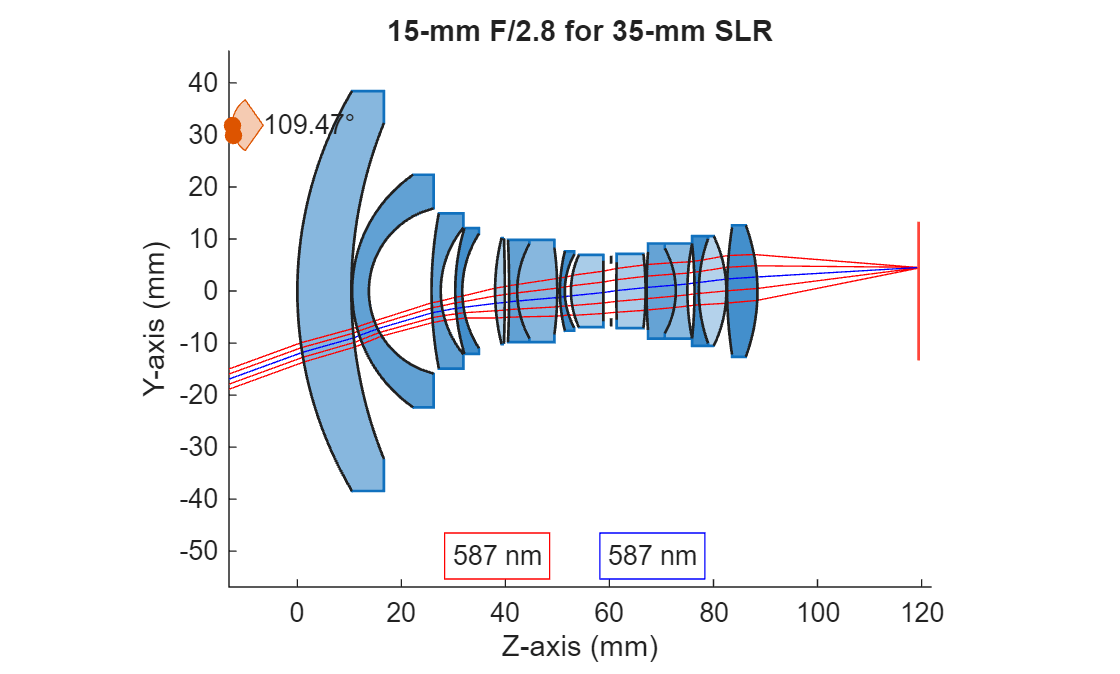
Display the optical system using the view2d object function, and visualize the traced rays through the system using the addRays object function. The chief and sample rays are visualized in blue and red, respectively.
hv = view2d(opsys); addRays(hv,rb,Color="r") addRays(hv,cr,Color="b")
Input Arguments
Optical system for which to trace rays, specified as an opticalSystem object.
By default, the traceRays function traces the rays from the
field points specified by the FieldPoints property of the opticalSystem
object, at the operational wavelengths specified by the Wavelengths property of the opticalSystem
object.
Name-Value Arguments
Specify optional pairs of arguments as
Name1=Value1,...,NameN=ValueN, where Name is
the argument name and Value is the corresponding value.
Name-value arguments must appear after other arguments, but the order of the
pairs does not matter.
Example: traceRays(FieldPoints=fieldPoint(Angle=[15 0])) specifies to
trace rays from a light source in the yz-plane at 15 degrees below the
optical axis, located at an infinite distance away from the first component in the optical
system.
Field point representation of a light source or light sources, specified as one of these options:
FieldPoints value | Light Source Type |
|---|---|
Array of | Field points represent light sources that are at an infinite distance from the first surface of the optical system. |
Array of | Field points represent light sources that are at a finite distance from the first surface of the optical system. |
Array of FieldPosition and FieldAngle
objects | Field points represent two types of light sources, either at an infinite distance and at a finite distance from the first surface of the optical system. |
By default, the value of FieldPoints is set by the
FieldPoints property of the optical system
opsys.
Wavelengths for which to trace rays, specified as an M-element numeric vector. M is the number of wavelengths. Each element of the vector is a wavelength, in nanometers.
Additional ray properties to compute, specified as one or more of these values.
The traceRays function returns the specified ray properties
as additional fields in the RayData property of the RayBundle
object in . Each value of rbRayProperties, except
"All", creates a field of the same name in
RayData.
RayProperties Value | Field Value in RayData |
|---|---|
| Surface normal vectors at ray intersection points, represented as a
The normal vector is oriented such that it points toward the incident ray direction. |
| Angle of incidence between the incoming ray and the surface normal
at each intersection, represented as a
|
| Optical path length (OPL), represented as a
|
| Coordinates of the intersection point between a ray and a surface
in the local surface coordinate system, represented as a
|
| Fresnel reflection and transmission coefficients at each interface, bulk transmission and phase shift, and the total transmittance through the optical system, represented as a structure with these fields.
|
| Polarization transformation matrices for each ray and surface intersection, represented as a structure with these fields.
|
| Adds all additional ray properties to
|
For more information about the global and local coordinate systems, see Coordinate Systems in Optical Design.
Sampling grid of the normalized coordinates at which to sample the entrance pupil
or surface, specified as a samplingGrid object. The
traceRays function adds a ray at each coordinate to the ray
bundle.
Surface that contains sampling grid, specified as one of these options.
"auto"— Trace rays from the field points through the entrance pupil, using coordinates defined in the plane of the entrance pupil for each combination of field point and wavelength. If the function cannot trace any rays through the entry pupil to the image plane, it samples the first surface instead."first-surface"— Trace rays from the field points through the grid of coordinates sampled on the first surface for each combination of field point and wavelength."entrance-pupil"— Trace rays from the field points through the entrance pupil, using coordinates defined in the plane of the entrance pupil for each combination of field point and wavelength.
Output Arguments
Ray bundle traced through optical system, returned as an
N-by-M matrix of RayBundle
objects. N is the number of field points, and M is
the number of wavelengths for which the chief ray is traced. Each element of the matrix
is a RayBundle object.
Version History
Introduced in R2026a
MATLAB Command
You clicked a link that corresponds to this MATLAB command:
Run the command by entering it in the MATLAB Command Window. Web browsers do not support MATLAB commands.
选择网站
选择网站以获取翻译的可用内容,以及查看当地活动和优惠。根据您的位置,我们建议您选择:。
您也可以从以下列表中选择网站:
如何获得最佳网站性能
选择中国网站(中文或英文)以获得最佳网站性能。其他 MathWorks 国家/地区网站并未针对您所在位置的访问进行优化。
美洲
- América Latina (Español)
- Canada (English)
- United States (English)
欧洲
- Belgium (English)
- Denmark (English)
- Deutschland (Deutsch)
- España (Español)
- Finland (English)
- France (Français)
- Ireland (English)
- Italia (Italiano)
- Luxembourg (English)
- Netherlands (English)
- Norway (English)
- Österreich (Deutsch)
- Portugal (English)
- Sweden (English)
- Switzerland
- United Kingdom (English)