samplingGrid
R2026bDescription
Add-On Required: This feature requires the Optical Design and Simulation Library for Image Processing Toolbox add-on.
A samplingGrid object creates a sampling grid in the
xy-plane of the local surface coordinate frame, that defines the initial
positions and angles of rays entering the optical system through the entrance pupil or first
surface.
You can specify the sampling grid as a fixed shape, such as a uniformly sampled square or
hexapolar pattern, or as a random grid of points. You can also specify a custom sampling grid
using x- and y-coordinates. The coordinates you specify
must be normalized to the range [–1, 1], where the coordinate [0 0] defines
the center of the entrance surface.
Creation
Syntax
Description
Specify Sampling Grid Shape
sg = samplingGrid
sg = samplingGrid("Square")
sg = samplingGrid("Square",numPointsPerSide)numPointsPerSide points per
side.
sg = samplingGrid("Hexapolar")
sg = samplingGrid("Random")
sg = samplingGrid("Stratified")
sg = samplingGrid("Stratified",numPointsPerSide)numPointsPerSide points per
side.
Specify Custom Grid Coordinates
Input Arguments
Output Arguments
Properties
Examples
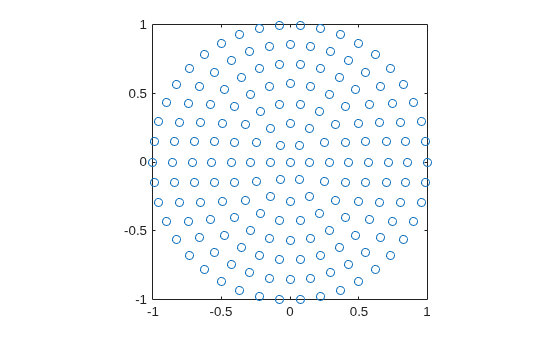
Create a hexapolar sampling grid for ray tracing using the samplingGrid object.
sg = samplingGrid("Hexapolar");Plot the (x,y) coordinates of the sampling grid by using the Coordinates property of the samplingGrid object.
figure
plot(sg.Coordinates(:,1),sg.Coordinates(:,2),"o");
axis square
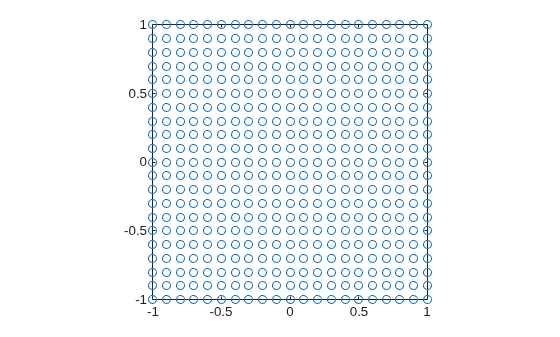
Create a square sampling grid for ray tracing, with 21 grid points per side.
sg = samplingGrid("Square",21);Plot the (x,y) coordinates of the sampling grid by using the Coordinates property of the samplingGrid object.
figure
plot(sg.Coordinates(:,1),sg.Coordinates(:,2),"o");
axis square
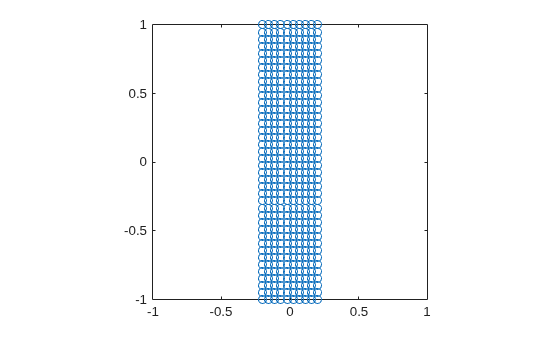
Specify the x- and *y-*coordinates of a sampling grid for ray tracing.
xcoords = linspace(-0.2,0.2,10);
ycoords = linspace(-1,1,40);
Create a custom sampling grid using the specified coordinates..
sg = samplingGrid(xcoords,ycoords);
Plot the *xy-*coordinates of the sampling grid by using the Coordinates property of the samplingGrid object.
figure
plot(sg.Coordinates(:,1),sg.Coordinates(:,2),"o")
xlim([-1 1])
ylim([-1 1])
axis square
Load a wide angle lens from a ZMX file into the workspace.
opsys = zmximport("WideAngleLens.zmx");Define a field angle representation of a light source at infinity, with a field angle of 20 degrees from the z-axis, using the fieldPoint function.
fp = fieldPoint(Angles=[20 0]);
Trace a chief ray through the optical system using the traceChiefRay object function.
cr = traceChiefRay(opsys,FieldPoints=fp,Wavelengths=587);
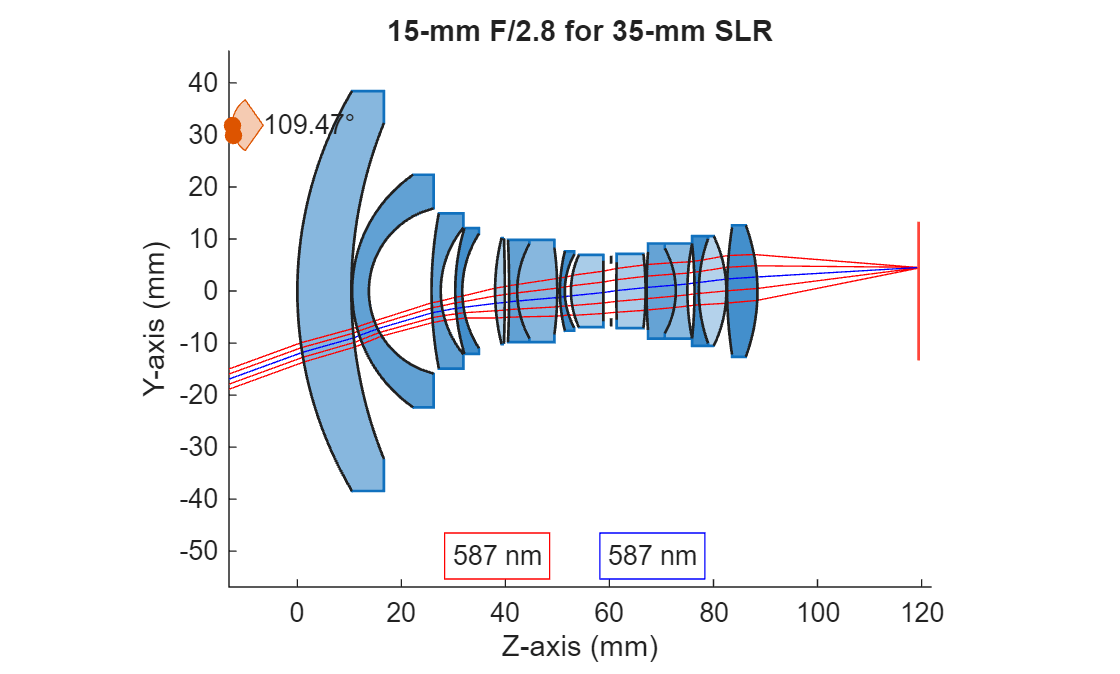
Define a hexapolar sampling grid of coordinate points, through which to sample traced rays, using the samplingGrid function.
sg = samplingGrid("Hexapolar",6);Trace rays through the optical system using the traceRays object function. Specify the defined hexapolar sampling grid using the SamplingGrid name-value argument.
rb = traceRays(opsys,FieldPoints=fp,Wavelength=587,SamplingGrid=sg);
Display the optical system using the view2d object function, and visualize the traced rays through the system using the addRays object function. The chief and sample rays are visualized in blue and red, respectively.
hv = view2d(opsys);
addRays(hv,rb,Color="r")
addRays(hv,cr,Color="b")
Tips
When you specify a stratified sampling grid, the algorithm uses a random number generator to introduce randomness. To obtain reproducible results, set the random seed before generating the grid. To set the random seed, use the
rngfunction before generating the stratified sampling grid.
Algorithms
Version History
Introduced in R2026a

