opticalCoating
R2026bDescription
Add-On Required: This feature requires the Optical Design and Simulation Library for Image Processing Toolbox add-on.
An opticalCoating object creates a custom optical coating.
Using the object properties, you can specify optical coating features such as incident
light angles, wavelength spectrum range, substrate, coating layer thicknesses, and coating
materials.
To apply the optical coating to an individual surface in your optical system, specify it
to the Coating property of the corresponding Surface
component. To apply the coating at the creation of a lens or mirror component, specify it
to the Coating name-value argument of the addRefractiveSurface or addMirror
object function, respectively. To apply the coating to all lens surfaces in an optical
system, use the addCoating
object function of the opticalSystem
object.
To evaluate the performance of the optical coating, you can use the fresnelCoefficients object function to compute its Fresnel
coefficients.
To create a custom app that enables you to edit and visualize coatings, use the OpticalCoatingEditor object.
Creation
Description
oc = opticalCoatingoc with default properties.
oc = opticalCoating(PropertyName=Value)ThicknessUnit="nm" sets the units of thickness for the layers
of the optical coating to nanometers.
Properties
Object Functions
fresnelCoefficients | Compute Fresnel coefficients for optical coating |
Examples
Create a broadband anti-reflective (AR) optical coating that consists of two alternating TiO2/SiO2 material layer stacks.
ocBBAR = opticalCoating(Name="BBAR_4l", ...
CoatingMaterial = ["TiO2" "SiO2"], ...
LayerMaterialIndex = [1 2 1 2], ...
ThicknessUnit = "nm", ...
LayerThickness = [14.6 36.5 129.1 95.5])
ocBBAR =
  opticalCoating with properties:

                  Name: "BBAR_4l"
    IncidentAngleRange: [0 15]
       WavelengthRange: [300 800]
     PrimaryWavelength: 587.5618
                Medium: [1×1 opticalMaterial]
             Substrate: [1×1 opticalMaterial]
      CoatingMaterials: [2×1 opticalMaterial]
    LayerMaterialIndex: [1 2 1 2]
        LayerThickness: [14.6000 36.5000 129.1000 95.5000]
         ThicknessUnit: "nm"
             NumLayers: 4
        TotalThickness: 275.7000
Load a double Gauss lens from a ZMX file into the workspace. View the optical system in 2-D using the view2d function.
opsys = zmximport("DoubleGaussLens.zmx");
view2d(opsys);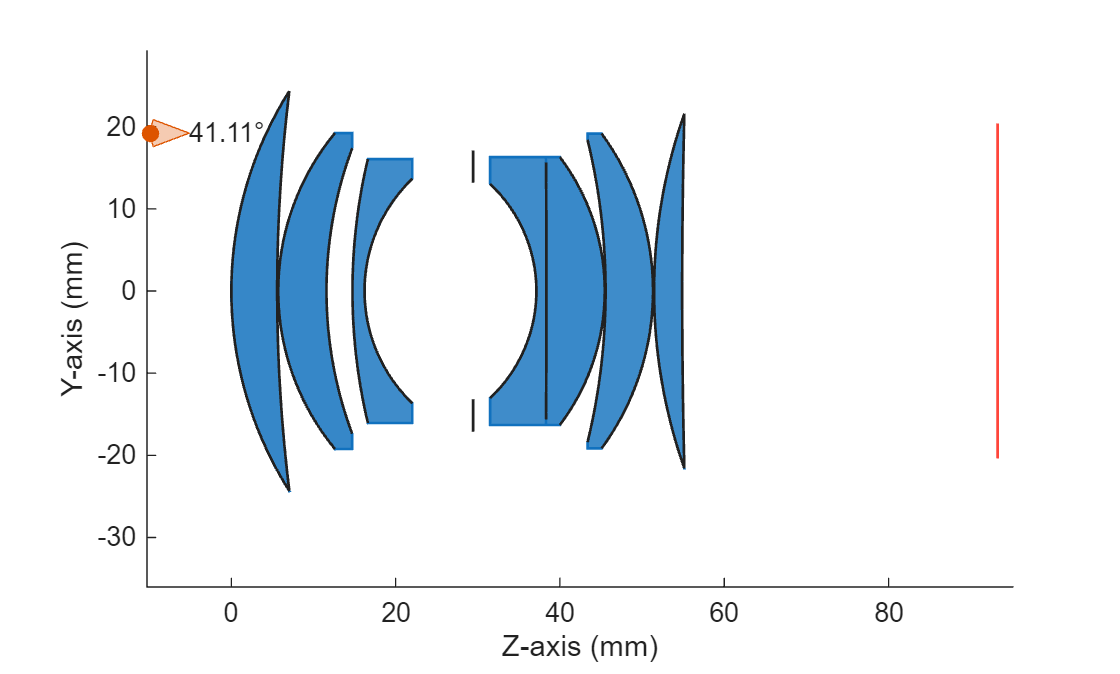
Apply the broadband AR coating you created to all lens surfaces of the optical system using the addCoating function.
addCoating(opsys,ocBBAR)
Create a broadband anti-reflective optical coating that contains two alternating TiO2/SiO2 layer stacks.
ocBBAR = opticalCoating(Name="BBAR_4l", ...
CoatingMaterial = ["TiO2", "SiO2"], ...
LayerMaterialIndex = [1 2 1 2], ...
ThicknessUnit = "nm", ...
LayerThickness = [14.6 36.5 129.1 95.5]);
Plot Spectral Response for Fixed Incident Angle
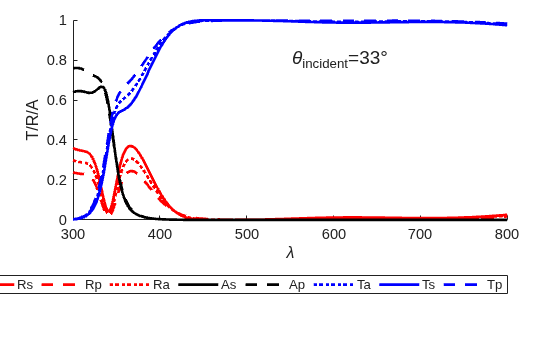
Compute the amplitude and power response coefficients for the optical coating at the incident angle of 33 degrees.
coeffs = fresnelCoefficients(ocBBAR,IncidentAngles=33);
Define the wavelength range.
lambda = ocBBAR.WavelengthRange(1):ocBBAR.WavelengthRange(2);
Plot the spectral dependence of reflectance, R, transmittance, T, and absorbance, A, for s- and p-polarized light, and their averages, at an incidence angle of 33 degrees.
figure;
hold on;
plot(lambda,coeffs.Rs,"r-",LineWidth=2);
plot(lambda,coeffs.Rp,"r--",LineWidth=2);
plot(lambda,coeffs.Ra,"r:",LineWidth=2);
plot(lambda,coeffs.As,"k-",LineWidth=2);
plot(lambda,coeffs.Ap,"k--",LineWidth=2);
plot(lambda,coeffs.Ta,"b:",LineWidth=2);
plot(lambda,coeffs.Ts,"b-",LineWidth=2);
plot(lambda,coeffs.Tp,"b--",LineWidth=2);

xlabel("\lambda");
ylabel("T/R/A");
text(550,0.8,"\theta_{incident}=33\circ",FontSize=14);

legend({"Rs","Rp","Ra","As","Ap","Ta","Ts","Tp"}, ...
    Orientation="horizontal",Location="southoutside");

xlim([min(lambda),max(lambda)]);
ylim([0 1]);
hold off;
set(gca,FontSize=11);
Plot Spectral Response for Fixed Wavelength
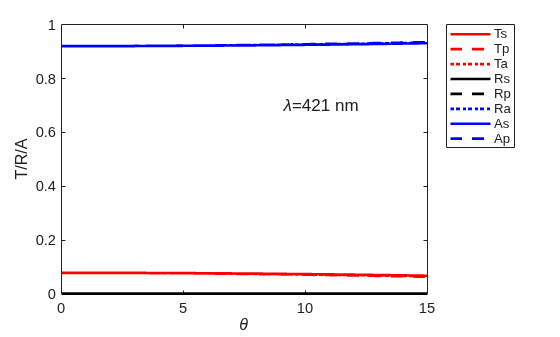
Compute the amplitude and power response coefficients for the optical coating at the incident light wavelength of 421 nm.
coeffs = fresnelCoefficients(ocBBAR,Wavelengths=421);
theta = ocBBAR.IncidentAngleRange(1):ocBBAR.IncidentAngleRange(2);
Plot the incident angle-dependent spectral dependence of reflectance, R, transmittance, T, and absorbance, A, for s- and p-polarized light, and their averages, at an incident light wavelength of 421 nm.
figure; hold on;
plot(theta,coeffs.Rs,"r-",LineWidth=2);
plot(theta,coeffs.Rp,"r--",LineWidth=2);
plot(theta,coeffs.Ra,"r:",LineWidth=2);
plot(theta,coeffs.As,"k-",LineWidth=2);
plot(theta,coeffs.Ap,"k--",LineWidth=2);
plot(theta,coeffs.Ta,"b:",LineWidth=2);
plot(theta,coeffs.Ts,"b-",LineWidth=2);
plot(theta,coeffs.Tp,"b--",LineWidth=2);

xlabel("\theta");
ylabel("T/R/A");
ylim([0 1]);
xlim([min(theta), max(theta)]);

text(0.6*max(theta),0.7,"\lambda=421 nm",FontSize=13);
legend({"Ts","Tp","Ta","Rs","Rp","Ra","As","Ap"},Location="northeastoutside");

set(gca,FontSize=11);
box on;
hold off;
Version History
Introduced in R2026a

