addImagePlane
R2026bDescription
Add-On Required: This feature requires the Optical Design and Simulation Library for Image Processing Toolbox add-on.
addImagePlane( adds a circular image
plane to the optical system opsys)opsys. The image plane is the surface in an
optical system where the image of an object is brought into focus. When you create an
image plane using this function, you create an ImagePlane
object.
addImagePlane(
also specifies properties of the image plane using one or more name-value arguments. For
example, opsys,Name=Value)SemiDiameter=2.5 specifies the semi-diameter of the image
plane as 2.5 millimeters.
Examples
Create an empty optical system and display its properties.
opsys = opticalSystem
opsys =
  opticalSystem with properties:

   Main properties
                      Name: "Optical System"
         PrimaryWavelength: 587.5618
               Wavelengths: [486.1340 587.5618 656.2810]
         WavelengthWeights: [1 1 1]
               FieldPoints: [1×1 optics.fieldpoint.FieldAngle]
         FieldPointWeights: 1
                Components: [0×1 optics.component.Component]
       FlattenedComponents: [0×1 optics.component.Component]
                 Materials: [0×0 opticalMaterial]
                  Surfaces: [0×0 optics.surface.Surface]
              SurfaceTable: [0×0 table]

   Extended properties
                  UserData: []
               ObjectPlane: [1×1 optics.component.ObjectPlane]
    PrimaryWavelengthIndex: 2
           AmbientMaterial: [1×1 opticalMaterial]
                  Coatings: [0×0 opticalCoating]
         ConstructionFrame: [4×4 double]
                  Position: [0 0 0]
                TiltAngles: [0 0 0]
To add a lens component to the optical system, create the two refractive surfaces of the lens using the addRefractiveSurface object function. Specify the lens glass material using the Material name-value argument for the first surface. Specify the center thickness of the lens, in millimeters, using the DistanceToNext name-value argument for the first surface.
addRefractiveSurface(opsys,Radius=15,Material=[1.74 25.4],DistanceToNext=3)
addRefractiveSurface(opsys,Radius=-15,DistanceToNext=6.5)
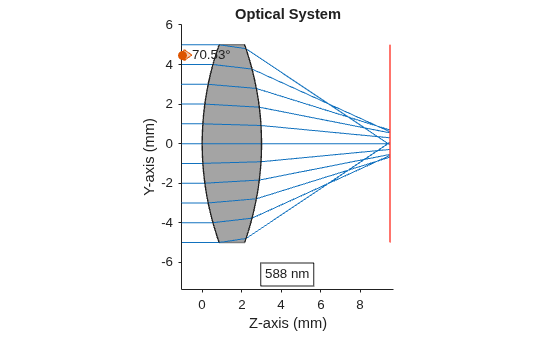
Add an image plane using the addImagePlane object function.
addImagePlane(opsys)
Trace rays through the optical system using the traceRays object function. Specify the ray wavelength as the Fraunhofer d line using the Wavelengths name-value argument.
rays = traceRays(opsys,Wavelengths=587.5618);
Display a 2-D visualization of the optical system using the view2d object function. Visualize the traced rays on the displayed optical system using the addRays object function.
hv = view2d(opsys);
addRays(hv,rays)
Input Arguments
Name-Value Arguments
Version History
Introduced in R2026a
See Also
opticalSystem | ImagePlane | addRefractiveSurface | addMirror | addDiaphragm

