addDiaphragm
R2026bDescription
Add-On Required: This feature requires the Optical Design and Simulation Library for Image Processing Toolbox add-on.
addDiaphragm( adds a circular
diaphragm component to the optical system opsys)opsys. A diaphragm is a thin,
opaque structure with a central opening that controls the amount of light passing through
the optical system by regulating the size of the opening. When you create an diaphragm
using this function, you create a Diaphragm
object.
addDiaphragm(
also specifies properties of the diaphragm using one or more name-value arguments. For
example, opsys,Name=Value)SemiDiameter=3.0 specifies the semi-diameter of the diaphragm
as 3.0 millimeters.
Examples
Create an empty optical system.
opsys = opticalSystem;
To add a lens component to the optical system, create the two refractive surfaces of the lens using the addRefractiveSurface object function. Specify the lens glass material using the Material name-value argument for the first surface. Specify the center thickness of the lens, in millimeters, using the DistanceToNext name-value argument.
addRefractiveSurface(opsys,Radius=50,DistanceToNext=1.5,Material=pickGlass("N-BK7"))
addRefractiveSurface(opsys,Radius=-50)
Add a gap using the addGap object function.
addGap(opsys,20)
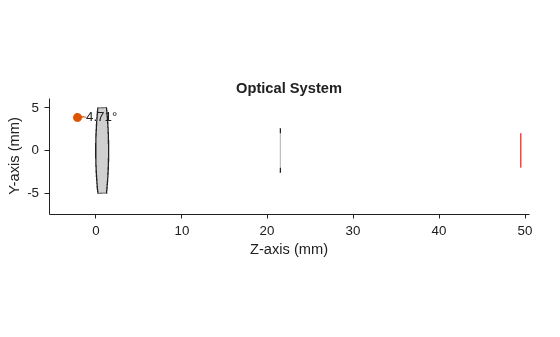
Add a diaphragm using the addDiaphragm object function. Specify the diaphragm properties using the DistanceToNext and SemiDiameter name-value arguments.
addDiaphragm(opsys,DistanceToNext=28,SemiDiameter=2)
Add an image plane using the addImagePlane object function.
addImagePlane(opsys,SemiDiameter=2)
Display a 2-D visualization of the optical system by using the view2d object function.
view2d(opsys)
ans =
  OpticalSystemViewer2D with properties:

            Title: ""
    OpticalSystem: [1×1 opticalSystem]
           Labels: "none"
      FieldPoints: "on"
             Rays: [0×0 optics.ui.Rays2D]
           Parent: [1×1 Figure]

  Show all properties
Input Arguments
Name-Value Arguments
Version History
Introduced in R2026a
See Also
opticalSystem | Diaphragm | addImagePlane | addRefractiveSurface

