changem
R2026b替换数组中的值
描述
示例
将夏威夷欧胡岛的土地覆盖分类数据 [1] 作为矩阵、地图像元引用对象和颜色图进行读取。矩阵中的元素作为索引指向颜色图。
[A,R,cmap] = readgeoraster("oahu_landcover.img");矩阵中的值 9、10 和 11 分别表示落叶林、常绿林和混交林。创建一个矩阵,将所有森林统一为同一颜色,方法是将所有出现的 9 和 10 替换为 11。
new = [11 11];
old = [9 10];
B = changem(A,new,old);
在地图上显示原始土地覆盖分类。使用存储在参考对象中的投影坐标参考系 (CRS) 来设置地图。将索引图像转换为 RGB 图像,以便使用 geoimage 函数显示数据。
figure
newmap(R.ProjectedCRS)
A_RGB = ind2rgb(A,cmap);
geoimage(A_RGB,R)
title("Land Cover Classification with Three Forest Types")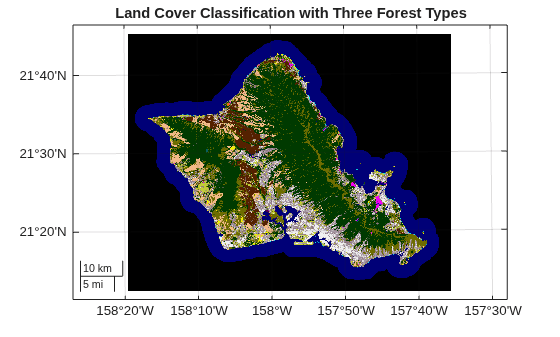
在类似的地图上显示更新后的土地覆盖分类。
figure
newmap(R.ProjectedCRS)
B_RGB = ind2rgb(B,cmap);
geoimage(B_RGB,R)
title("Land Cover Classification with One Forest Type")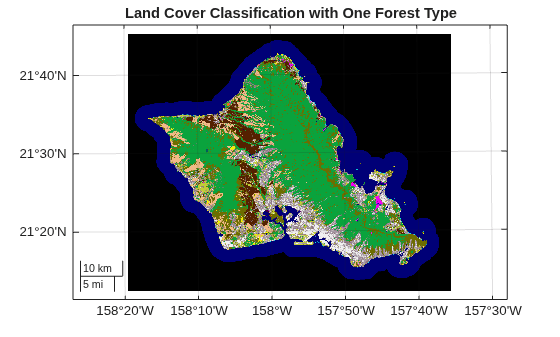
[1] 本示例中使用的数据由美国国家海洋和大气管理局 (NOAA) 提供。
输入参数
版本历史记录
在 R2006a 之前推出

