Run Optimizations in the Background
R2026bThis example shows how to run an optimization in the background and monitor the optimization process.
You can run optimization functions in the background using parfeval and backgroundPool. When you run a function in the background, you can run other MATLAB® code at the same time. For more information about workers and the background, see Background Workers.
Set Up Data Queue for Progress Updates
To send the solver progress data from the background to the client session, use a parallel.pool.DataQueue object. A DataQueue object can automatically process data the background sends to the client session.
queue = parallel.pool.DataQueue;
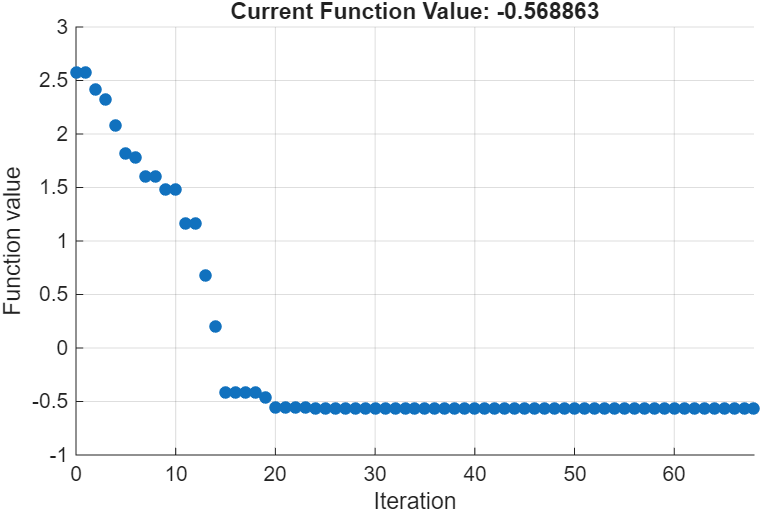
Use the afterEach function to specify a callback function that automatically processes the data in the DataQueue. In this example, use the built-in optimization plot function optimplotfval to plot progress data each time the client session receives data. For more information about built-in plot functions, see Optimization Solver Plot Functions.
afterEach requires a callback function that accepts a single input argument. However, the optimplotfval function expects three inputs: x, optimValues, and state. To meet this requirement, the background worker groups these variables into a structure and sends it to the client through the DataQueue object. Use an anonymous function to extract the fields from the structure and pass them to optimplotfval.
afterEach(queue, ...
    @(data) optimplotfval(data.x,data.optimVals,data.state));
Define Optimization Problem
Define an objective function for the optimization problem:
objf = @(x) exp(x(1))*(4*x(1)^2+2*x(2)^2+x(1)*x(2)+2*x(2));
Specify the start point as [−1,1].
x0 = [-1 1];
Configure Solver Options
Use the optimset function to set options for a custom output function, sendSolverProgress, which is defined at the end of this example. sendSolverProgress sends solver progress from the background using a DataQueue object.
outfun = @(x,values,state) sendSolverProgress(x,values,state,queue);
opts = optimset(OutputFcn=outfun);
Solve Using parfeval
Use parfeval to solve the optimization problem in the background. parfeval returns a Future object that allows you to interact with the computation. In the parfeval call:
To run the function in the background, specify
backgroundPoolas the first argument.Specify the
fminsearchfunction as the second argument.Request four output arguments.
Provide the input arguments for
fminsearch, including the optimset object.
parfeval computations do not block MATLAB, so you can continue working while the computation runs in the background. The background worker sends progress data through the DataQueue as it becomes available, and the optimplotfval plot function displays the progress in a figure window.
solverF = parfeval(backgroundPool,@fminsearch,4,objf,x0,opts);
Set Up Completion Notification
Use afterEach with the Future object returned by parfeval to set up a callback function that notifies you when the computation completes.
callbackFcn = @(~,~,~,out) msgbox(out.message,"parfeval Complete");
afterEach(solverF,callbackFcn,0);
Retrieve Results
After the computation is complete, retrieve the results by using the fetchOutputs function. The fetchOutputs function blocks MATLAB until the parfeval computation completes. To avoid blocking MATLAB, wait for the computation to complete before uncommenting these lines and running this section.
% [sol,fval,eflag,output] = fetchOutputs(solverF);
% sol
% fval
Helper Functions
The sendSolverProgress function sends progress data to the client using a DataQueue object. For more information about the structure of an output function, see Optimization Solver Output Functions.
The afterEach function for DataQueue accepts a callback with one input. In the sendSolverProgress function, create a structure with the x, optimValues, and state variables and send the structure to the client using the DataQueue object queue.
function stop = sendSolverProgress(x,optimValues,state,queue)
stop = false;
data = struct("x",x,"optimVals",optimValues,"state",state);
send(queue,data);
pause(0.5); % Simulate an expensive function by pausing
end

