matlab.system.display.Table Class
R2026bNamespace: matlab.system.display
Description
Use the matlab.system.display.Table class to specify table data in the
Block Parameters dialog box for a MATLAB System block.
Creation
Description
table = matlab.system.display.Table(
creates a table parameter in the Block Parameters dialog box of a MATLAB System block with
column properties set by myTab,Columns)Columns.
Properties
Examples
Create Table Parameter for MATLAB System Block
Create a table parameter for a MATLAB System block that stores the name, gender, age, and vote status of three individuals:
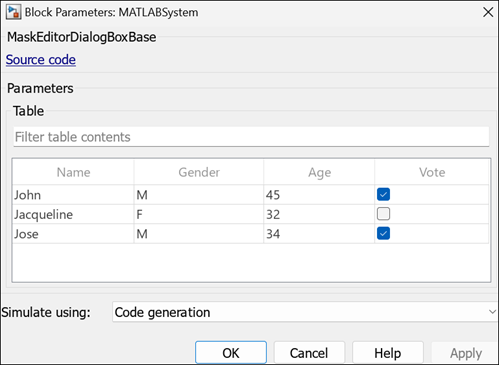
Open the Block Parameters dialog box of a MATLAB System block, and click
New to open a new class definition template. In the public properties
section, define the column properties of the table myTab, and assign
values to the table using the MATLAB table function.
properties
    tab{matlab.system.display.Table(myTab,...
      {"matlab.system.display.TableColumn('Type','edit','Evaluate',true)", ...
      "matlab.system.display.TableColumn('Type','popup','TypeOptions',{'M','F'})", ...
      "matlab.system.display.TableColumn('Type','edit')",...
      "matlab.system.display.TableColumn('Type','checkbox')"})}...
      = table({'John';'Jacqueline';'Jose'},{'M';'F';'M'},[45;32;34],...
      {'true';'false';'true'},'VariableNames',{'Name','Gender','Age','Vote'})
end
Version History
Introduced in R2026a

