matlab.system.display.TableColumn Class
R2026bNamespace: matlab.system.display
Description
Use the matlab.system.display.TableColumn class to customize the column
properties of a table parameter. You can set the column type of each column as either edit,
popup, or checkbox. Use the TypeOptions property to specify options for the
popup column type. Set the Evaluate property to true to evaluate any MATLAB
expressions present in the cells of the column.
Creation
Description
tableColumn = matlab.system.display.TableColumn(
creates an object of the Table Column class with table properties defined by one or more
name-value arguments.PropertyName=Value)
Properties
Examples
Create Table Parameter for MATLAB System Block
Create a table parameter for a MATLAB System block that stores the name, gender, age, and vote status of three individuals:
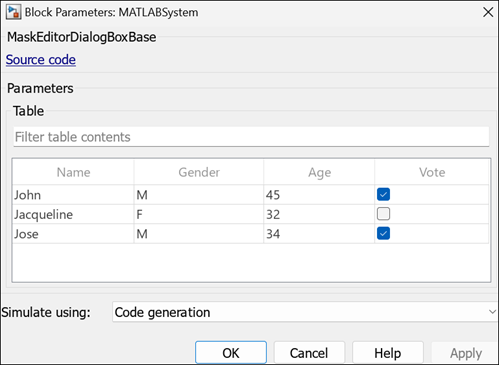
Open the Block Parameters dialog box of a MATLAB System block, and click
New to open a new class definition template. In the public properties
section, define the column properties of the table myTab, and assign
values to the table using the MATLAB table function.
properties
    tab{matlab.system.display.Table(myTab,...
      {"matlab.system.display.TableColumn('Type','edit','Evaluate',true)", ...
      "matlab.system.display.TableColumn('Type','popup','TypeOptions',{'M','F'})", ...
      "matlab.system.display.TableColumn('Type','edit')",...
      "matlab.system.display.TableColumn('Type','checkbox')"})}...
      = table({'John';'Jacqueline';'Jose'},{'M';'F';'M'},[45;32;34],...
      {'true';'false';'true'},'VariableNames',{'Name','Gender','Age','Vote'})
end
Version History
Introduced in R2026a

