Align Model and Feature Inputs
R2026bA model in Model-Based Calibration Toolbox™ is a function of a set of variables.
In this example, you create two function models to align the statistical model with the feature inputs. Specifically, the function models relate the spark angle to the spark angle retarded from MBT.
retard_SPARK— Maximum brake torque, MBT, minus the spark angle, S.abs_SPARK— Maximum brake torque, MBT, minus the delta spark angle, delta_S.
To create function model retard_SPARK:
In the CAGE toolbar, select
 to create a function model.
In the Function Model Wizard:
Enter the formula
retard_SPARK=MBT-S.Confirm the model and assigned inputs.
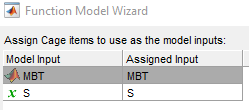
Click Finish.
To create function model abs_SPARK:
In the CAGE toolbar, select
to create a function model.In the Function Model Wizard:
Enter the formula
abs_SPARK=MBT-delta_S.Confirm the model and assigned inputs.
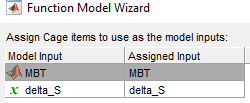
Click Finish.
In the CAGE browser, in the Models pane, confirm the model inputs and descriptions in the Models view.


