Using Optimization in CAGE
R2026bOverview of Optimization in CAGE
You can use CAGE to solve many automotive optimization problems. For examples of problems you can solve with CAGE, see Optimization Problems You Can Solve with CAGE.
To reach the Optimization view, click the Optimization button in the left Processes pane.
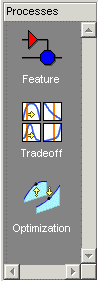
In the Optimization view, you can set up and view optimizations. The view is blank until you create an optimization. When you have optimizations in your project, the left pane shows a tree hierarchy of your optimizations, and the right panes display details of the optimization selected in the tree.
For any optimization, you need one or more models. You can run an optimization at a single point, or you can supply a set of points to optimize. The steps required are
Import a model or models.
Set up an optimization.
Optimization functionality in CAGE is described in the following sections:
The steps for setting up and running optimizations are described in these sections:
Optimization Analysis describes using the optimization output views to analyze your results, fill lookup tables and export results.
Parallel Computing in Optimization
By default, the toolbox automatically runs optimizations in parallel if you have Parallel Computing Toolbox™. The optimization runs are then executed in parallel. This option can significantly reduce the computation time for larger problems where each run is taking a lot longer than the time it takes to send the problem to another computer.
When you run the optimization, CAGE calls parpool to open the
parallel pool if necessary, then the optimization runs are executed in parallel. CAGE
displays progress messages until the optimization is completed.
Building models in the Model Browser might open parpool for
you.
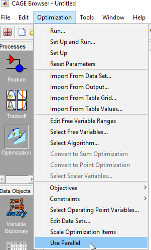
If you do not want to run optimizations in parallel, in CAGE, clear Optimization > Use Parallel.
Optimization Problems You Can Solve with CAGE
Point Optimization Problems
CAGE provides a flexible optimization environment in which many automotive optimization problems can be solved. These problems can be divided into two main groups, point and sum problems. This section describes point problems.
In a point problem, a single optimization run can determine optimal control parameter values at a single operating point. To optimize control parameters over a set of operating points, an optimization can be run for each point.
Examples of point problems that CAGE can be used to solve are described below:
Find the optimal spark timing (SPK), intake valve timing (INTCAM) and exhaust valve timing (EXHCAM) at each point of a lookup table whose axes are engine speed (N) and relative load (L).
Optimized values of the control parameters are determined by running the following optimization at each point of the lookup table:
Objective: Maximize engine torque, TQ = TQ(N, L, SPK, EXHCAM, INTCAM)
Constraints:
Residual fraction <= 17% at each (N, L) operating point
Exhaust temperature <= 1290°C at each (N, L) operating point
Engine to be operated inside the operating envelope of the engine
Find the optimal mass of fuel injected (F), rail pressure (P), pilot timing (PT), and main timing (MT) at each point of a lookup table whose axes are engine speed (N) and engine torque (TQ).
Optimized values of the control parameters are determined by running the following optimization at each point of the lookup table:
Objective: Minimize brake-specific fuel consumption, BSFC = BSFC(N, TQ)
Constraints:
Engine out NOx <= 0.001 kg/s at each (N, TQ) operating point
Engine out Soot emissions <= 0.0001 kg/s at each (N, TQ) operating point
Find the optimum spark timing (SPK) and exhaust gas recirculation (EGR) at each point of a set of operating points defined by engine speed (N), engine load (L) pairs. Optimized values of SPK and EGR are determined by running the following optimization at each point:
Objective: Maximize engine torque, TQ = TQ(N, L, SPK, EGR)
Constraints: Engine out NOx <= 400 g/hr at each (N, L) operating point
For a new engine, find out the optimal torque versus NOx emissions curve for this engine over the operating range of the engine. This is a multi-objective optimization, and CAGE Optimization contains an algorithm (NBI) to solve these problems.
For this example, the optimal torque-NOx curve is determined by solving the following optimization problem for optimal settings of spark timing (SPK) and exhaust gas recirculation (EGR):
Objectives:
Maximize engine torque, TQ = TQ(N, L, SPK, EGR)
Minimize engine out NOx = NOx(N, L, SPK, EGR)
To find out more about solving multiobjective optimization problems in CAGE, see Set Up Multiobjective Optimizations.
For engines with multiple operating modes, find the best operating mode for each operating point. See Set Up Modal Optimizations.
To find out more about solving point optimization types of problems in CAGE, see Create an Optimization.
Sum Optimization Problems
In a sum optimization, a single optimization run can determine the optimal value of
control parameters at several operating points simultaneously. All the control parameters
for the operating points are optimized by calling the algorithm once (there is only one
call to fmincon per run for a sum optimization). This approach
contrasts with a point optimization, which has to make a call to the algorithm for every
point to find the optimal settings of the control parameters.
Find the optimal spark timing (SPK), intake valve timing (INTCAM) and exhaust valve timing (EXHCAM) at each point of a look-up table whose axes are engine speed (N) and relative load (L).
Optimized values of the control parameters are determined by running the following optimization once:
Objective: Maximize weighted sum of engine torque, TQ = TQ(N, L, SPK, EXHCAM, INTCAM) over the (N, L) points of a look-up table.
Constraints:
Difference in INTCAM between adjacent cells is no greater than 5°.
Difference in EXHCAM between adjacent cells is no greater than 10°.
At each table cell, residual fraction <= 17%
At each table cell, exhaust temperature <= 1290°C
Find the optimal start of injection (SOI), basefuelmass (BFM), fuel pressure (P), turbo position (TP) and lift of the EGR valve (EGR) at a set of mode points defined by engine speed (N), engine torque (TQ) pairs.
Optimized values of the control parameters are determined by running the following optimization once:
Objective: Maximize weighted sum of brake-specific fuel consumption, BSFC = BSFC(SOI, BFM, P, TP, EGR, N, TQ) over the (N, TQ) mode points.
Constraints:
Weighted sum of brake-specific NOx must be less than a legislated maximum
At each mode point, air fuel ratio must be greater than a specified minimum
At each mode point, turbo speed must not exceed a specified maximum
To find out more about solving these types of problems in CAGE, see Set Up Sum Optimizations.
Restore Previous Calibration
CAGE allows you to restore previous calibrations and calibrations items, including tables, normalizers and scalers. You can restore previous calibrations from:
Optimizations
Feature fills
Imported calibration data files
To restore a previous calibration in CAGE, select Tools > Calibration History. Use the dialog box to select the calibration and calibration items.


