Set Up Multiobjective Optimizations
R2026bCAGE Optimization contains these solvers to solve multiobjective problems:
gamultiobjNBIparetosearch
The gamultiobj solver is recommended if you have the Global Optimization Toolbox installed. Otherwise, NBI is the only available
solver.
Use the Optimization Quick Start Tool to configure two objectives. If needed, you can add more objectives from the optimization view. Next, run the optimization using the procedure for Run Optimizations. Then, view the results (see View Your Optimization Results). For descriptions of optimization output specific to multiobjective problems, see Tools for Optimizations with Multiple Solutions and Analyze Multiobjective Optimization Results
About the gamultiobj Solver
The gamultiobj solver uses the gamultiobj function
from the Global Optimization Toolbox product. This solver is only available if you have the Global Optimization Toolbox product installed.
For details on the gamultiobj function, see Multiobjective Optimization (Global Optimization Toolbox). For CAGE options, see gamultiobj Optimization Parameters.
To analyze results, see Tools for Optimizations with Multiple Solutions and Analyze Multiobjective Optimization Results.
About the NBI (Normal Boundary Intersection) Solver
You can use the normal boundary intersection (NBI) type of optimization to determine the optimal torque versus NOx emissions curve for an engine over the operating range of the engine. To solve this problem, you must define two competing optimization objectives, to maximize torque while minimizing NOx emissions [1].
The NBI algorithm is performed in two steps. In the first step, the
algorithm finds the global of each objective individually. This process is called the shadow
minima problem and is a single-objective problem for each objective function. The algorithm
uses the MATLAB® routine fmincon to find these values and plot them against
each other. For example, consider an NBI optimization that simultaneously
maximizes torque (TQ) and minimizes NOX emissions. A plot against each other might look like
this one.
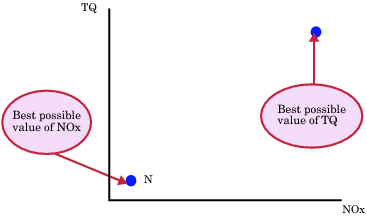
In the second step, the algorithm finds the best set of tradeoff solutions between your
objectives. The NBI algorithm spaces Npts start points
in the (n-1) hypersurface, S, that connects the
shadow. In the previous example, S is the straight line that connects the
points N and T. For each of the
Npts points on S, the algorithm tries to maximize
the distance along the normal away from this surface. This distance is labeled
L in the next figure. This process is called the NBI
subproblem. For each of the points, the NBI subproblem is a
single-objective problem, and the algorithm uses the MATLAB
fmincon routine to solve it. This figure shows the NBI
subproblem for the TQ-NOx example. The algorithm tries to maximize the distance
L along the normal away from the surface. The figure shows spacing of
the points along the (n-1) surface.
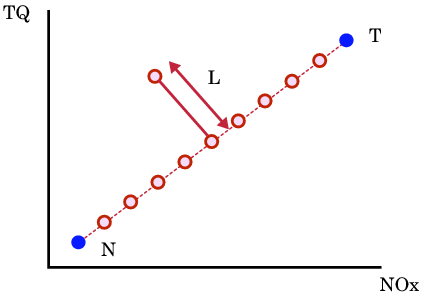
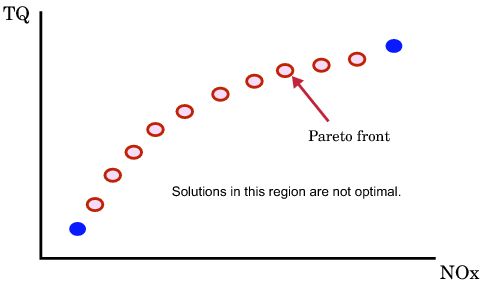
The next figure shows the final solution found by the NBI
algorithm.
To see how the NBI solver settings are used in the Optimization
Parameters dialog box, see NBI Optimization Parameters.
About the paretosearch Solver
The paretosearch solver uses the paretosearch
function from the Global Optimization Toolbox. This solver is only available if you have the Global Optimization Toolbox installed.
Use the paretosearch solver to find the optimal tradeoffs between
competing objective functions. See paretosearch (Global Optimization Toolbox) and
options (Global Optimization Toolbox).
For details on the paretosearch function, see Multiobjective Optimization (Global Optimization Toolbox). For CAGE options, see paretosearch Optimization Parameters.
References
[1] Das, Indraneel, and J. E. Dennis. "Normal-Boundary Intersection: A New Method for Generating the Pareto Surface in Nonlinear Multicriteria Optimization Problems." SIAM Journal on Optimization 8, no. 3 (1998): 631–57. https://doi.org/10.1137/S1052623496307510.

