在 GPU 上对 A\b 进行基准测试
R2026b本示例演示了如何对在 GPU 上求解线性方程组进行性能测试。
MATLAB® 中的线性代数函数可提供快速且数值上稳健的矩阵计算,而在 A*x = b 中求解 x 的代码非常简单。使用矩阵左除法(也称为 mldivide 或反斜杠运算符 \)来计算 x(即 x = A\b)。本示例比较了在不同矩阵尺寸下,mldivide 函数在 GPU 和 CPU 上的单精度与双精度性能。
检查 GPU 设置
检查是否可用 GPU。
gpu = gpuDevice;
disp(gpu.Name + " GPU detected and available.")
NVIDIA RTX A5000 GPU detected and available.
本示例中的代码是在配备 64 GB 内存、搭载 Intel® Xeon® W-2133 @ 3.60 GHz 处理器的 Windows® 11 测试系统上进行性能测量的。
定义基准测试参数
与其他许多并行算法一样,并行求解线性方程组的性能在很大程度上取决于矩阵大小,因此为基准测试选择合适的矩阵大小非常重要。定义测试参数:
创建一个变量,表示存储一个双精度数字所需的字节数。
指定要运行的测试的最大数量。
创建一个包含多个大小的向量,其中最大大小为可用 GPU 内存的 1/5。该基准测试会遍历该向量,并创建大小逐渐增大的数组。要创建一个对数间隔点组成的向量,请使用
logspace函数。由于 MATLAB 中 GPU 上的数组元素数量不能超过 ,请删除任何会导致数组大小超过此限制的尺寸设置。
sizeOfDouble = 8;
maxNumTests = 15;
maxSize = 0.2*gpu.AvailableMemory;
sizes = logspace(5,log10(maxSize),maxNumTests);
sizes(sizes/sizeOfDouble > intmax) = [];
运行基准测试
处理器每秒能执行的浮点运算次数是衡量其性能的一个有用指标。要计算每秒浮点运算次数 (FLOPS),需将执行的浮点运算次数除以执行这些运算所花费的时间。
使用 HPC Challenge 中的浮点运算计数规则,因此对于一个 n×n 矩阵,其浮点运算次数为
.
双精度
MATLAB 支持双精度或单精度计算。使用单精度计算而非双精度计算可以提升在 GPU 上运行的代码性能,因为大多数 GPU 显卡专为图形显示设计,而图形显示对单精度性能有较高要求。相比之下,CPU 是为通用计算而设计的,因此在从双精度切换到单精度时,性能提升并不明显。有关将数据转换为单精度并对单精度数据执行算术运算的更多信息,请参阅 浮点数。适合 GPU 上单精度计算的工作流的典型示例包括图像处理和机器学习。然而,其他类型的计算,例如线性代数问题,通常需要双精度处理。
要大致测量 GPU 在单精度与双精度下的相对性能,请查询设备的 SingleDoubleRatio 属性。此属性描述设备上单精度浮点单元 (FPU) 与双精度浮点单元 (FPU) 的比例。大多数台式机 GPU 的单精度浮点运算单元数量是双精度浮点运算单元的 24 倍、32 倍,甚至 64 倍。
gpu.SingleDoubleRatio
ans =
32
为了对 GPU 和主机 CPU 在双精度运算中的性能进行基准测试,针对 sizes 中的每个数组大小:
numTests = numel(sizes);
NDouble = floor(sqrt(sizes/(sizeOfDouble)));
timeCPUDouble = inf(1,numTests);
timeGPUDouble = inf(1,numTests);

for idx=1:numTests
    disp("Test " + idx + " of " + numTests + ". Timing double-precision mldivide on GPU and CPU with " + NDouble(idx)^2 + " elements.")
    A = rand(NDouble(idx)) + 100*eye(NDouble(idx));
    b = rand(NDouble(idx),1);

    timeCPUDouble(idx) = timeit(@() A\b);

    A = gpuArray(A);
    b = gpuArray(b);
    timeGPUDouble(idx) = gputimeit(@() A\b);
end
Test 1 of 15. Timing double-precision mldivide on GPU and CPU with 12321 elements.
Test 2 of 15. Timing double-precision mldivide on GPU and CPU with 26896 elements.
Test 3 of 15. Timing double-precision mldivide on GPU and CPU with 58564 elements.
Test 4 of 15. Timing double-precision mldivide on GPU and CPU with 126736 elements.
Test 5 of 15. Timing double-precision mldivide on GPU and CPU with 275625 elements.
Test 6 of 15. Timing double-precision mldivide on GPU and CPU with 597529 elements.
Test 7 of 15. Timing double-precision mldivide on GPU and CPU with 1295044 elements.
Test 8 of 15. Timing double-precision mldivide on GPU and CPU with 2808976 elements.
Test 9 of 15. Timing double-precision mldivide on GPU and CPU with 6091024 elements.
Test 10 of 15. Timing double-precision mldivide on GPU and CPU with 13205956 elements.
Test 11 of 15. Timing double-precision mldivide on GPU and CPU with 28633201 elements.
Test 12 of 15. Timing double-precision mldivide on GPU and CPU with 62062884 elements.
Test 13 of 15. Timing double-precision mldivide on GPU and CPU with 134536801 elements.
Test 14 of 15. Timing double-precision mldivide on GPU and CPU with 291623929 elements.
Test 15 of 15. Timing double-precision mldivide on GPU and CPU with 632170449 elements.
计算 GPU 和 CPU 的双精度处理能力(单位:FLOPS)。
flopsCPUDouble = (2/3*NDouble.^3 + 3/2*NDouble.^2)./timeCPUDouble;
flopsGPUDouble = (2/3*NDouble.^3 + 3/2*NDouble.^2)./timeGPUDouble;
单精度
您可以通过使用single函数将数据转换为单精度,或者在创建函数(如 single、zeros、ones 和 rand)中将数据类型指定为 eye。
对 GPU 和主机 CPU 在单精度下的性能进行基准测试。
NSingle = floor(sqrt(sizes/(sizeOfDouble/2)));
timeCPUSingle = inf(1,numTests);
timeGPUSingle = inf(1,numTests);

for idx=1:numTests
    disp("Test " + idx + " of " + numTests + ". Timing single-precision mldivide on GPU and CPU with " + NSingle(idx)^2 + " elements.")
    A = rand(NSingle(idx),"single") + 100*eye(NSingle(idx),"single");
    b = rand(NSingle(idx),1,"single");

    timeCPUSingle(idx) = timeit(@() A\b);

    A = gpuArray(A);
    b = gpuArray(b);
    timeGPUSingle(idx) = gputimeit(@() A\b);
end
Test 1 of 15. Timing single-precision mldivide on GPU and CPU with 24964 elements.
Test 2 of 15. Timing single-precision mldivide on GPU and CPU with 53824 elements.
Test 3 of 15. Timing single-precision mldivide on GPU and CPU with 116964 elements.
Test 4 of 15. Timing single-precision mldivide on GPU and CPU with 254016 elements.
Test 5 of 15. Timing single-precision mldivide on GPU and CPU with 550564 elements.
Test 6 of 15. Timing single-precision mldivide on GPU and CPU with 1194649 elements.
Test 7 of 15. Timing single-precision mldivide on GPU and CPU with 2592100 elements.
Test 8 of 15. Timing single-precision mldivide on GPU and CPU with 5621641 elements.
Test 9 of 15. Timing single-precision mldivide on GPU and CPU with 12187081 elements.
Test 10 of 15. Timing single-precision mldivide on GPU and CPU with 26409321 elements.
Test 11 of 15. Timing single-precision mldivide on GPU and CPU with 57259489 elements.
Test 12 of 15. Timing single-precision mldivide on GPU and CPU with 124121881 elements.
Test 13 of 15. Timing single-precision mldivide on GPU and CPU with 269091216 elements.
Test 14 of 15. Timing single-precision mldivide on GPU and CPU with 583270801 elements.
Test 15 of 15. Timing single-precision mldivide on GPU and CPU with 1264371364 elements.
计算 GPU 和 CPU 的单精度处理能力(单位:FLOPS)。
flopsCPUSingle = (2/3*NSingle.^3 + 3/2*NSingle.^2)./timeCPUSingle;
flopsGPUSingle = (2/3*NSingle.^3 + 3/2*NSingle.^2)./timeGPUSingle;
绘制性能曲线
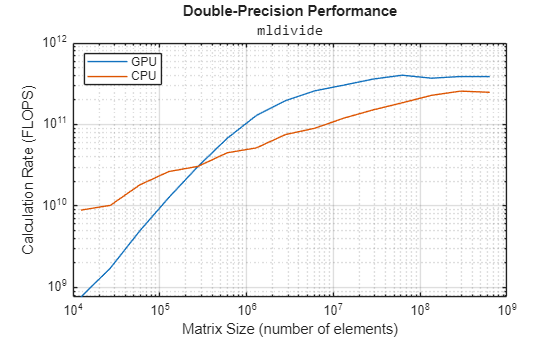
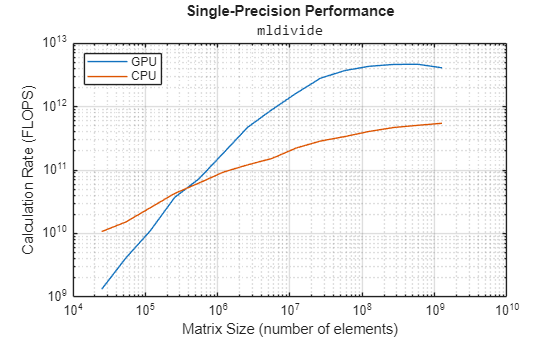
绘制双精度和单精度下处理能力与数组大小的关系图。当矩阵规模较大时,CPU 和 GPU 的性能都会趋于平稳。
figure
loglog(NDouble.^2,flopsGPUDouble, ...
     NDouble.^2,flopsCPUDouble)
grid on
legend(["GPU" "CPU"],Location="NorthWest")
title("Double-Precision Performance","\fontname{monospace}mldivide")
ylabel("Calculation Rate (FLOPS)")
xlabel("Matrix Size (number of elements)")
figure
loglog(NSingle.^2,flopsGPUSingle, ...
     NSingle.^2,flopsCPUSingle)
grid on
legend(["GPU" "CPU"],Location="NorthWest")
title("Single-Precision Performance","\fontname{monospace}mldivide")
ylabel("Calculation Rate (FLOPS)")
xlabel("Matrix Size (number of elements)")
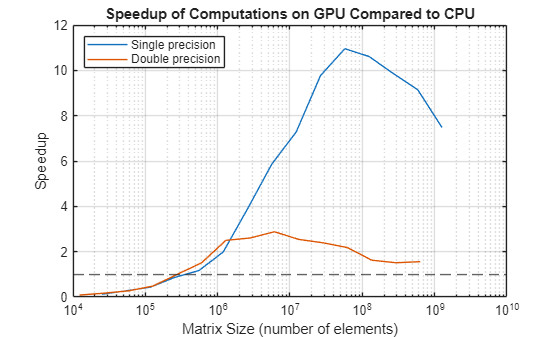
计算 CPU 执行时间与 GPU 执行时间之比(即加速比),并将结果绘制成图。绘制一条表示加速比为 1 的直线。位于该线以上的点表示在这些矩阵尺寸下,mldivide 在 GPU 上的运行速度快于在 CPU 上。由于用于发布此示例的 GPU 内存容量小于 CPU,因此在较小的矩阵尺寸下,GPU 的性能会比 CPU 更早受到内存延迟的限制。内存延迟是指将数据从内存传输到浮点运算单元所需的时间。
speedupDouble = timeCPUDouble./timeGPUDouble;
speedupSingle = timeCPUSingle./timeGPUSingle;

figure
semilogx(NSingle.^2,speedupSingle, ...
     NDouble.^2,speedupDouble)
yline(1,"--")

grid on
legend(["Single precision" "Double precision"],Location="NorthWest")
title("Speedup of Computations on GPU Compared to CPU")
ylabel("Speedup")
xlabel("Matrix Size (number of elements)")
这些基准测试结果表明:
在数据量足够大的情况下,GPU 的计算速度比主机 CPU 更快。
GPU 在单精度计算中比双精度计算更快,而且通常快得多。
这些基准测试的结果会因您的硬件配置而异。
另请参阅
gpuArray | gpuDevice | mldivide

