使用 PointNet++ 深度学习进行航空激光雷达语义分割
R2026b此示例说明如何训练 PointNet++ 深度学习网络,以对航空激光雷达数据执行语义分割。
通过机载激光扫描系统采集的激光雷达数据被应用于地形测绘、城市建模、生物量测量和灾害管理等应用。要从这些数据中提取有意义的信息,需要进行语义分割,即为点云中的每个点分配一个唯一的类标签。
在此示例中,您使用代顿标注激光雷达地球扫描 (DALES) 数据集 [1] 训练 PointNet++ 网络以执行语义分割。该数据集包含来自城市、郊区、农村和商业环境的密集、带标注的航空激光雷达场景。该数据集为建筑物、汽车、卡车、电线杆、电力线、围栏、地面和植被等 8 个类提供语义分割标签。
加载 DALES 数据
DALES 数据集包含 40 个航空激光雷达数据场景。在这 40 个场景中,29 个场景用于训练,其余 11 个场景用于测试。数据中的每个像素都有一个类标签。按照 DALES 网站上的说明,将该数据集下载到由 dataFolder 变量指定的文件夹。创建用于存储训练数据和测试数据的文件夹。
dataFolder = fullfile(tempdir,'DALES');
trainDataFolder = fullfile(dataFolder,'dales_las','train');
testDataFolder = fullfile(dataFolder,'dales_las','test');
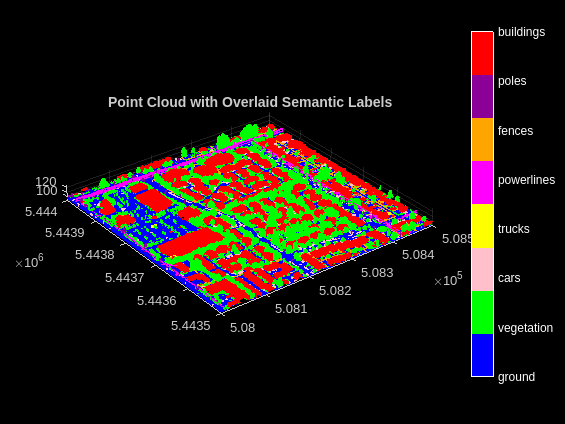
预览训练数据中的点云。
lasReader = lasFileReader(fullfile(trainDataFolder,'5080_54435.las'));
[pc,attr] = readPointCloud(lasReader,'Attributes','Classification');
labels = attr.Classification;

% Select only labeled data.
pc = select(pc,labels~=0);
labels = labels(labels~=0);
classNames = [
    "ground"
    "vegetation"
    "cars"
    "trucks"
    "powerlines"
    "fences"
    "poles"
    "buildings"
    ];
figure;
ax = pcshow(pc.Location,labels);
helperLabelColorbar(ax,classNames);
title("Point Cloud with Overlaid Semantic Labels");
预处理数据
DALES 数据集中的每个点云覆盖一个 500×500 米的区域,远大于地面激光雷达点云通常覆盖的区域。为实现高效的内存处理,请使用 blockedPointCloud 对象将点云划分为非重叠的小块。
使用 blockSize 参数定义块维度。由于数据集中每个点云的大小各不相同,请将块的 z 维度设置为 Inf,以避免沿 z 轴创建块。
blocksize = [51 51 Inf];
创建一个 matlab.io.datastore.FileSet 对象,用于收集训练数据中的所有点云文件。
fs = matlab.io.datastore.FileSet(trainDataFolder);
使用 Fileset 对象创建一个 blockedPointCloud 对象。
bpc = blockedPointCloud(fs,blocksize);
注意:处理可能需要一些时间。代码会暂停 MATLAB® 的执行,直到处理完成。
使用此示例作为支持文件附带的 helperCalculateClassWeights 辅助函数,计算训练数据集中所有类的点分布。
numClasses = numel(classNames);
[weights,maxLabel,maxWeight] = helperCalculateClassWeights(fs,numClasses);
创建用于训练的数据存储对象
使用分块后的点云 bpc 创建一个 blockedPointCloudDatastore 对象以训练网络。
ldsTrain = blockedPointCloudDatastore(bpc,MinPoints=10);
指定从 1 到类数的标签 ID。
labelIDs = 1 : numClasses;
预览并显示点云。
ptcld = preview(ldsTrain);
figure;
pcshow(ptcld.Location);
title("Cropped Point Cloud");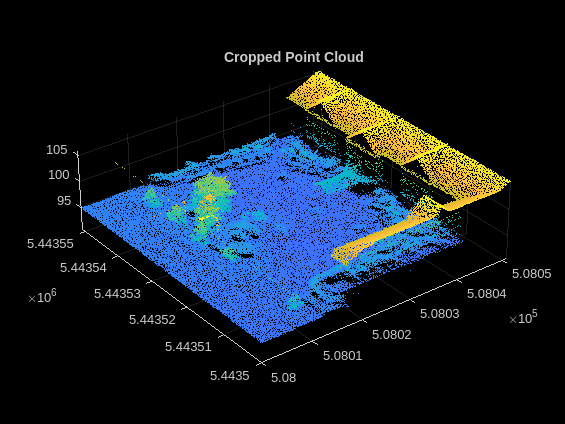
为加快训练速度,请为每个块设置固定数目的点。
numPoints = 8192;
使用此示例末尾定义的 helperTransformToTrainData 函数对数据进行变换,使其与网络的输入层兼容。按照以下步骤应用变换。
提取点云及相应的标签。
将点云及标签下采样至指定的数量
numPoints。将点云归一化到范围 [0 1]。
转换点云及对应标签,使其与网络的输入层兼容。
ldsTransformed = transform(ldsTrain,@(x,info) helperTransformToTrainData(x, ...
    numPoints,info,labelIDs,classNames),'IncludeInfo',true);
read(ldsTransformed)
ans = 1×2 cell array
    8192×3 double    8192×1 categorical
定义 PointNet++ 模型
PointNet++ 是一种流行的神经网络,用于对无序激光雷达点云进行语义分割。语义分割将三维点云中的每个点关联到一个类标签,例如汽车、卡车、地面或植被。有关详细信息,请参阅Get Started with PointNet++。
使用 pointnetplusNetwork 函数定义 PointNet++ 架构。
net = pointnetplusNetwork(numPoints,3,numClasses);
为处理 DALES 数据集中的类不平衡问题,使用了加权的 crossentropy (Deep Learning Toolbox) 损失函数。如果属于权重较低类的点被误分类,这会对网络施加更大的惩罚。
% Define the loss function.
lossfun = @(Y,T) mean(mean(sum(crossentropy(Y,T,weights,'WeightsFormat','UC','Reduction','none'),3),1),4);
指定训练选项
使用 Adam 优化算法训练网络。使用 trainingOptions (Deep Learning Toolbox) 函数指定超参数。
使用 CPU 或 GPU 训练网络。使用 GPU 需要 Parallel Computing Toolbox™ 和支持 CUDA® 的 NVIDIA® GPU。有关详细信息,请参阅GPU 计算要求 (Parallel Computing Toolbox)。要自动检测是否有可用的 GPU,请将 executionEnvironment 设置为 "auto"。如果您没有 GPU,或者不想使用 GPU 进行训练,请将 executionEnvironment 设置为 "cpu"。为确保使用 GPU 进行训练,请将 executionEnvironment 设置为 "gpu"。
executionEnvironment = "auto";
if canUseParallelPool
    dispatchInBackground = true;
else
    dispatchInBackground = false;
end

learningRate = 0.0005;
l2Regularization = 0.01;
numEpochs = 20;
miniBatchSize = 16;
learnRateDropFactor = 0.1;
learnRateDropPeriod = 10;
gradientDecayFactor = 0.9;
squaredGradientDecayFactor = 0.999;

options = trainingOptions('adam', ...
    'InitialLearnRate',learningRate, ...
    'L2Regularization',l2Regularization, ...
    'MaxEpochs',numEpochs, ...
    'MiniBatchSize',miniBatchSize, ...
    'LearnRateSchedule','piecewise', ...
    'LearnRateDropFactor',learnRateDropFactor, ...
    'LearnRateDropPeriod',learnRateDropPeriod, ...
    'GradientDecayFactor',gradientDecayFactor, ...
    'SquaredGradientDecayFactor',squaredGradientDecayFactor, ...
    'ExecutionEnvironment',executionEnvironment, ...
    'DispatchInBackground',dispatchInBackground, ...
    'Plots','training-progress');
注意:训练时,请减小 miniBatchSize 值以控制内存使用量。
训练模型
要训练网络,请将 doTraining 参量设置为 true。否则,请加载预训练的网络。要训练网络,您可以使用 CPU 或 GPU。使用 GPU 需要 Parallel Computing Toolbox™ 和支持 CUDA® 的 NVIDIA® GPU。有关详细信息,请参阅GPU 计算要求 (Parallel Computing Toolbox)。
doTraining = false;
if doTraining
    % Train the network on the ldsTransformed datastore using
    % the trainnet function.
    [net,info] = trainnet(ldsTransformed,net,lossfun,options);
else
    % Load the pretrained network.
    load('pointnetplusNetworkTrained','net');
end
分割航空点云
要对测试点云执行分割,请先创建一个 blockedPointCloud 对象,然后创建一个 blockedPointCloudDatastore 对象。
将训练数据时所用的类似变换应用于测试数据:
提取点云及相应的标签。
将点云下采样至指定的数量
numPoints。将点云归一化到范围 [0 1]。
转换点云,使其与网络的输入层兼容。
tbpc = blockedPointCloud(fullfile(testDataFolder,'5080_54470.las'),blocksize);
tbpcds = blockedPointCloudDatastore(tbpc);
定义 numNearestNeighbors 和 radius,以便在下采样点云中为密集点云中的每个点查找最近点,并有效地执行插值。
numNearestNeighbors = 20;
radius = 0.05;
初始化用于存放预测的空占位符。
labelsDensePred = [];
对此测试点云执行推断,以计算预测标签。对预测标签进行插值,以获得密集点云上的预测标签。遍历所有非重叠块,重复该过程,并使用 pcsemanticseg 函数预测标签。
while hasdata(tbpcds)

    % Read the block along with block information.
    ptCloudDense = read(tbpcds);

    % Use the helperDownsamplePoints function, attached to this example as a
    % supporting file, to extract a downsampled point cloud from the
    % dense point cloud.
    ptCloudSparse = helperDownsamplePoints(ptCloudDense{1},[],numPoints);

    % Use the helperNormalizePointCloud function, attached to this example as
    % a supporting file, to normalize the point cloud between 0 and 1.
    ptCloudSparseNormalized = helperNormalizePointCloud(ptCloudSparse);
    ptCloudDenseNormalized = helperNormalizePointCloud(ptCloudDense{1});

    % Use the helperTransformToTestData function, defined at the end of this
    % example, to convert the point cloud to a cell array and to permute the
    % dimensions of the point cloud to make it compatible with the input layer
    % of the network.
    ptCloudSparseForPrediction = helperTransformToTestData(ptCloudSparseNormalized);

    % Get the output predictions.
    labelsSparsePred = predict(net,ptCloudSparseForPrediction{1,1});
    [~,labelsSparsePred] = max(labelsSparsePred,[],3);

    % Use the helperInterpolate function, attached to this example as a
    % supporting file, to calculate labels for the dense point cloud,
    % using the sparse point cloud and labels predicted on the sparse point cloud.
    interpolatedLabels = helperInterpolate(ptCloudDenseNormalized, ...
        ptCloudSparseNormalized,labelsSparsePred,numNearestNeighbors, ...
        radius,maxLabel,numClasses);

    % Concatenate the predicted labels from the blocks.
    labelsDensePred = vertcat(labelsDensePred,interpolatedLabels);
end
Starting parallel pool (parpool) using the 'Processes' profile ...
Connected to parallel pool with 32 workers.
为获得更好的可视化效果,请仅显示从点云数据中推断出的一个块。
figure;
ax = pcshow(ptCloudDense{1}.Location,interpolatedLabels);
axis off;
helperLabelColorbar(ax,classNames);
title("Point Cloud Overlaid with Detected Semantic Labels");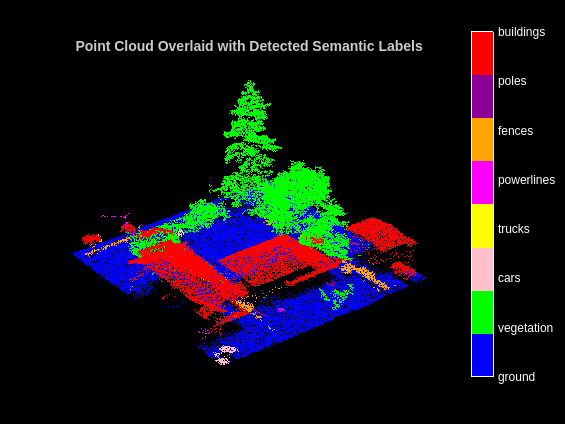
评估网络
要对测试数据执行评估,请从测试点云中获取标签。测试数据的标签已在上一步中完成预测。因此,请遍历该点云的非重叠块,并提取真实标签。
初始化用于存放目标标签的占位符。
labelsDenseTarget = [];
遍历块点云数据存储,并获取真实标签。
reset(tbpcds);

while hasdata(tbpcds)
    % Read the block along with block information.
    [~,infoDense] = read(tbpcds);

    % Extract the labels from the block information.
    labelsDense = infoDense.PointAttributes.Classification;

    % Concatenate the target labels from the blocks.
    labelsDenseTarget = vertcat(labelsDenseTarget,labelsDense);
end
使用 evaluateSemanticSegmentation (Computer Vision Toolbox) 函数根据测试集结果计算语义分割度量。目标标签和预测标签此前已计算,并分别存储在 labelsDensePred 和 labelsDenseTarget 变量中。
confusionMatrix = segmentationConfusionMatrix(double(labelsDensePred), ...
    double(labelsDenseTarget),'Classes',1:numClasses);
metrics = evaluateSemanticSegmentation({confusionMatrix},classNames,'Verbose',false);
可以使用交并比 (IoU) 度量来测量每个类的重叠量。
evaluateSemanticSegmentation (Computer Vision Toolbox) 函数会针对整个数据集、各个类以及每个测试图像返回度量。要查看数据集级别的度量,请使用 metrics.DataSetMetrics 属性。
metrics.DataSetMetrics
ans = 1×4 table
    0.9365    0.6649    0.5344    0.8905
数据集度量提供网络性能的总览。要查看每个类对整体性能的影响,请使用 metrics.ClassMetrics 属性检查每个类的度量。
metrics.ClassMetrics
ans = 8×2 table
    0.9925    0.9430
    0.8580    0.8318
    0.5780    0.4079
    0.1588    0.0564
    0.7577    0.6736
    0.5040    0.2406
    0.5305    0.2238
    0.9399    0.8980
尽管整体网络性能良好,但某些类(如 Trucks)的类度量表明,需要更多训练数据才能获得更好的性能。
支持函数
helperLabelColorbar 函数向当前轴添加颜色栏。该颜色栏经过格式化,以显示类名称及其对应颜色。
function helperLabelColorbar(ax,classNames)
% Colormap for the original classes.
cmap = [[0 0 255];
    [0 255 0];
    [255 192 203];
    [255 255 0];
    [255 0 255];
    [255 165 0];
    [139 0 150];
    [255 0 0]];
cmap = cmap./255;
cmap = cmap(1:numel(classNames),:);
colormap(ax,cmap);

% Add colorbar to current figure.
c = colorbar(ax);
c.Color = 'w';

% Center tick labels and use class names for tick marks.
numClasses = size(classNames,1);
c.Ticks = 1:1:numClasses;
c.TickLabels = classNames;

% Remove tick mark.
c.TickLength = 0;
end
helperTransformToTrainData 函数对输入数据执行以下这组变换:
提取点云及相应的标签。
将点云及标签下采样至指定的数量
numPoints。将点云归一化到范围 [0 1]。
转换点云及对应标签,使其与网络的输入层兼容。
function [cellout,dataout] = helperTransformToTrainData(data,numPoints,info,...
    labelIDs,classNames)
if ~iscell(data)
    data = {data};
end
numObservations = size(data,1);
cellout = cell(numObservations,2);
dataout = cell(numObservations,2);
for i = 1:numObservations
    classification = info.PointAttributes(i).Classification;

    % Remove labels with zero value.
    pc = data{i,1};
    pc = select(pc,(classification ~= 0));
    classification = classification(classification ~= 0);

    % Use the helperDownsamplePoints function, attached to this example as a
    % supporting file, to extract a downsampled point cloud and its labels
    % from the dense point cloud.
    [ptCloudOut,labelsOut] = helperDownsamplePoints(pc, ...
    classification,numPoints);

    % Make the spatial extent of the dense point cloud and the sparse point
    % cloud same.
    limits = [ptCloudOut.XLimits;ptCloudOut.YLimits;...
                    ptCloudOut.ZLimits];
    ptCloudSparseLocation = ptCloudOut.Location;
    ptCloudSparseLocation(1:2,:) = limits(:,1:2)';
    ptCloudSparseUpdated = pointCloud(ptCloudSparseLocation, ...
        'Intensity',ptCloudOut.Intensity, ...
        'Color',ptCloudOut.Color, ...
        'Normal',ptCloudOut.Normal);

    % Use the helperNormalizePointCloud function, attached to this example as
    % a supporting file, to normalize the point cloud between 0 and 1.
    ptCloudOutSparse = helperNormalizePointCloud( ...
        ptCloudSparseUpdated);
    cellout{i,1} = ptCloudOutSparse.Location;

    % Permuted output.
    cellout{i,2} = permute(categorical(labelsOut,labelIDs,classNames),[1 3 2]);

    % General output.
    dataout{i,1} = ptCloudOutSparse;
    dataout{i,2} = labelsOut;
end
end
helperTransformToTestData 函数将点云转换为元胞数组,并置换点云的维度,使其与网络的输入层兼容。
function data = helperTransformToTestData(data)
if ~iscell(data)
    data = {data};
end
numObservations = size(data,1);
for i = 1:numObservations
    tmp = data{i,1}.Location;
    data{i,1} = tmp;
end
end
参考资料
[1] Varney, Nina, Vijayan K. Asari, and Quinn Graehling."DALES:A Large-Scale Aerial LiDAR dataset for Semantic Segmentation."ArXiv:2004.11985 [Cs, Stat], April 14, 2020. https://arxiv.org/abs/2004.11985.
[2] Qi, Charles R., Li Yi, Hao Su, and Leonidas J. Guibas."PointNet++:Deep Hierarchical Feature Learning on Point Sets in a Metric Space."ArXiv:1706.02413 [Cs], June 7, 2017. https://arxiv.org/abs/1706.02413.
另请参阅
函数
pointnetplusNetwork|pcsemanticseg|pcsegsam|trainingOptions(Deep Learning Toolbox)
对象
主题
- Code Generation for Aerial Lidar Semantic Segmentation Using PointNet++ Deep Learning
- Aerial Lidar Semantic Segmentation Using RandLANet Deep Learning
- Lidar Point Cloud Semantic Segmentation Using PointSeg Deep Learning Network
- Lidar Point Cloud Semantic Segmentation Using SqueezeSegV2 Deep Learning Network
- Point Cloud Classification Using PointNet++ Deep Learning

