coverageConfig
R2026bDescription
cfg = coverageConfig(scanner,Name=Value)struct
cfg that describes the current scan coverage of
scanner, with additional options specified using one or more
name-value arguments.
Examples
Create an electronic sector scan controller that scans the azimuth sector from -30 to 30 degrees for a bistatic transmitter that has a fan beam with a 10-degree azimuth beamwidth and a 30-degree elevation beamwidth.
Define the bistatic transmitter.
freq = 300e6;
txAnt = phased.SincAntennaElement(Beamwidth=[10 30]);
txRdr = bistaticTransmitter(TransmitAntenna=phased.Radiator(Sensor=txAnt,OperatingFrequency=freq));
Create a radar scenario and position a moving platform for the bistatic transmitter.
scnro = radarScenario;
traj = kinematicTrajectory(Position=[0 10e3 0],Orientation=quaternion([-90 0 0],"eulerd","ZYX","frame"));
txPlat = platform(scnro,Trajectory=traj);
Set the scan duration to 31 pulse repetition intervals (PRIs) so the beam sweeps slowly enough to capture the full transmit antenna pattern as it traverses the receive antenna's location.
pri = 1/txRdr.Waveform.PRF;
txScnr = radarScanController("Electronic","Sector",AzimuthLimits=[-30 30],ScanDuration=31*pri)
txScnr =
  ElectronicSectorScanner with properties:

      AzimuthLimits: [-30 30]
       ScanDuration: 0.0031
          StepAngle: 1
    DwellTimeSource: "Auto"
          ScanAngle: -30
           ScanTime: 0
Create a default coverage configuration structure using coverageConfig.
txCovCfg = coverageConfig(txScnr)
txCovCfg = struct with fields:
          Index: 1
      LookAngle: [-30 0]
    FieldOfView: [0 0]
     ScanLimits: [-30 30]
          Range: 1
       Position: [0 0 0]
    Orientation: [1×1 quaternion]
Update the default coverage configuration to include information about the bistatic transmitter and platform.
txCovCfg.Index = txPlat.PlatformID;
txCovCfg.Range = 20e3;
txCovCfg.FieldOfView = txRdr.TransmitAntenna.Sensor.Beamwidth;
txCovCfg.Position = txPlat.Position;
txCovCfg.Orientation = quaternion(txPlat.Orientation,"eulerd","ZYX","frame")
txCovCfg = struct with fields:
          Index: 1
      LookAngle: [-30 0]
    FieldOfView: [10 30]
     ScanLimits: [-30 30]
          Range: 20000
       Position: [0 10000 0]
    Orientation: [1×1 quaternion]
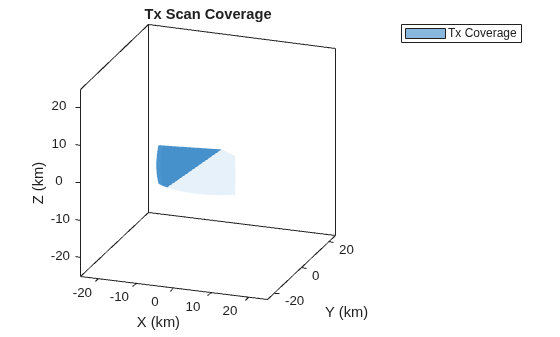
Plot the scan coverage using theaterPlot, coveragePlotter, and plotCoverage.
fig = figure(Name="Scan Coverage");
clf(fig);
ax = axes(fig);
tp = theaterPlot(Parent=ax,AxesUnits=["km" "km" "km"], ...
    XLimits=25e3*[-1 1],YLimits=25e3*[-1 1],ZLimits=25e3*[-1 1]);
title(ax,"Tx Scan Coverage");
view(ax,20,20);

txCovPltr = coveragePlotter(tp,DisplayName="Tx Coverage");
plotCoverage(txCovPltr,txCovCfg);
Input Arguments
Name-Value Arguments
Output Arguments
Version History
Introduced in R2026b
See Also
radarScanController | plotCoverage | scan | isScanDone | isLocked | release | bistaticTransmitter | bistaticReceiver

