radarScanController
R2026bDescription
radarScanController creates scan controller objects that define
mechanical and electronic sector and raster patterns for radars, returned as one
of:
MechanicalRasterScanner– Defines the scan pattern for a mechanically steered antenna array over a 2-D angular raster.MechanicalSectorScanner– Defines the scan pattern for a mechanically steered antenna array over a 1-D angular sector span.ElectronicRasterScanner– Defines the scan pattern for an electronically steered antenna array over a 2-D angular raster.ElectronicSectorScanner– Defines the scan pattern for an electronically steered antenna array over a 1-D angular sector span.
Mechanical scanners sweep through scan angles continuously at a fixed rate and then return to the initial position. Electronic scanners dwell at discrete scan angles, and the return to the initial position is instantaneous.
You can use scan controllers to implement surveillance scanning for radars that lack
built-in scanning capabilities, including bistaticTransmitter and
bistaticReceiver objects, as shown in Radar Surveillance Scan Pattern Tutorial.
Creation
Syntax
Description
creates a scan controller object scanner = radarScanController(scanmode,scantype)scanner with a
"Mechanical" or "Electronic" scan mode and a
"Sector" or "Raster" scan type.
creates a scan controller object, with each specified scanner = radarScanController(scanmode,scantype,PropertyName=Value)PropertyName
set to the corresponding Value. You can specify additional pairs of
arguments in any order as
PropertyName1=Value1,...,PropertyNameN=ValueN.
Properties
Scan mode, specified as one of:
"Mechanical"– Implements a mechanically steered scan pattern."Electronic"– Implements an electronically steered scan pattern.
Data Types: string | char
Scan type, specified as one of:
"Raster"– Implements a 2-D angular raster scan pattern."Sector"– Implements a 1-D angular sector span pattern.
Data Types: string | char
Any scanmode
Scan time duration, specified as a positive scalar. Units are in seconds.
scanmode | scantype | Description | Default |
|---|---|---|---|
"Mechanical" | "Raster" | The scan duration is the amount of time it takes to mechanically
scan the antenna between the scan limits for the raster search pattern
defined by the | 1 |
"Mechanical" | "Sector" | The scan duration is the amount of time it takes to mechanically
scan the antenna between the sector scan limits defined by the
| 5 |
"Electronic" | "Raster" | The scan duration is the amount of time it takes to electronically
scan the antenna between the raster search pattern defined by the
| 1 |
"Electronic" | "Sector" | The scan duration is the amount of time it takes to electronically
scan the antenna between the sector scan limits defined by the
| 1 |
Dependencies
To enable this property for "Mechanical"
scanmode, set the ScanRateSource property to
"Auto".
To enable this property for "Electronic"
scanmode, set the DwellTimeSource property
to "Auto".
This property is not applicable when both AzimuthLimits and
ElevationLimits span zero degrees, indicating a stationary
scanner.
Data Types: double
Start and stop scan limits in the azimuth dimension of the angular sector scanned or
searched by the sector or raster pattern, specified as a 2-element vector, where the
first element is the initial limit and the second element is the final limit. The total
angular sector span defined by AzimuthLimits cannot exceed 360°. In
other words, abs(stop – start) ≤ 360. Units are in degrees.
scanmode | scantype | Description | Default |
|---|---|---|---|
"Mechanical" | "Raster" | Start and stop scan limits in the azimuth dimension of the angular sector searched by the raster pattern, specified as a 2-element vector, where the first element is the initial limit and the second element is the final limit. | [-90 90] |
"Mechanical" | "Sector" | Start and stop scan limits in the azimuth dimension of the angular sector scanned by the sector, specified as a 2-element vector, where the first element is the initial limit and the second element is the final limit. | [0 360] |
"Electronic" | "Raster" | Start and stop scan limits in the azimuth dimension of the angular sector searched by the raster pattern, specified as a 2-element vector, where the first element is the initial limit and the second element is the final limit. | [-90 90] |
"Electronic" | "Sector" | Start and stop scan limits in the azimuth dimension of the angular sector scanned by the sector, specified as a 2-element vector, where the first element is the initial limit and the second element is the final limit. | [-90 90] |
Note
Sector scanning objects ("Sector"
scantype) only scan in the azimuth dimension whereas raster
search objects ("Raster"
scantype) scan in two dimensions, with the elevation limits
specified by the ElevationLimits property.
Data Types: double
"Mechanical"
scanmode
Source of mechanical scan rate, specified as "Auto" or
"Property". The default value is "Auto".
"Auto"– The scan rate is automatically calculated.scantypeDescription "Raster"The scan rate is computed as the absolute value of the total angular raster span divided by the scan duration, where the total angular raster span is determined from the
AzimuthLimits,ElevationLimits,NumBars, andAlignmentproperties and the scan duration is defined by theScanDurationproperty."Sector"The scan rate is computed as the absolute value of the total angular sector span divided by the scan duration, where the total angular sector span is determined from the
AzimuthLimitsproperty and the scan duration is defined by theScanDurationproperty.
"Property"– The scan rate is defined by theScanRateproperty.
Dependencies
This property is not applicable when both AzimuthLimits and
ElevationLimits span zero degrees, indicating a stationary
scanner.
Data Types: string | char
Mechanical scan rate, specified as 2-element row vector for raster scans or a positive scalar for sector scans. Units are in degrees per second (deg/s).
scantype | Description | Default |
|---|---|---|
"Raster" | The scan rate is specified as a 2-element vector, where the first
element is the scan rate along the azimuth axis and the second element is
the scan rate along the elevation axis. The antenna mechanically scans
between the azimuth and elevation scan limits defined by the
| [1 1] |
"Sector" | The scan rate is specified as a positive scalar. The antenna
mechanically scans from the initial start angle to the final stop angle
defined by the | 1 |
Dependencies
To enable this property, set the ScanRateSource property to
"Property".
This property is not applicable when both AzimuthLimits and
ElevationLimits span zero degrees, indicating a stationary
scanner.
Data Types: double
Mechanical scan pattern reset behavior, specified as "Return" or
"Reverse". This property is not applicable for a scan pattern that
ends at its starting position, such as a 360° sweep. The default value is
"Return" when
"Return"– The scan pattern resets after completing a full scan by returning to its initial position before executing the next scan. The time required for the mechanical slew to return to the initial position is defined by theReturnDurationproperty."Reverse"– The scan pattern resets after the completion of a full scan pattern by reversing the direction of the scan pattern, retracing the scan pattern in the opposite sequence as the previous scan to arrive back at the initial position.
Dependencies
This property is not applicable when both AzimuthLimits and
ElevationLimits span zero degrees, indicating a stationary
scanner.
Data Types: string | char
Mechanical scan return time duration or flyback time, specified as a nonnegative
scalar. The default value is 0. Units are in seconds.
scantype | Description | Default |
|---|---|---|
"Raster" | The return duration is the amount of time it takes to mechanically
slew the antenna back to the initial start position defined by the
| 0 |
"Sector" | The return duration is the amount of time it takes to mechanically
slew the antenna back to the initial start position defined by the
| — (This property is not applicable for the |
Dependencies
To enable this property, set the ScanReset property to the
default value of "Return".
This property is not applicable when both AzimuthLimits and
ElevationLimits span zero degrees, indicating a stationary
scanner.
This property is not applicable for a scan pattern that ends at its starting position, such as a 360° sweep.
Data Types: double
"Electronic"
scanmode
Source of electronic dwell time, specified as "Auto" or
"Property". The default value is "Auto".
"Auto"– The dwell time is automatically calculated:scantypeDescription "Raster"The dwell time is computed as the ratio of the step angle and scan rate, where the step angle is defined by the
StepAngleproperty and the scan rate is the absolute value of the total angular raster span divided by the scan duration. The total angular raster search span is determined from theAzimuthLimits,ElevationLimits, andNumBarsproperties and the scan duration is defined by theScanDurationproperty."Sector"The dwell time is computed as the ratio of the step angle and scan rate, where the step angle is defined by the
StepAngleproperty and the scan rate is the absolute value of the total angular span divided by the scan duration. The total angular sector span is determined from theAzimuthLimitsproperty and the scan duration is defined by theScanDurationproperty.
"Property"– The dwell time is defined by theDwellTimeproperty.
Dependencies
This property is not applicable when both AzimuthLimits and
ElevationLimits span zero degrees, indicating a stationary
scanner.
Data Types: string | char
Duration of time spent at each electronic scan angle, specified as a positive
scalar. The default value is 0.1. Units are in seconds.
Dependencies
To enable this property, set the DwellTimeSource property to
"Property".
This property is not applicable when both AzimuthLimits and
ElevationLimits span zero degrees, indicating a stationary
scanner.
Data Types: double
Electronic step angle or how much the electronic scan angle changes between dwell
times, specified as a nonnegative scalar. For the duration of a dwell, the electronic
scan angle remains constant and only changes between dwells. When the step angle is
larger than the total angular span, the scanner remains at the initial start angle. The
default value is 1. Units are in degrees (deg).
scantype | Description |
|---|---|
"Raster" | The electronic step angle defines how much the electronic scan
angle changes along the primary scan direction between dwell times. The
primary scan direction is defined by the |
"Sector" | The electronic step angle defines how much the electronic scan
angle changes between dwell times and must be less than the angle spanned by
|
Dependencies
This property is not applicable when both AzimuthLimits and
ElevationLimits span zero degrees, indicating a stationary
scanner.
Data Types: double
"Raster"
scantype
Start and stop scan limits in the elevation dimension of the angular sector scanned
by the 2-D raster pattern, specified as a 2-element vector, where first element is the
initial limit and the second element is the final limit. The total angular sector span
defined by ElevationLimits cannot exceed 180°. In other words, abs(stop – start) ≤ 180. Units are in degrees (deg).
Data Types: double
Alignment or primary direction of the raster scan pattern, specified as
"Azimuth" or "Elevation". The raster scan
consists of a primary scan direction and a secondary or scan direction. The sensor
repeatedly scans along the primary direction while incrementally stepping along the
secondary direction to cover the scan area.
When this property is set to
"Azimuth", the primary scan is performed over the angular span defined by theAzimuthLimitsproperty. Upon reaching the end of the azimuth span, the scanner advances along the secondary elevation direction to the next raster bar and then performs another primary scan across the azimuth span.When this property is set to
"Elevation", the primary scan is performed over the angular span set by theElevationLimitsproperty. Upon reaching the end of the elevation span, the scanner advances along the secondary azimuth direction to the next raster bar and then performs another primary scan across the elevation span.
Dependencies
This property is not applicable when both AzimuthLimits and
ElevationLimits span zero degrees, indicating a stationary
scanner.
Data Types: string | char
Number of raster bars in the search pattern, specified as a positive integer scalar.
The number of raster bars specifies the number of scans in the primary direction that
must be completed before repeating the raster search pattern. A bar is one continuous
scan or sweep in the primary direction (defined by the Alignment
property) at a fixed angle in the secondary direction. After one bar is completed, the
antenna steps in the secondary direction. The number of steps along the secondary scan
direction is NumBars–1. The default value is 2.
Note
Set this property to a value of 1 to force a 1-D scan.
Dependencies
This property is not applicable when both AzimuthLimits and
ElevationLimits span zero degrees, indicating a stationary
scanner.
Data Types: double
Read Only
This property is read-only.
Current scan time, returned as a nonnegative scalar. Units are in seconds.
Data Types: double
This property is read-only.
Current scan angle in units of degrees (deg), returned as a scalar or 2-element row vector.
"Raster"– 2-element row vector, where the first element is the azimuth angle and the second element is the elevation angle."Sector"– Scalar azimuth angle.
Data Types: double
Object Functions
scan | Advances the scan position to the desired time |
isScanDone | Determine if the current scan frame is complete |
isLocked | Determine if the radar scan controller object is locked |
release | Release radar scan controller object |
coverageConfig | Coverage configuration for radar scan controller object |
Examples
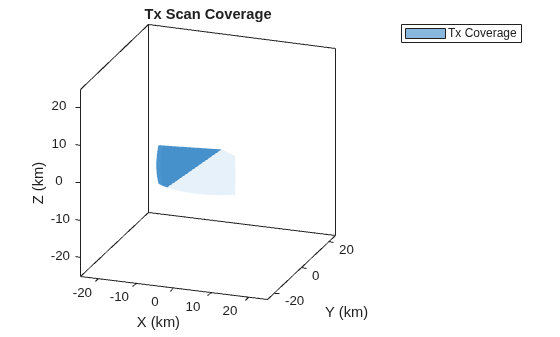
Create an electronic sector scan controller that scans the azimuth sector from -30 to 30 degrees for a bistatic transmitter that has a fan beam with a 10-degree azimuth beamwidth and a 30-degree elevation beamwidth.
Define the bistatic transmitter.
freq = 300e6; txAnt = phased.SincAntennaElement(Beamwidth=[10 30]); txRdr = bistaticTransmitter(TransmitAntenna=phased.Radiator(Sensor=txAnt,OperatingFrequency=freq));
Create a radar scenario and position a moving platform for the bistatic transmitter.
scnro = radarScenario; traj = kinematicTrajectory(Position=[0 10e3 0],Orientation=quaternion([-90 0 0],"eulerd","ZYX","frame")); txPlat = platform(scnro,Trajectory=traj);
Set the scan duration to 31 pulse repetition intervals (PRIs) so the beam sweeps slowly enough to capture the full transmit antenna pattern as it traverses the receive antenna's location.
pri = 1/txRdr.Waveform.PRF; txScnr = radarScanController("Electronic","Sector",AzimuthLimits=[-30 30],ScanDuration=31*pri)
txScnr =
ElectronicSectorScanner with properties:
AzimuthLimits: [-30 30]
ScanDuration: 0.0031
StepAngle: 1
DwellTimeSource: "Auto"
ScanAngle: -30
ScanTime: 0
Create a default coverage configuration structure using coverageConfig.
txCovCfg = coverageConfig(txScnr)
txCovCfg = struct with fields:
Index: 1
LookAngle: [-30 0]
FieldOfView: [0 0]
ScanLimits: [-30 30]
Range: 1
Position: [0 0 0]
Orientation: [1×1 quaternion]
Update the default coverage configuration to include information about the bistatic transmitter and platform.
txCovCfg.Index = txPlat.PlatformID; txCovCfg.Range = 20e3; txCovCfg.FieldOfView = txRdr.TransmitAntenna.Sensor.Beamwidth; txCovCfg.Position = txPlat.Position; txCovCfg.Orientation = quaternion(txPlat.Orientation,"eulerd","ZYX","frame")
txCovCfg = struct with fields:
Index: 1
LookAngle: [-30 0]
FieldOfView: [10 30]
ScanLimits: [-30 30]
Range: 20000
Position: [0 10000 0]
Orientation: [1×1 quaternion]
Plot the scan coverage using theaterPlot, coveragePlotter, and plotCoverage.
fig = figure(Name="Scan Coverage"); clf(fig); ax = axes(fig); tp = theaterPlot(Parent=ax,AxesUnits=["km" "km" "km"], ... XLimits=25e3*[-1 1],YLimits=25e3*[-1 1],ZLimits=25e3*[-1 1]); title(ax,"Tx Scan Coverage"); view(ax,20,20); txCovPltr = coveragePlotter(tp,DisplayName="Tx Coverage"); plotCoverage(txCovPltr,txCovCfg);
Create a mechanical raster scan controller that scans from -30 to 30 degrees in azimuth and -5 to 25 degrees in elevation for use with a pencil beam bistatic transmitter.
txScnr = radarScanController("Mechanical","Raster",AzimuthLimits=[-30 30],ElevationLimits=[-5 25])
txScnr =
MechanicalRasterScanner with properties:
AzimuthLimits: [-30 30]
ElevationLimits: [-5 25]
ScanDuration: 1
NumBars: 2
Alignment: "Azimuth"
ScanReset: "Return"
ReturnDuration: 0
ScanRateSource: "Auto"
ScanAngle: [-30 -5]
ScanTime: 0
Define the bistatic transmitter to have a 10 degree field of view.
freq = 300e6;
fov = [10 10]; % [az el] degrees
txAnt = phased.SincAntennaElement(Beamwidth=fov);
txRdr = bistaticTransmitter(TransmitAntenna=phased.Radiator(Sensor=txAnt,OperatingFrequency=freq));The raster scanner sweeps along its primary scan direction, defined by the Alignment property. When it reaches the end of the primary axis (azimuth in this case), it steps along the secondary axis to the next raster bar. Raster bars are spaced evenly between the secondary limits, and the scanner reverses its primary scan direction each time it steps to a new bar.
For a pencil beam with a 10-degree beamwidth in both azimuth and elevation, the 30-degree elevation span requires 30/10 + 1 = 4 raster bars to cover the full surveillance volume.
txScnr.NumBars = floor(diff(txScnr.ElevationLimits)/fov(2)) + 1
txScnr =
MechanicalRasterScanner with properties:
AzimuthLimits: [-30 30]
ElevationLimits: [-5 25]
ScanDuration: 1
NumBars: 4
Alignment: "Azimuth"
ScanReset: "Return"
ReturnDuration: 0
ScanRateSource: "Auto"
ScanAngle: [-30 -5]
ScanTime: 0
Create a stationary scanner that does not scan its antenna by setting both azimuth limits to the same value. This forces the scanner to stare at a fixed angle. Set that angle to 0 degrees.
rxScnr = radarScanController("Mechanical","Sector",AzimuthLimits=[0 0])
rxScnr =
MechanicalSectorScanner with properties:
AzimuthLimits: [0 0]
ScanAngle: 0
ScanTime: 0
Version History
Introduced in R2026b
See Also
scan | isScanDone | coverageConfig | isLocked | release | bistaticTransmitter | bistaticReceiver
MATLAB Command
You clicked a link that corresponds to this MATLAB command:
Run the command by entering it in the MATLAB Command Window. Web browsers do not support MATLAB commands.
选择网站
选择网站以获取翻译的可用内容,以及查看当地活动和优惠。根据您的位置,我们建议您选择:。
您也可以从以下列表中选择网站:
如何获得最佳网站性能
选择中国网站(中文或英文)以获得最佳网站性能。其他 MathWorks 国家/地区网站并未针对您所在位置的访问进行优化。
美洲
- América Latina (Español)
- Canada (English)
- United States (English)
欧洲
- Belgium (English)
- Denmark (English)
- Deutschland (Deutsch)
- España (Español)
- Finland (English)
- France (Français)
- Ireland (English)
- Italia (Italiano)
- Luxembourg (English)
- Netherlands (English)
- Norway (English)
- Österreich (Deutsch)
- Portugal (English)
- Sweden (English)
- Switzerland
- United Kingdom (English)