CAN Receive
R2026bCAN Receive block
To add a block to a model, double-click the canvas and start typing the block name. Then, select the block from the list.
Libraries:
ROS Toolbox /
ROS 2
Description
This feature also requires the Vehicle Network Toolbox™ product when receiving message as a structured CAN message.
The CAN Receive block receives messages from a CAN network using a real
or virtual CAN interface on your target machine. It enables the Simulink® model to process incoming CAN messages in either raw uint8 format or as
structured messages containing ID, length, and data fields. Use this block to receive CAN
messages in real-time simulation, external mode execution, or code generation workflows. The
block supports polling-based execution, where it checks for new messages at each time step,
similar to the IsNew semantics in
the ROS 2 Subscribe block. If you do not have access to physical hardware, you
can use a virtual CAN interface for testing and validation. For more information on how to set
up a virtual CAN interface, see Set Up Virtual CAN Interface.
This block outputs received messages in a format compatible with downstream ROS 2 message handling blocks that support SocketCAN integration for CAN message transportation.
This image shows a ROS 2-CAN node that you can deploy on hardware. This node acts as a bridge between the CAN device and the ROS 2 network, thereby enabling the transmission and reception of CAN messages.
For Raw Data input type, you can apply message filters such as
Identifier type,
Message ID, and
Message length from
the block mask parameters.
For ROS Msg or CAN Msg input type, you can set
message filters such as ID Type, Acceptance
Mask, and Acceptance Filter using the steps listed in Configure CAN Interfaces and Apply Message Filtering.
Examples
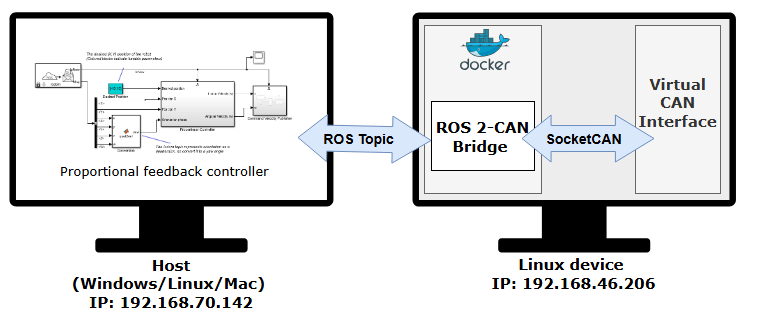
Send and Receive CAN Data in Simulink Using ROS 2-CAN Bridge Node
Design and test a feedback control algorithm in Simulink® using CAN messages exchanged between the CAN and ROS 2 network.
Ports
Output
Parameters
Extended Capabilities
Version History
Introduced in R2026a

