mlreportgen.dom.TemplateText 类
R2026a命名空间: mlreportgen.dom
来自文档模板的标记文本
描述
使用 mlreportgen.dom.TemplateText 类的实例创建一个文档对象模型 (DOM),该模型表示在打开文档时从文档模板中读取的 XML 标记。该对象包含以下模板文本段之一:
模板的开始处和模板中的第一个空位
模板上的后续空位
最后一个空位和模板的末端
从一个空位移动到另一个空位会导致这些文本段嵌入到 TemplateText 对象中并追加到文档的子列表中。这保证了模板文本将按照其在模板中出现的顺序包含在输出文档中,并与每个空位中追加的内容交错。
mlreportgen.dom.TemplateText 类是一个 handle 类。
属性
方法
示例
import mlreportgen.dom.*;
d = Document('test');
d.TitleBarText = 'My Report';
open(d);
% Display browser title bar text that the DOM template parser inserts into
% the markup read from the beginning of the template.
disp(d.Children(2).HTMLText);
My Report
close(d);
rptview(d);
要添加额外的内容或空位,或更改现有模板的样式,请创建一个新的 TemplateDocumentPart 对象来替换现有的 TemplateDocumentPart 对象。您可以替换相关文档部件,同时源模板的其余内容保持不变。
使用 tmplview 在源模板中显示模板文档部分 "partToModify"。本文件部分目前包含静态文本 "Text in template document part",随后是一个模板占位符 "templateHole"。在此示例中,您通过查找需要修改的部分、复制原始文本和模板空位,然后在模板空位前后添加额外文本,来在模板空位前后添加额外文本。
tmplview("existingTemplate","html",OpenDocument="partToModify");

导入 DOM API 命名空间,这样您就不必使用完全限定的类名。
import mlreportgen.dom.*通过复制现有模板创建一个新模板。
t = Template("updatedTemplate","html","existingTemplate");
open(t);
在文档部件中找到需要修改的部分。
toModifyIdx = strcmp({t.TemplateDocumentParts.Name},"partToModify");
toModifyPart = t.TemplateDocumentParts(toModifyIdx);
基于现有文档部件定义一个新的模板文档部件。
newTemplateDocPart = TemplateDocumentPart("partToModify");将原始模板文档部分中的子级复制到新文档部分的模板空位前后位置。当您的 for 循环到达模板位置时,添加新文本的第一行,复制模板位置,然后添加新文本的第二行。
for child = toModifyPart.Children
    % If the child is a template hole
    if isa(child,"mlreportgen.dom.TemplateHole")
        switch child.HoleId
            case "templateHole"
                append(newTemplateDocPart,...
                    Text("Text before template hole."));
                append(newTemplateDocPart,TemplateHole(child.HoleId));
                append(newTemplateDocPart,...
                    Text("Content after template hole"));
            otherwise
                append(newTemplateDocPart,TemplateHole(child.HoleId))
        end
        % If the child is not the template hole, copy the child to
        % the new document part
    else
        append(newTemplateDocPart,clone(child));
    end
end
用新的模板文档部分替换需要修改的部分。
t.TemplateDocumentParts(toModifyIdx) = newTemplateDocPart;
关闭模板。
close(t);
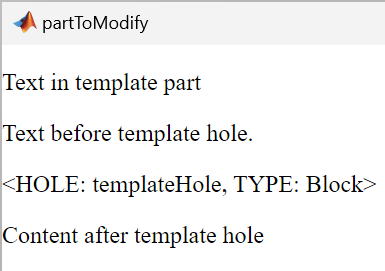
使用 tmplview 确认模板文档部分的更改。
tmplview("updatedTemplate.htmtx",OpenDocument="partToModify");
要了解如何直接检查源文件或更新的模板文件,请参阅 打开模板文件。
提示
要了解如何直接检查源文件或更新的模板文件,请参阅 打开模板文件。
版本历史记录
在 R2014b 中推出

