本页面提供的是上一版软件的文档。当前版本中已删除对应的英文页面。
clone
类: mlreportgen.dom.TemplateText
命名空间: mlreportgen.dom
示例
要添加额外的内容或空位,或更改现有模板的样式,请创建一个新的 TemplateDocumentPart 对象来替换现有的 TemplateDocumentPart 对象。您可以替换相关文档部件,同时源模板的其余内容保持不变。
使用 tmplview 在源模板中显示模板文档部分 "partToModify"。本文件部分目前包含静态文本 "Text in template document part",随后是一个模板占位符 "templateHole"。在此示例中,您通过查找需要修改的部分、复制原始文本和模板孔,然后在模板孔前后添加额外文本,来在模板孔前后添加额外文本。
tmplview("existingTemplate","html",OpenDocument="partToModify");

导入 DOM API 命名空间,这样您就不必使用完全限定的类名。
import mlreportgen.dom.*通过复制现有模板创建一个新模板。
t = Template("updatedTemplate","html","existingTemplate");
open(t);
在文档部件中找到需要修改的部分。
toModifyIdx = strcmp({t.TemplateDocumentParts.Name},"partToModify");
toModifyPart = t.TemplateDocumentParts(toModifyIdx);
基于现有文档部件定义一个新的模板文档部件。
newTemplateDocPart = TemplateDocumentPart("partToModify");将原始模板文档部分中的子级复制到新文档部分的模板空位前后位置。当您的 for 循环到达模板位置时,添加新文本的第一行,复制模板位置,然后添加新文本的第二行。
for child = toModifyPart.Children
    % If the child is a template hole
    if isa(child,"mlreportgen.dom.TemplateHole")
        switch child.HoleId
            case "templateHole"
                append(newTemplateDocPart,...
                    Text("Text before template hole."));
                append(newTemplateDocPart,TemplateHole(child.HoleId));
                append(newTemplateDocPart,...
                    Text("Content after template hole"));
            otherwise
                append(newTemplateDocPart,TemplateHole(child.HoleId))
        end
        % If the child is not the template hole, copy the child to
        % the new document part
    else
        append(newTemplateDocPart,clone(child));
    end
end
用新的模板文档部分替换需要修改的部分。
t.TemplateDocumentParts(toModifyIdx) = newTemplateDocPart;
关闭模板。
close(t);
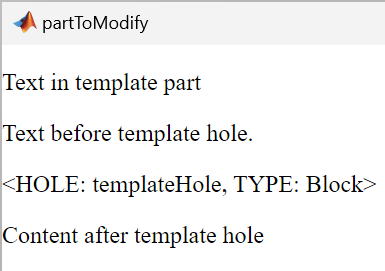
使用 tmplview 确认模板文档部分的更改。
tmplview("updatedTemplate.htmtx",OpenDocument="partToModify");
要了解如何直接检查源文件或更新的模板文件,请参阅 打开模板文件。
输入参数
输出参量
版本历史记录
在 R2024b 中推出

