Use Data Dictionary to Define Shared Variant Control Variables for Variant Blocks
R2026bYou can define variant control variables in a data dictionary so that multiple models share the same definitions. A data dictionary is a version-controlled file that tracks modifications by team members over time. A data dictionary supports all variant activation times, including code compile. Because the dictionary is a persistent file, variant control variables load automatically with the linked model without requiring callbacks or setup scripts.
Use variant control variables in a data dictionary when you:
Share variant control variables across multiple models that need identical values and variant activation times
Track changes to variant control variables using version control
Need the
code compilevariant activation time without relying on base workspace scripts or callbacks
For information on variant activation times and variant control variable types that a data dictionary supports, see Verify Variable Type Compatibility with Workspace and Variant Activation Time.
For constraints that apply when defining variant control variables in different workspaces, see Workspace Constraints for Variant Control Variables.
Define and Use a Variant Control Variable in a Data Dictionary
The slexVariantSubsystems model contains a Variant Subsystem block, Controller.
Open the slexVariantSubsystems model.
model = "slexVariantSubsystems";
open_system(model);
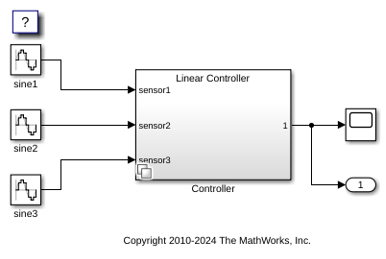
Create and Link a Data Dictionary
Create a data dictionary and link the model to it.
dictObj = Simulink.data.dictionary.create("myVariantDictionary.sldd");
set_param(model,"DataDictionary","myVariantDictionary.sldd")
After you create the data dictionary, commit the .sldd file to version control so that team members can share and track changes to variant control variables.
Define a Variant Control Object in the Data Dictionary
In the Design Data section of the data dictionary, define a Simulink.VariantControl object VSS_MODE. Set its value to 1 and its variant activation time to update diagram.
sectObj = getSection(dictObj,"Design Data");
addEntry(sectObj,"VSS_MODE",Simulink.VariantControl(Value=1,ActivationTime="update diagram"));
Specify Variant Control Expressions in the Variant Block
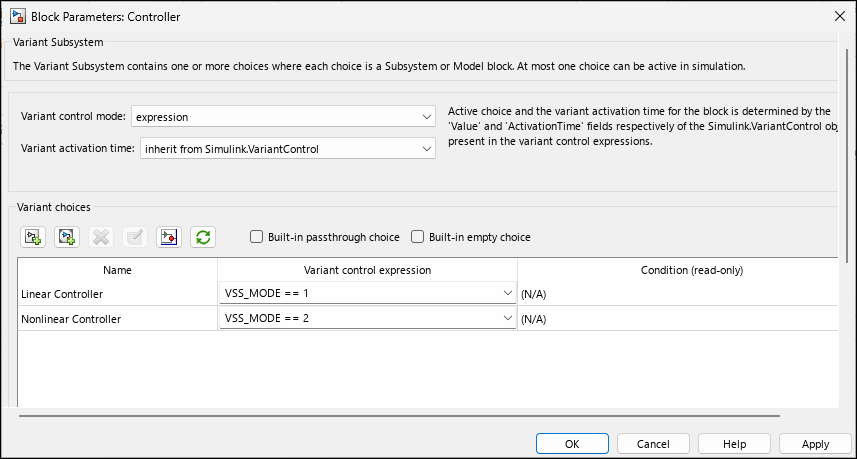
Open the Block Parameters dialog box of the Controller block.
The Variant activation time parameter is set to
inherit from Simulink.VariantControlso that the block inherits the activation time fromVSS_MODE.
The variant control expressions are
VSS_MODE == 1andVSS_MODE == 2. The block has two variant choices,Linear ControllerandNonlinear Controller.
VSS_MODEis aSimulink.VariantControlmyVariantDictionary.sldd. To view it, open the data dictionary in Model Explorer.
ControllerBlockPath = model + "/Controller";
LinearControllerBlockPath = ControllerBlockPath + "/Linear Controller";
NonlinearControllerBlockPath = ControllerBlockPath + "/Nonlinear Controller";
set_param(LinearControllerBlockPath,"VariantControl","VSS_MODE == 1")
set_param(NonlinearControllerBlockPath,"VariantControl","VSS_MODE == 2")
set_param(ControllerBlockPath,"VariantActivationTime","inherit from Simulink.VariantControl")
Simulate the Model
Simulate the model. During simulation, the Controller block inherits the update diagram activation time from VSS_MODE and the Linear Controller block becomes active.
sim(model);
open_system(model + "/Controller")
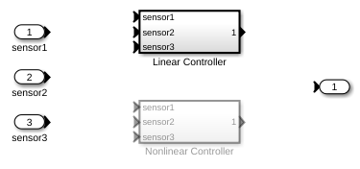
Open the Controller block by pressing Ctrl and double-clicking the block. The active choice, Linear Controller, is highlighted and the inactive choice, Nonlinear Controller, is dimmed.
Change the Value to Switch the Active Choice
To change the value of VSS_MODE in the data dictionary, use the setValue function on the dictionary entry. Simulate the model.
entryObj = getEntry(sectObj,"VSS_MODE");
setValue(entryObj, Simulink.VariantControl(Value=2,ActivationTime="update diagram"));
sim(model);
The Nonlinear Controller block becomes active during simulation.
Because VSS_MODE is stored in the data dictionary, this change applies to all models linked to myVariantDictionary.sldd. All linked models that reference VSS_MODE use the updated value.
Note: If a variable with the same name exists in a closer scope, such as the mask or model workspace, it shadows the data dictionary value. Verify that you do not have unintended variables with the same name in multiple workspaces.
See Also
Use Base Workspace to Define Globally Accessible Variant Control Variables for Variant Blocks

