High-Order Control Barrier Function
R2026bModify control actions to satisfy high-order control barrier function (CBF) constraints and action bounds
Since R2026a
High-Order Control Barrier Function block
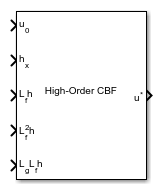
To add a block to a model, double-click the canvas and start typing the block name. Then, select the block from the list.
Libraries:
Simulink Control Design /
Constraint Control
Description
The High-Order Control Barrier Function block computes the modified control actions that are closest to specified control actions subject to high-order control barrier function constraints and action bounds.
A control barrier function defines a safety set h(x) ≥ 0 based on the system state x. If the initial system start within the safety set, the High-Order Control Barrier Function block adjusts the control actions to keep the states within the safety set. The block uses a quadratic programming (QP) solver to find the control action u that minimizes in real time. Here, u0 is the original control action from the controller.
The solver applies constraints based on the barrier function relative order.
| Barrier Function Relative Order | Constraint Equation |
|---|---|
| First | |
| Second | |
| Third | |
| Fourth |
Here:
f(x) and g(x) are the drift and control vector fields of the plant dynamics equation , respectively.
h(x) is the barrier function.
Lfih is the i-th Lie derivative of hx with respect to x, with and .
LgLfih is given by .
γi and βi are parameters for controlling the effect of the barrier certificate.
umin is a lower bound for the control action.
umax is an upper bound for the control action.
The High-Order Control Barrier Function block requires Optimization Toolbox™ software.
For more information on control barrier function enforcement, see Enforce Safety Constraints with Control Barrier Functions.
Examples
This example shows how to compute Lie derivatives for a quadruple integrator and apply constraints using the High-Order Control Barrier Function block.
Consider the quadruple integrator system defined as:
Writing in the control-affine form, you get:
This example provides the model quadIntegratorCBF preconfigured with two variant subsystems, one for baseline state-feedback control and the other that imposes CBF constraints.
Baseline Simulation
Design a baseline state-feedback controller using pole placement to drive all system states to zero.
A = [0 1 0 0;
     0 0 1 0;
     0 0 0 1;
     0 0 0 0];
B = [0;0;0;1];
C = eye(4);
D = zeros(4,1);
sys = ss(A,B,C,D);
initcond = [4;0;0;0];
p = [-0.5+1.5j, -0.5-1.5j,-5,-6];
K = place(A,B,p);
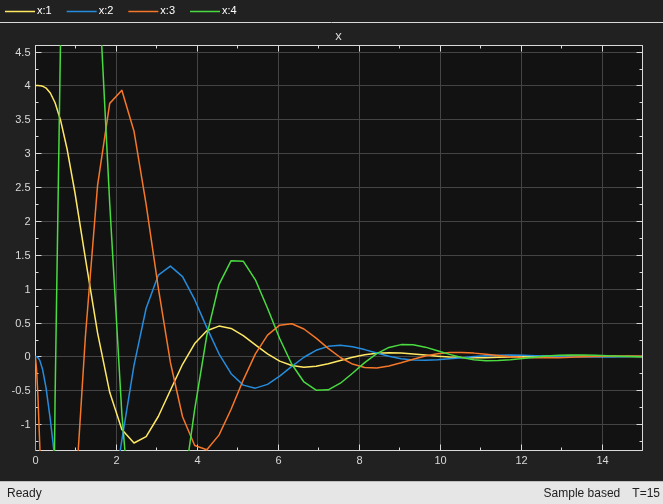
Simulate the model with the baseline controller.
mdl = "quadIntegratorCBF";
open_system("quadIntegratorCBF")
set_param([mdl+"/Select Input"], 'LabelModeActiveChoice','nominal')
sim(mdl,15);
open_system("quadIntegratorCBF/Scope")
Safety Set and Lie Derivatives
Now, define a control barrier function (CBF) for this system that ensures stays above the boundary .
To determine the relative degree, compute successive time derivatives of until appears explicitly.
The control input term appears in the fourth derivative of , so the relative degree for this system is 4. Compute the required Lie derivatives for relative degree 4.
Similarly,
Simulation with Constraints
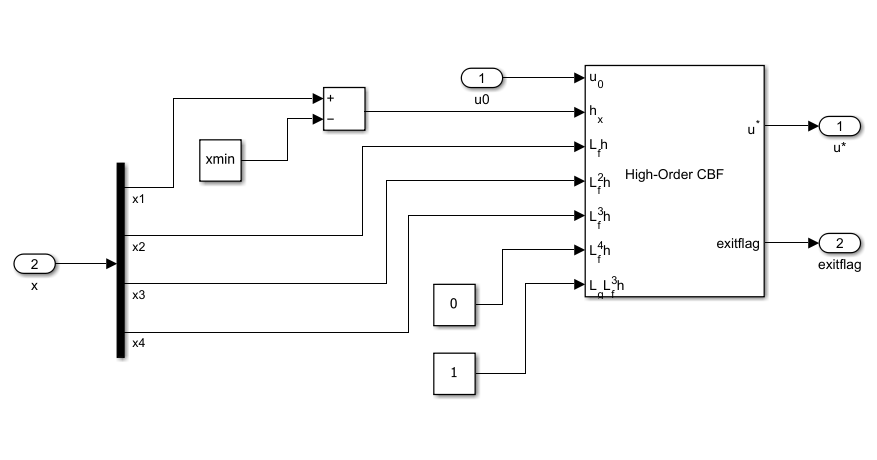
To impose the CBF constraints, use the High-Order Control Barrier Function block. In the Simulink® model, the CBF Constraint variant of the Select Input subsystem shows how to provide the required inputs: the baseline controller output, the control barrier function, and the computed Lie derivatives.
By default, the order (relative degree) parameter is set to 2, so you must configure the block parameter as follows.
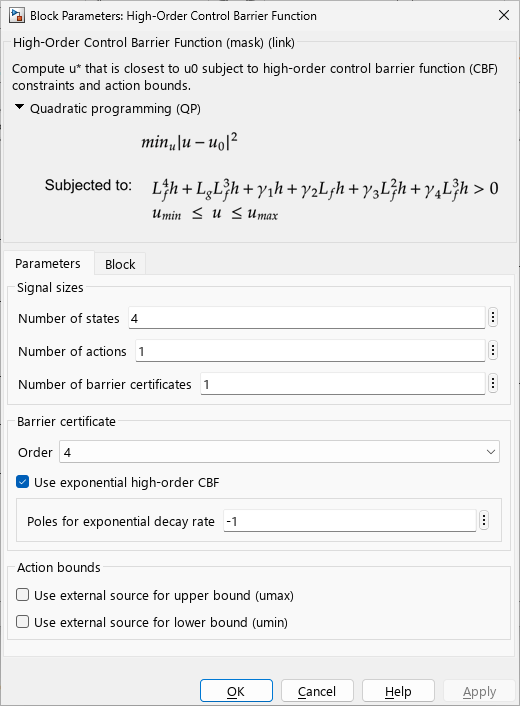
Enable the CBF Constraint variant and run the simulation.
x1min = 0.5;
set_param([mdl+"/Select Input"], 'LabelModeActiveChoice','enableCBF')
sim(mdl,15);
open_system("quadIntegratorCBF/Scope")
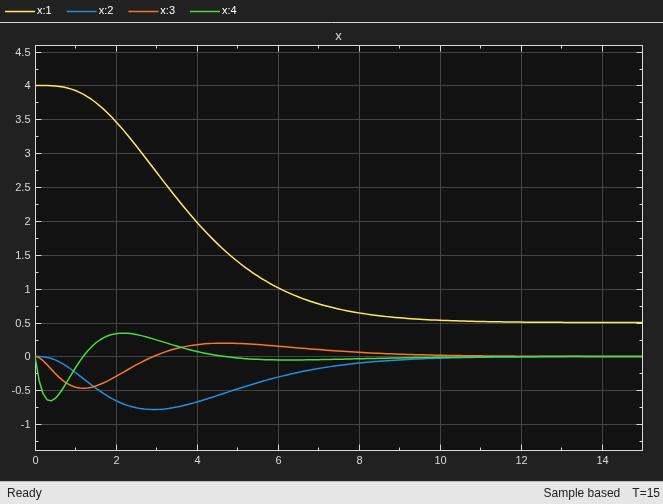
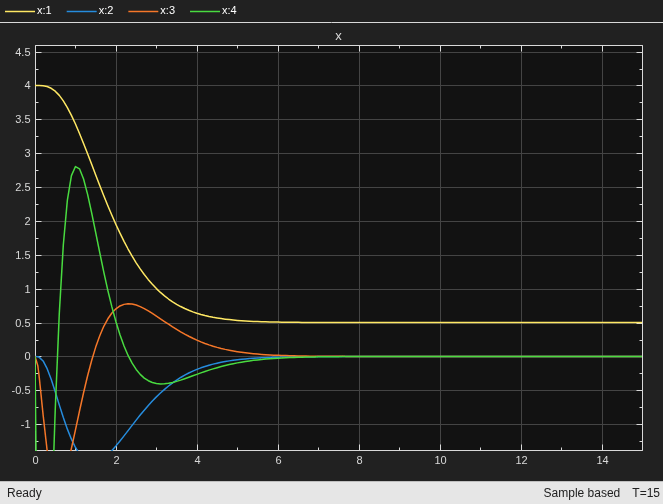
Additionally, you can tune the Poles for exponential decay rate parameter to speed up convergence. For example, set the decay to -2 and simulate the model. converges faster to the boundary but causes more overshoot in other states.
set_param([mdl+"/Select Input/CBF Constraint/High-Order Control Barrier Function"],"DecayPoles","-2")
sim(mdl,15);
open_system("quadIntegratorCBF/Scope")
Extended Examples
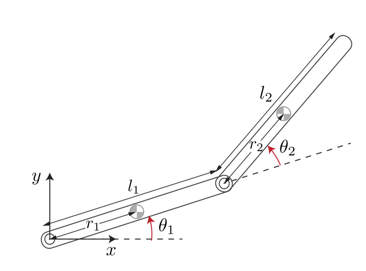
Safe PID Controller for Two Link Robot using High-Order Control Barrier Function
Apply high-order CBF constraints to ensure safety for a two-link robot.
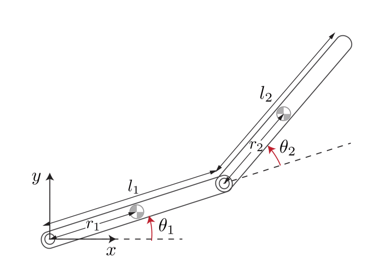
Add Safety Constraint to Simulate Two-Link Robot with SAC Agent
Add high-order barrier function to safely simulate a two-link robot model with a SAC agent.
Ports
Input
Output
Parameters
To edit block parameters interactively, use the Property Inspector. From the Simulink® Toolstrip, on the Simulation tab, in the Prepare gallery, select Property Inspector.
Specify the number of plant states.
Programmatic Use
To set the block parameter value programmatically, use
the set_param function.
| Parameter: | nx |
| Values: | "1" (default) | positive integer in quotes |
Example: set_param(gcb,"nx","3")
Specify the number of control actions to apply bounds to and optimize.
Programmatic Use
To set the block parameter value programmatically, use
the set_param function.
| Parameter: | nu |
| Values: | "1" (default) | positive integer in quotes |
Example: set_param(gcb,"nu","2")
Specify the number of barrier certificate constraints to enforce.
Programmatic Use
To set the block parameter value programmatically, use
the set_param function.
| Parameter: | nc |
| Values: | "1" (default) | positive integer in quotes |
Example: set_param(gcb,"nc","2")
Specify the barrier function order. This is the number of time derivatives of h you must take before the control term u appears explicitly
Programmatic Use
To set the block parameter value programmatically, use
the set_param function.
| Parameter: | Order |
| Values: | "2" (default) | "1" | "3" | "4" |
Example: set_param(gcb,"Order","2")
Enforce strict state-dependent high-relative degree safety for nonlinear systems. When you enable this option, the software automatically computes the constraint factor gains γi based on the poles specified in the Poles for exponential decay rate parameter.
Programmatic Use
To set the block parameter value programmatically, use
the set_param function.
| Parameter: | ExponentialCBF |
| Values: | "on" (default) | "off" |
Example: set_param(gcb,"ExponentialCBF","off")
Pole values for exponential decay rate, specified as a real negative
scalar or matrix of size nc-by-no,
where nc is the Number of barrier
certificates and no is the
Order.
Dependencies
To enable this option, select Use exponential high-order CBF.
Programmatic Use
To set the block parameter value programmatically, use
the set_param function.
| Parameter: | DecayPoles |
| Values: | "-1" (default) | real negative scalar in quotes | nc-by-no matrix in
quotes |
Example: set_param(gcb,"DecayPoles","[-1,-2;-3,-4]")
Constraint factor γi in the
barrier certificate constraint, specified as a positive scalar or matrix of
size nc-by-no, where
nc is the Number of barrier
certificates and no is the
Order.
Dependencies
To enable this option, disable Use exponential high-order CBF.
Programmatic Use
To set the block parameter value programmatically, use
the set_param function.
| Parameter: | gamma |
| Values: | "10" (default) | positive scalar in quotes |
Example: set_param(gcb,"gamma","4")
Constraint power β in the barrier certificate
constraint, specified as a positive scalar or matrix of size
nc-by-no, where
nc is the Number of barrier
certificates and no is the
Order.
Dependencies
To enable this option, disable Use exponential high-order CBF.
Programmatic Use
To set the block parameter value programmatically, use
the set_param function.
| Parameter: | beta |
| Values: | "1" (default) | positive scalar in quotes |
Example: set_param(gcb,"beta","2")
Select this parameter to add the umax input port for external upper action bounds.
Programmatic Use
To set the block parameter value programmatically, use
the set_param function.
| Parameter: | external_umax |
| Values: | "off" (default) | "on" |
Example: set_param(gcb,"external_umax","on")
Select this parameter to add the umin input port for external lower action bounds.
Programmatic Use
To set the block parameter value programmatically, use
the set_param function.
| Parameter: | external_umin |
| Values: | "off" (default) | "on" |
Example: set_param(gcb,"external_umin","on")
Specify the output data type.
The Data Type Assistant helps you set
data attributes. To use the Data Type
Assistant, click  .
.
You can specify the following data types.
Built in—singleordoubledata types.Expression— Use a MATLAB expression that specifies the type.
For more information, see Specify Data Types Using Data Type Assistant.
Specify the sample time for running the optimization.
Programmatic Use
To set the block parameter value programmatically, use
the set_param function.
| Parameter: | Ts |
| Values: | "0.1" (default) | positive scalar in quotes |
Example: set_param(gcb,"Ts","0.2")
Specify the maximum number of optimization iterations.
Programmatic Use
To set the block parameter value programmatically, use
the set_param function.
| Parameter: | maxiter |
| Values: | "200" (default) | positive integer in quotes |
Example: set_param(gcb,"maxiter","300")
Specify a tolerance value for constraint violations.
Programmatic Use
To set the block parameter value programmatically, use
the set_param function.
| Parameter: | tol |
| Values: | "1e-6" (default) | nonnegative scalar in quotes |
Example: set_param(gcb,"tol","1e-4")
Select this parameter to add the exitflag output port for the optimization status of the QP solver.
Programmatic Use
To set the block parameter value programmatically, use
the set_param function.
| Parameter: | output_exitflag |
| Values: | "off" (default) | "on" |
Example: set_param(gcb,"output_exitflag","on")
Extended Capabilities
Version History
Introduced in R2026a

