Analyze Models in Parallel Using Parallel Computing Toolbox
R2026bThis example shows how you can perform Simulink® Design Verifier™ analysis on multiple models by using Parallel Computing Toolbox™. First, you create a parallel parfor for the models and perform design error detection in parallel to detect dead logic. You create coverage filters once the dead logic is found. Then, you perform test generation analysis with the coverage filters applied.
Create Array of Models and Dependencies
In this example, the models used for the parallel analysis are sldvdemo_cruise_control_fixed and sldvdemo_fuelsys_logic.
Create an array of models on which you perform Simulink® Design Verifier™ analysis before starting the parallel pool. Perform this action before the parfor-loop, and after opening the parallel pool on the cluster.
models = {'sldvdemo_cruise_control_fixed','sldvdemo_fuelsys_logic'};
dependentFiles = {"sldvdemo_fuelsys_logic.mat"};
numWorkers = 4;
initParPoolStatus = 1;
Note: sldvrun and sldvreport show the Results Summary window by default during the analysis. In a parallel environment, this may cause the HeadlessException warning. To avoid this, use:
setenv('MW_HEADLESS', 'true');
showSLDVUI = false;
Use this command to view the Results Summary window explicitly during the analysis:
% showSLDVUI = true;Start the parallel pool and store the initial status of pool. The pool closes after the analysis if it is not already opened.
if isempty(gcp('nocreate'))
    initParPoolStatus = 0;
parpool(numWorkers);
end
Starting parallel pool (parpool) using the 'Processes' profile ...
30-Jan-2026 18:05:44: Job Queued. Waiting for parallel pool job with ID 1 to start ...
30-Jan-2026 18:06:45: Job Queued. Waiting for parallel pool job with ID 1 to start ...
Connected to parallel pool with 4 workers.
Create Parallel for-loop
Create a parallel for-loop to process the models.
parfor i = 1:length(models)
    load_system(models{i});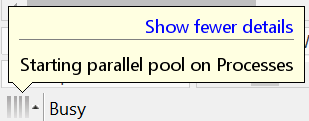
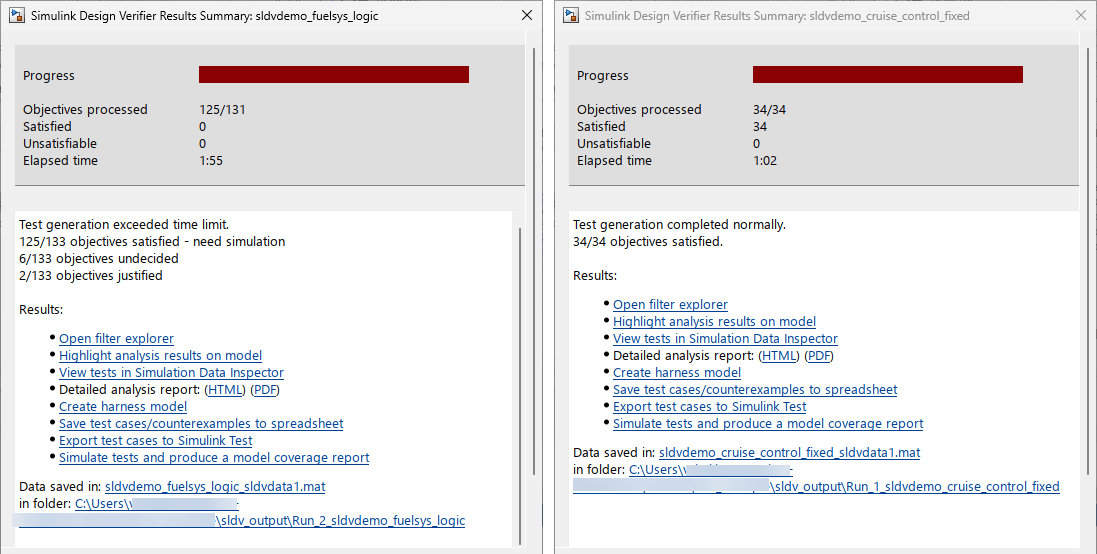
Simulink® Design Verifier™ runs design error detection and test generation analysis for both models in parallel inside this parallel for-loop.
Perform Design Error Detection Analysis in Parallel
Perform Design Error Detection analysis on the models in parallel mode to detect the dead logic. Simulink® Design Verifier™ performs design error detection analysis once the parallel parfor starts.
    opts = sldvoptions;
    opts.Mode = 'DesignErrorDetection';
    opts.MaxProcessTime = 60;
    opts.DefectChecker = 'off';
    opts.MakeOutputFilesUnique = 'on';
    opts.DetectDeadLogic = 'on';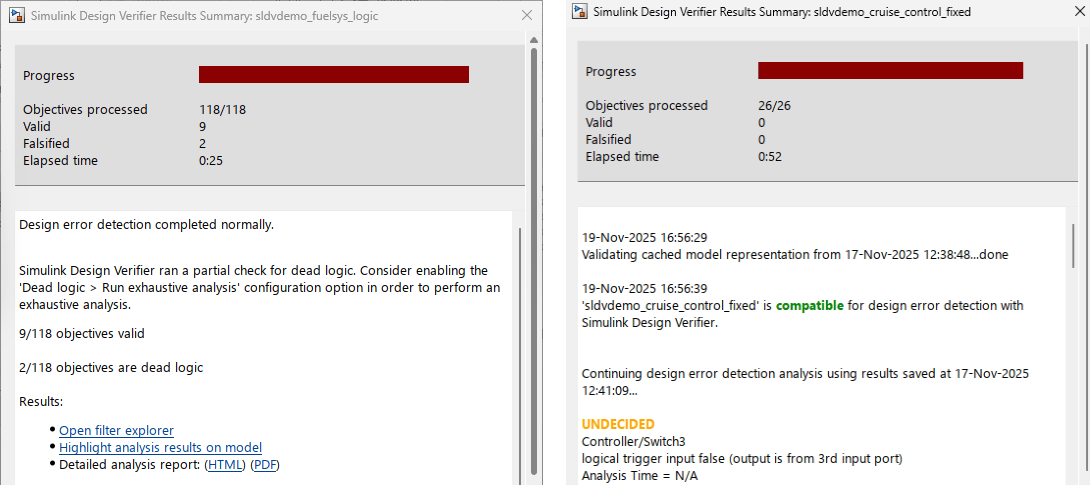
The results get stores the report in sldv_output folder.
opts.SaveReport = 'on';
opts.DisplayReport = 'off';
opts.ReportFileName = [models{i} '_DeadLogicReport'];
opts.OutputDir = fullfile('sldv_output', ['Run_' num2str(i) '_' models{i}]);

[statDED, filesDED] = sldvrun(models{i}, opts, showSLDVUI);
    if isstruct(filesDED) && isfield(filesDED, 'DataFile') && ~isempty(filesDED.DataFile)
        sldvreport(filesDED.DataFile);
    end
Create Coverage Filters
Create coverage filters once the design error detection analysis is complete and dead logic is found in the model.
       if statDED && isstruct(filesDED) && isfield(filesDED, 'DataFile') && ~isempty(filesDED.DataFile)
        slDVDataObj = load(filesDED.DataFile);
        sldvObj = {slDVDataObj.sldvData.Objectives.status};
        unSat = find(ismember(sldvObj, 'Dead Logic') == 1);
        if ~isempty(unSat)
            filtFile = sldvmakefilter(models{i}, filesDED.DataFile);
            opts.CovFilter = 'on';
            opts.CovFilterFileName = filtFile;
        end
       end
Perform Test Case Generation Analysis
Perform test generation using the coverage filter:
    opts.Mode = 'TestGeneration';
    opts.ModelCoverageObjectives = 'MCDC';
    opts.MaxProcessTime = 120;
    opts.ReportFileName = [models{i} '_TestGenerationReport'];
    [status, fileN] = sldvrun(models{i}, opts, showSLDVUI);
Check and generate Simulink® Design Verifier™ analysis report if DataFile exists.
    if isstruct(fileN) && isfield(fileN, 'DataFile') && ~isempty(fileN.DataFile)
        sldvreport(fileN.DataFile);
    end
end
30-Jan-2026 18:09:36
Checking compatibility for design error detection: model 'sldvdemo_cruise_control_fixed'
Compiling model...done

30-Jan-2026 18:09:56
Checking compatibility for design error detection: model 'sldvdemo_fuelsys_logic'
Building model representation...done

30-Jan-2026 18:10:00

'sldvdemo_cruise_control_fixed' is compatible for design error detection with Simulink Design Verifier.
Detecting design errors...

Compiling model...done
Building model representation...done

30-Jan-2026 18:10:28

'sldvdemo_fuelsys_logic' is compatible for design error detection with Simulink Design Verifier.
Detecting design errors...

..........................
30-Jan-2026 18:11:06

Error detection exceeded time limit.
Simulink Design Verifier has exceeded the maximum processing time. This may have impacted the results. Rerun and complete the analysis after extending the time limit. You can extend the time limit by modifying the "Maximum analysis time" edit field on the Design Verifier pane of the configuration dialog or by modifying the "MaxProcessTime" attribute of the options object.


Generating output files:

    Report:
    C:\Users\user\OneDrive - MathWorks\Documents\MATLAB\ExampleManager\user.Bdoc.Jan30\sldv-ex82788811\sldv_output\Run_1_sldvdemo_cruise_control_fixed\sldvdemo_cruise_control_fixed_DeadLogicReport.html

30-Jan-2026 18:11:24
Results generation completed.

    Data file:
    C:\Users\user\OneDrive - MathWorks\Documents\MATLAB\ExampleManager\user.Bdoc.Jan30\sldv-ex82788811\sldv_output\Run_1_sldvdemo_cruise_control_fixed\sldvdemo_cruise_control_fixed_sldvdata.mat

30-Jan-2026 18:11:35
Checking compatibility for test generation: model 'sldvdemo_cruise_control_fixed'
...........
30-Jan-2026 18:11:37

Error detection exceeded time limit.
Simulink Design Verifier has exceeded the maximum processing time. This may have impacted the results. Rerun and complete the analysis after extending the time limit. You can extend the time limit by modifying the "Maximum analysis time" edit field on the Design Verifier pane of the configuration dialog or by modifying the "MaxProcessTime" attribute of the options object.

Compiling model...done

Generating output files:
Building model representation...done

30-Jan-2026 18:11:40

'sldvdemo_cruise_control_fixed' is compatible for test generation with Simulink Design Verifier.
Generating tests...


    Report:
    C:\Users\user\OneDrive - MathWorks\Documents\MATLAB\ExampleManager\user.Bdoc.Jan30\sldv-ex82788811\sldv_output\Run_2_sldvdemo_fuelsys_logic\sldvdemo_fuelsys_logic_DeadLogicReport.html

30-Jan-2026 18:11:52
Results generation completed.

    Data file:
    C:\Users\user\OneDrive - MathWorks\Documents\MATLAB\ExampleManager\user.Bdoc.Jan30\sldv-ex82788811\sldv_output\Run_2_sldvdemo_fuelsys_logic\sldvdemo_fuelsys_logic_sldvdata.mat

30-Jan-2026 18:12:08
Checking compatibility for test generation: model 'sldvdemo_fuelsys_logic'
Compiling model...done
..................................
30-Jan-2026 18:12:14

Completed normally.

Generating output files:
Building model representation...done

30-Jan-2026 18:12:22

    Report:
    C:\Users\user\OneDrive - MathWorks\Documents\MATLAB\ExampleManager\user.Bdoc.Jan30\sldv-ex82788811\sldv_output\Run_1_sldvdemo_cruise_control_fixed\sldvdemo_cruise_control_fixed_TestGenerationReport.html

30-Jan-2026 18:12:22
Results generation completed.

'sldvdemo_fuelsys_logic' is compatible for test generation with Simulink Design Verifier.

    Data file:
    C:\Users\user\OneDrive - MathWorks\Documents\MATLAB\ExampleManager\user.Bdoc.Jan30\sldv-ex82788811\sldv_output\Run_1_sldvdemo_cruise_control_fixed\sldvdemo_cruise_control_fixed_sldvdata1.mat
Generating tests...

Warning: Import Custom Code option will be removed in a future release. Custom code will be imported by default.
................................................................................
...................................................
30-Jan-2026 18:14:26

Test generation exceeded time limit.
Simulink Design Verifier has exceeded the maximum processing time. This may have impacted the results. Rerun and complete the analysis after extending the time limit. You can extend the time limit by modifying the "Maximum analysis time" edit field on the Design Verifier pane of the configuration dialog or by modifying the "MaxProcessTime" attribute of the options object.


Generating output files:

    Report:
    C:\Users\user\OneDrive - MathWorks\Documents\MATLAB\ExampleManager\user.Bdoc.Jan30\sldv-ex82788811\sldv_output\Run_2_sldvdemo_fuelsys_logic\sldvdemo_fuelsys_logic_TestGenerationReport.html

30-Jan-2026 18:14:37
Results generation completed.

    Data file:
    C:\Users\user\OneDrive - MathWorks\Documents\MATLAB\ExampleManager\user.Bdoc.Jan30\sldv-ex82788811\sldv_output\Run_2_sldvdemo_fuelsys_logic\sldvdemo_fuelsys_logic_sldvdata1.mat
Close the Parallel Pool
Close the pool if it was not opened initially.
if ~initParPoolStatus
delete(gcp('nocreate'));
end
Parallel pool using the 'Processes' profile is shutting down.
Analyze Results
To view the results, double-click the sldv_output folder from the Files panel. Select the analysis for which you need the report in HTML format. In the Run_1_sldvdemo_cruise_control_fixed folder, click on sldvdemo_cruise_control_fixed_DeadLogicReport and sldvdemo_cruise_control_fixed_TestGenerationReport for Design error detection and test case generation analysis report for sldvdemo_cruise_control_fixed Simulink® model.
Similarly, in Run_2_sldvdemo_fuelsys_logic folder, click on sldvdemo_fuelsys_logic_DeadLogicReport and sldvdemo_fuelsys_logic_TestGenerationReport for design error detection and test case generation analysis report for sldvdemo_fuelsys_logic Simulink® model.
See Also
Analyze Models for Design Errors

