胎压监测系统中的架构分配
使用分配来分析轮胎压力监控系统。
概述
在系统工程中,以不同的抽象层次描述系统是很常见的。例如,您可以用系统的高级函数来描述系统。这些函数可能没有任何相关联的行为,但很可能追溯到系统必须满足的一些操作需求。我们将这一层(或架构)称为功能架构。在此示例中,介绍了三种不同架构的汽车轮胎压力监控系统:
功能架构 - 从高级函数的角度描述系统。连接显示了函数之间的依赖关系[1]。
逻辑架构 - 根据系统的逻辑组件以及它们之间的数据交换方式来描述系统。此外,此架构还规定了模型仿真的行为[2]。
平台架构 - 高层面描述系统所需的物理硬件[3]。
注意:此示例展示了使用特定方法在 System Composer™ 中进行分配的情形。不过,您也可以使用其他适合您需要的方法。
分配过程被定义为将这三个完全描述系统的架构链接起来。链接功能可捕捉每个架构层的信息,并使其他架构层也能访问这些信息。
使用此命令打开工程。
openProject("scExampleTirePressureMonitorSystem");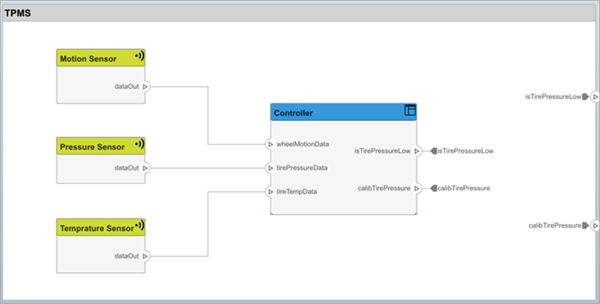
打开 FunctionalAllocation.mldatx 文件,该文件显示分配编辑器中从 TPMS_FunctionalArchitecture 到 TPMS_LogicalArchitecture 的分配情况。TPMS_FunctionalArchitecture 的元素显示在第一列。TPMS_LogicalArchitecture 的元素显示在第一行。箭头表示模型元素之间的分配。

箭头显示模型中已分配的组件。您可以观察模型层次结构中每个元素的分配情况。
示例的其余部分将展示如何使用这些分配信息来进一步分析模型。
从功能到逻辑的分配和覆盖率分析
本节介绍如何执行覆盖率分析,以验证所有函数都已分配。这一过程需要使用功能架构和逻辑架构之间指定的分配信息。
要开始分析,请加载分配集。
allocSet = systemcomposer.allocation.load('FunctionalAllocation');
scenario = allocSet.Scenarios;
确认系统中的每个函数都已分配。
import systemcomposer.query.*;
[~,allFunctions] = allocSet.SourceModel.find(HasStereotype(IsStereotypeDerivedFrom("TPMSProfile.Function")));
unAllocatedFunctions = [];
ImplementedAllocations = [];
for i = 1:numel(allFunctions)
    alloc = scenario.getAllocatedTo(allFunctions(i));
    if isempty(alloc)
        unAllocatedFunctions(end+1) = allFunctions(i);
    end
end

allCompsSource = allocSet.SourceModel.find(AnyComponent);
allCompsTarget = allocSet.TargetModel.find(AnyComponent);
for i = 1:numel(allCompsSource)
    for j = 1:numel(allCompsTarget)
        sourceComp = allocSet.SourceModel.lookup(Path=allCompsSource{i});
        targetComp = allocSet.TargetModel.lookup(Path=allCompsTarget{j});
        allocated = scenario.getAllocation(sourceComp,targetComp);
        if ~isempty(allocated)
            if allocated.getPropertyValue("TPMSProfile.FunctionalAllocation.IsImplemented")
                ImplementedAllocations(end+1) = strcat(sourceComp.Name," to ",targetComp.Name);
            end
        end
    end
end

if isempty(unAllocatedFunctions)
  fprintf('All functions are allocated');
else
  fprintf('%d Functions have not been allocated',numel(unAllocatedFunctions));
end

if isempty(ImplementedAllocations)
  fprintf('No allocations are implemented');
else
  fprintf('%d Allocations have been implemented',numel(ImplementedAllocations));
end
结果显示 All functions are allocated,以验证系统中的所有函数都已分配,并列出尚未实现的分配。
分析提供函数的供应商
本节介绍如何使用指定的分配来确定哪些函数将由哪些供应商提供。由于供应商将向系统集成商提供这些组件,因此供应商信息将存储在逻辑模型中。
suppliers = {'Supplier A','Supplier B','Supplier C','Supplier D'};
functionNames = arrayfun(@(x) x.Name, allFunctions,'UniformOutput',false);
numFunNames = length(allFunctions);
numSuppliers = length(suppliers);
allocTable = table('Size',[numFunNames,numSuppliers],'VariableTypes',...
  repmat("double",1,numSuppliers));
allocTable.Properties.VariableNames = suppliers;
allocTable.Properties.RowNames = functionNames;
for i = 1:numFunNames
  elem = scenario.getAllocatedTo(allFunctions(i));
  for j = 1:numel(elem)
      elemSupplier = getEvaluatedPropertyValue(elem(j),'TPMSProfile.LogicalComponent.Supplier');
      allocTable{i,strcmp(elemSupplier,suppliers)} = 1;
  end

end
下表显示了各供应商负责的相应函数。
allocTable
分析软件部署策略
您可以确定发动机控制单元 (ECU) 的容量是否足以容纳所有软件组件。软件组件分配给内核本身,但 ECU 是具有预算属性的组件。
获取平台架构。
platformArch = systemcomposer.loadModel('PlatformArchitecture');加载分配。
softwareDeployment = systemcomposer.allocation.load('SoftwareDeployment');

frontECU = platformArch.lookup('Path','PlatformArchitecture/Front ECU');
rearECU = platformArch.lookup('Path','PlatformArchitecture/Rear ECU');

scenario1 = softwareDeployment.getScenario('Scenario 1');
scenario2 = softwareDeployment.getScenario('Scenario 2');
frontECU_availMemory = getEvaluatedPropertyValue(frontECU,"TPMSProfile.ECU.MemoryCapacity");
rearECU_availMemory = getEvaluatedPropertyValue(rearECU,"TPMSProfile.ECU.MemoryCapacity");

frontECU_memoryUsed1 = getUtilizedMemoryOnECU(frontECU,scenario1);
frontECU_isOverBudget1 = frontECU_memoryUsed1 > frontECU_availMemory;
rearECU_memoryUsed1 = getUtilizedMemoryOnECU(rearECU,scenario1);
rearECU_isOverBudget1 = rearECU_memoryUsed1 > rearECU_availMemory;

frontECU_memoryUsed2 = getUtilizedMemoryOnECU(frontECU,scenario2);
frontECU_isOverBudget2 = frontECU_memoryUsed2 > frontECU_availMemory;
rearECU_memoryUsed2 = getUtilizedMemoryOnECU(rearECU,scenario2);
rearECU_isOverBudget2 = rearECU_memoryUsed2 > rearECU_availMemory;
生成一个表格来展示结果。
softwareDeploymentTable = table([frontECU_memoryUsed1;frontECU_availMemory;...
  frontECU_isOverBudget1;rearECU_memoryUsed1;rearECU_availMemory;rearECU_isOverBudget1],...
  [frontECU_memoryUsed2; frontECU_availMemory; frontECU_isOverBudget2;rearECU_memoryUsed2;...
  rearECU_availMemory; rearECU_isOverBudget2],...
  'VariableNames',{'Scenario 1','Scenario 2'},...
  'RowNames',{'Front ECUMemory Used (MB)','Front ECU Memory (MB)','Front ECU Overloaded',...
  'Rear ECU Memory Used (MB)','Rear ECU Memory (MB)','Rear ECU Overloaded'})
function memoryUsed = getUtilizedMemoryOnECU(ecu, scenario)对于 ECU 中的每个组件,累计每个已分配软件组件所需的二进制大小。
coreNames = {'Core1','Core2','Core3','Core4'};
memoryUsed = 0;
for i = 1:numel(coreNames)
  core = ecu.Model.lookup('Path',[ecu.getQualifiedName '/' coreNames{i}]);
  allocatedSWComps = scenario.getAllocatedFrom(core);
  for j = 1:numel(allocatedSWComps)
      binarySize = getEvaluatedPropertyValue(allocatedSWComps(j),"TPMSProfile.SWComponent.BinarySize");
      memoryUsed = memoryUsed + binarySize;
  end
end
end
参考
[1] Carter, Jeffrey. “Functional Architecture.” Guide to the Systems Engineering Body of Knowledge (SEBoK) v. 2.7, released October 31, 2022. https://sebokwiki.org/wiki/Functional_Architecture.
[2] Faisandier, Alan, Garry Roedler, and Rick Adcock. “Logical Architecture.” Guide to the Systems Engineering Body of Knowledge (SEBoK) v. 2.7, released October 31, 2022. https://sebokwiki.org/wiki/Logical_Architecture.
[3] Faisandier, Alan, and Rick Adcock. “Physical Architecture.” Guide to the Systems Engineering Body of Knowledge (SEBoK) v. 2.7, released October 31, 2022. https://sebokwiki.org/wiki/Physical_Architecture.
另请参阅
对象
systemcomposer.allocation.AllocationScenario|systemcomposer.allocation.AllocationSet|systemcomposer.allocation.Allocation