主要内容

Simulation 3D Custom UAV Pack

Translation and rotation input for custom UAV

Since R2026a

  • Simulation 3D Custom UAV Vehicle Pack block

Libraries:
UAV Toolbox / Simulation 3D

Description

The Simulation 3D Custom UAV Pack block generates translation and rotation input for the Simulation 3D UAV Vehicle block with Type set to Custom.

Examples

expand all

Open the tiltRotorUAVModel.slx Simulink® model.

open_system("tiltRotorUAVModel")
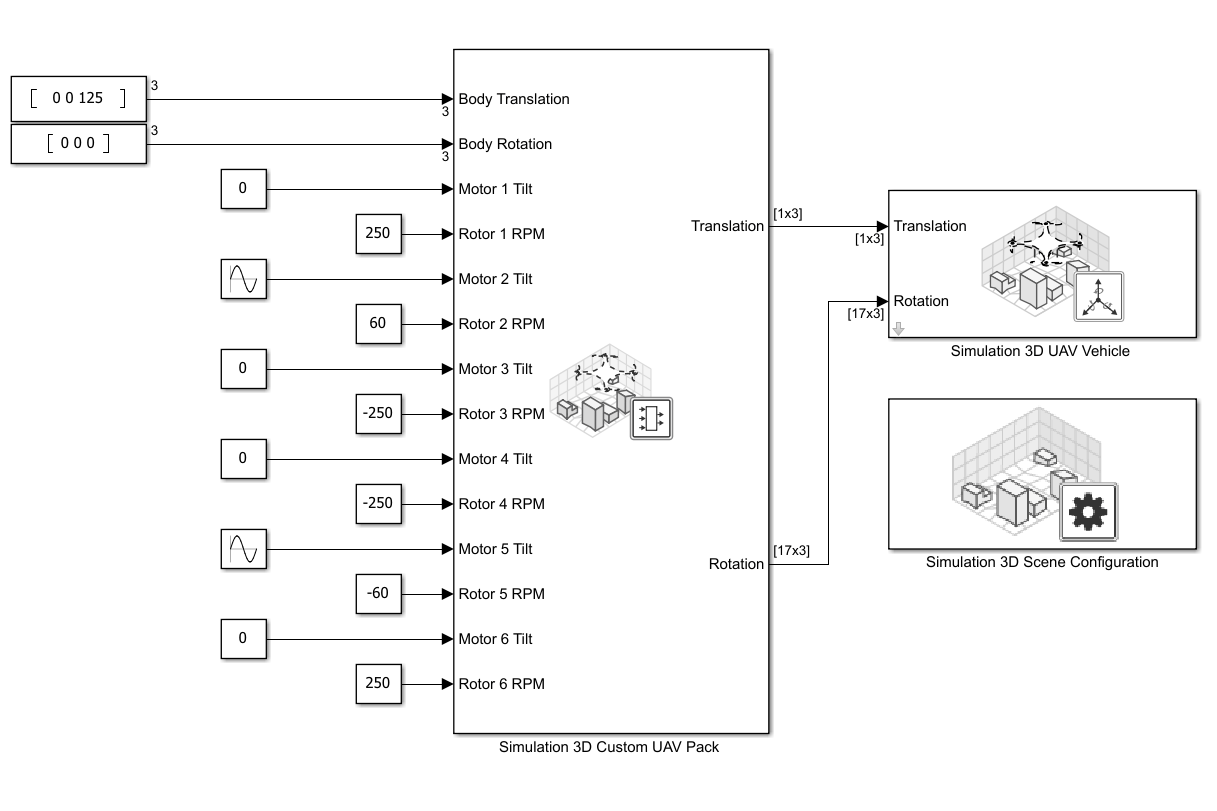
This model uses the Simulation 3D UAV Vehicle block to simulate a custom Hexarotor UAV in 3D environment. The Type parameter is specified to Custom, and the Path to custom mesh is specified to /MathWorksUAVContent/UAVs/HexaRotorUAV/HexaRotor.HexaRotor.
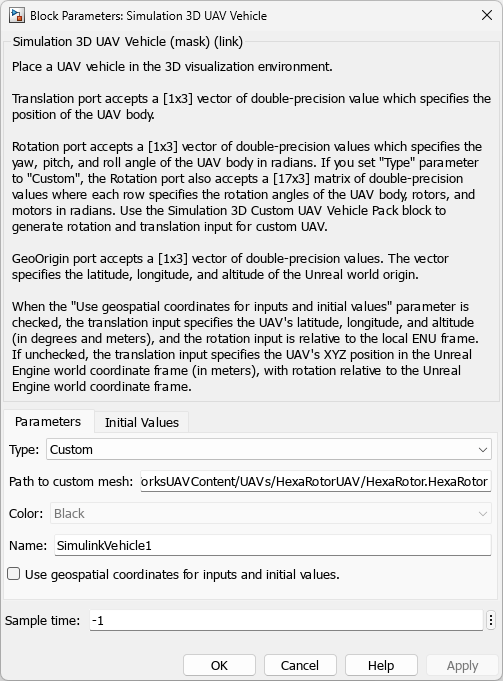
Simulation 3D UAV Vehicle block mask showing the Type and Path to custom mesh parameter.

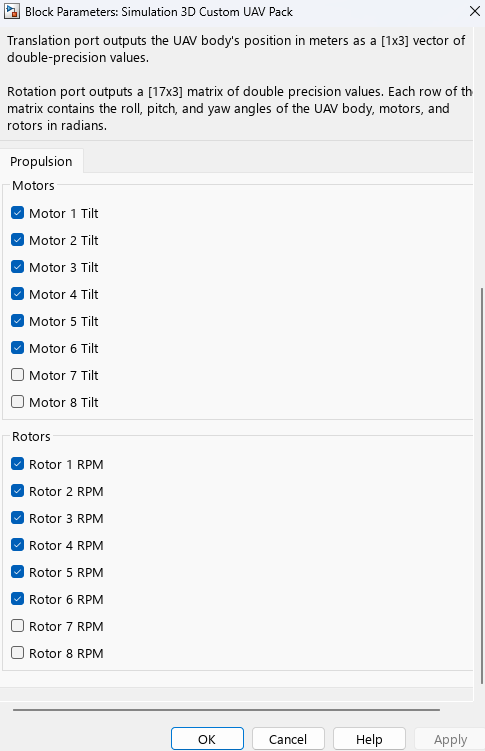
This model uses the Simulation 3D Custom UAV Pack block to generate the translation and rotation inputs. The block is configured to accept the body translation, body rotation, tilt angles for motors 1 to 6, and angular velocities of rotors 1 to 6.
The Hexarotor custom mesh is configured with the bone hierarchy that is shown in the following image. For more details on how to configure custom UAV mesh for simulation in Unreal Engine, visit Prepare Custom UAV Vehicle Mesh for Unreal Engine Scenario Simulation.
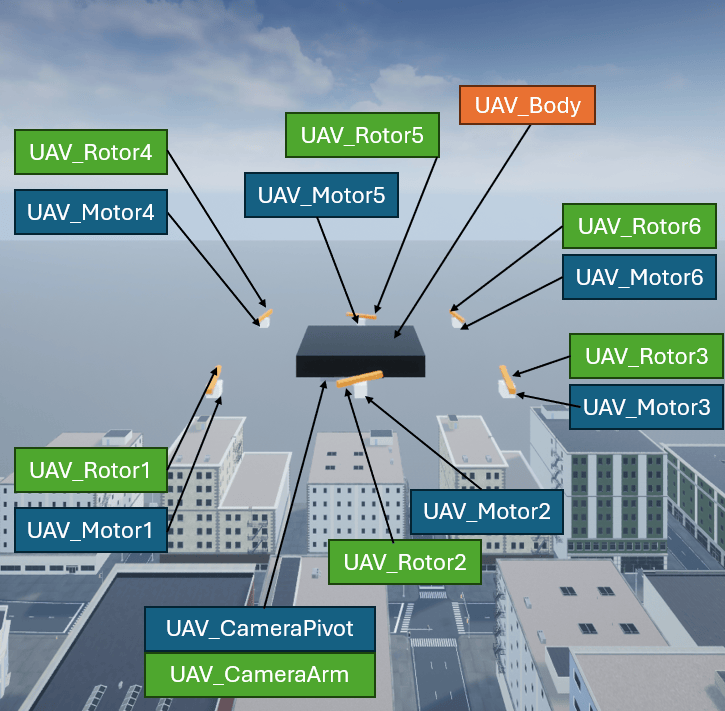
Hexarotor UAV mesh bone hierarchy. Starting from front left of the UAV and moving counter clockwise when viewed from the top of UAV, is motor rotor pair 1 to 6.

In this example, the Hexarotor UAV is configured with the following input:

  • UAV_Body rotation angle — 0 radian of roll, pitch, and yaw angles.

  • UAV_Motor1 tilt angle — 0 radian.

  • UAV_Rotor1 angular velocity — 250 RPM, clockwise.

  • UAV_Motor2 tilt angle — pi/2 radian, oscillating at a rate of 1 rad/s.

  • UAV_Rotor2 angular velocity — 60 RPM, clockwise.

  • UAV_Motor3 tilt angle — 0 radian.

  • UAV_Rotor3 angular velocity — 250 RPM, counter-clockwise.

  • UAV_Motor4 tilt angle — 0 radian.

  • UAV_Rotor4 angular velocity — 250 RPM, counter-clockwise.

  • UAV_Motor5 tilt angle — pi/2 radian, oscillating at a rate of 1 rad/s.

  • UAV_Rotor5 angular velocity — 60 RPM, counter-clockwise.

  • UAV_Motor6 tilt angle — 0 radian.

  • UAV_Rotor6 angular velocity — 250 RPM, clockwise.

Run the tiltRotorUAVModel.slx Simulink model to start the simulation.

tiltrotor_hex_2.gif

You can also run this example with an Octarotor UAV mesh by specifying the Path to custom mesh parameter of the Simulation 3D UAV Vehicle block as /MathWorksUAVContent/UAVs/OctaRotorUAV/OctaRotor.OctaRotor and running the model again.

tiltrotor_oct.gif

Ports

Input

expand all

UAV Body translation, specified as a 1-by-3 vector.

The translation frame of reference depends on the value of the Use geospatial coordinates for inputs and initial values parameter of the associated Simulation 3D UAV Vehicle block.

  • off — The elements of the vector represent the x-, y-, and z-positions of the UAV in the Unreal Engine® world coordinate frame. Units are in meters.

  • on — The elements of the vector represent the latitude, longitude, and altitude of the UAV in meters.

For more information on the coordinate systems, see Coordinate Systems for Unreal Engine Simulation in UAV Toolbox.

Data Types: double

UAV body rotation, specified as a 1-by-3 vector. Units are in radians.

The frame of reference depends on the value of the Use geospatial coordinates for inputs and initial values parameter of the associated Simulation 3D UAV Vehicle block:

  • off — The rotation input is relative to the Unreal Engine world coordinate frame.

  • on — The rotation input is relative to the local ENU frame at the current position of the UAV.

Data Types: double

Pitch angle of the Nth motor around its y-axis in radians, specified as a scalar.

Dependencies

To enable a Motor N Tilt port, select the corresponding Motor N Tilt parameter. For example, to enable the Motor 3 Tilt port, select the Motor 3 Tilt parameter.

Data Types: double

Angular velocity of the Nth rotor in revolutions per minute (RPM), specified as a scalar.

Dependencies

To enable a Rotor N RPM port, select the corresponding Rotor N RPM parameter. For example, to enable the Rotor 3 RPM, select the Rotor 3 RPM parameter.

Data Types: double

Output

expand all

Translated position of the UAV, returned as a 1-by-3 vector.

Data Types: double

Rotation of the UAV, returned as a 17-by-3 matrix. This table summarizes the rows of the rotation matrix.

  • The first row of the matrix contains the rotation angles for the UAV_Body mesh part, as specified to the Body Rotation port

  • Each angular velocity row contains the angular velocities around the x-, y-, and z-axes of the corresponding UAV_Rotorn mesh part that you set up when exporting the mesh to Unreal Engine. Units are in RPM.

    For each Rotor N RPM parameter you have not selected, the block assigns a value of [0 0 250] to the corresponding angular velocity row.

  • Each rotation angles row contains the yaw, pitch, and roll angles of the corresponding UAV_Motorn mesh part, in radians.

    For each Motor N Tilt parameter you have not selected, the block assigns a value of [0 0 0] to the corresponding rotation angles row.

Matrix RowUAV Mesh Part and Value
1UAV_Body rotation angles
2UAV_Motor1 rotation angles
3UAV_Rotor1 angular velocities
4UAV_Motor2 rotation angles
5UAV_Rotor2 angular velocities
6UAV_Motor3 rotation angles
7UAV_Rotor3 angular velocities
8UAV_Motor4 rotation angles
9UAV_Rotor4 angular velocities
10UAV_Motor5 rotation angles
11UAV_Rotor5 angular velocities
12UAV_Motor6 rotation angles
13UAV_Rotor6 angular velocities
14UAV_Motor7 rotation angles
15UAV_Rotor7 angular velocities
16UAV_Motor8 rotation angles
17UAV_Rotor8 angular velocities

For more details on custom UAV meshes, see Prepare Custom UAV Vehicle Mesh for Unreal Engine Scenario Simulation.

Data Types: double

Parameters

expand all

Select a Motor N Tilt parameter to enable the corresponding Motor N Tilt input port. For example, selecting the Motor 3 Tilt parameter enables the Motor 3 Tilt input port.

Select a Rotor N RPM parameter to enable the corresponding Rotor N RPM input port. For example, selecting the Rotor 3 RPM parameter enables the Rotor 3 RPM input port.

Version History

Introduced in R2026a