主要内容

trainFCDDAnomalyDetector

R2026b

Train fully convolutional data description (FCDD) anomaly detection network

Since R2022b

    Description

    detector = trainFCDDAnomalyDetector(normalData,anomalyData,untrainedDetector,options) trains the FCDD anomaly detection network untrainedDetector. The training data consists of normal images in normalData and anomaly images in anomalyData. The options argument controls options for training.

    Note

    This functionality requires Deep Learning Toolbox™.

    Note

    To improve training results, you can use a Parallel Computing Toolbox™ license with a CUDA® enabled NVIDIA® GPU. For information about the supported compute capabilities, see GPU Computing Requirements (Parallel Computing Toolbox).

    example

    detector = trainFCDDAnomalyDetector(normalData,untrainedDetector,options) trains the FCDD anomaly detection network untrainedDetector using only normal images. The function internally generates synthetic anomaly training data by using confetti noise on the normal data. Use this syntax when you do not have enough real anomaly data. (since R2026b)

    example

    detector = trainFCDDAnomalyDetector(___,Name=Value) specifies additional options using one or more name-value arguments in addition to any combination of input arguments from previous syntaxes. For example, FreezeBackbone=true freezes the backbone of the FCDD network.

    [detector,info] = trainFCDDAnomalyDetector(___) also returns information on the training progress, such as the training accuracy and learning rate for each iteration.

    Examples

    collapse all

    Load a data set that consists of images of digits from 0 to 9.

    dataDir = fullfile(toolboxdir("vision"),"visiondata","digits","synthetic");
    dsTrain = imageDatastore(dataDir,IncludeSubfolders=true,LabelSource="foldernames");

    Split the training data into normal and anomaly images. For instance, set the images of the digit 8 to be normal, and all other digits to be anomalous.

    trainingLabels = dsTrain.Labels;
    normalDataIdx = find(trainingLabels=="8");
    anomalyDataIdx = find(trainingLabels~="8");
    dsNormal = subset(dsTrain,normalDataIdx);
    dsAnomaly = subset(dsTrain,anomalyDataIdx);

    Create an fcddAnomalyDetector object with a ResNet-18 backbone.

    backbone = pretrainedEncoderNetwork("resnet18",3);
    untrainedDetector = fcddAnomalyDetector(backbone);

    Specify training options for SGDM optimization.

    options = trainingOptions("sgdm", ...
        Plots="training-progress", ...
        InitialLearnRate = 0.01, ...
        MaxEpochs=40, ...
        MiniBatchSize=300, ...
        ResetInputNormalization=false, ...
        Shuffle="every-epoch");

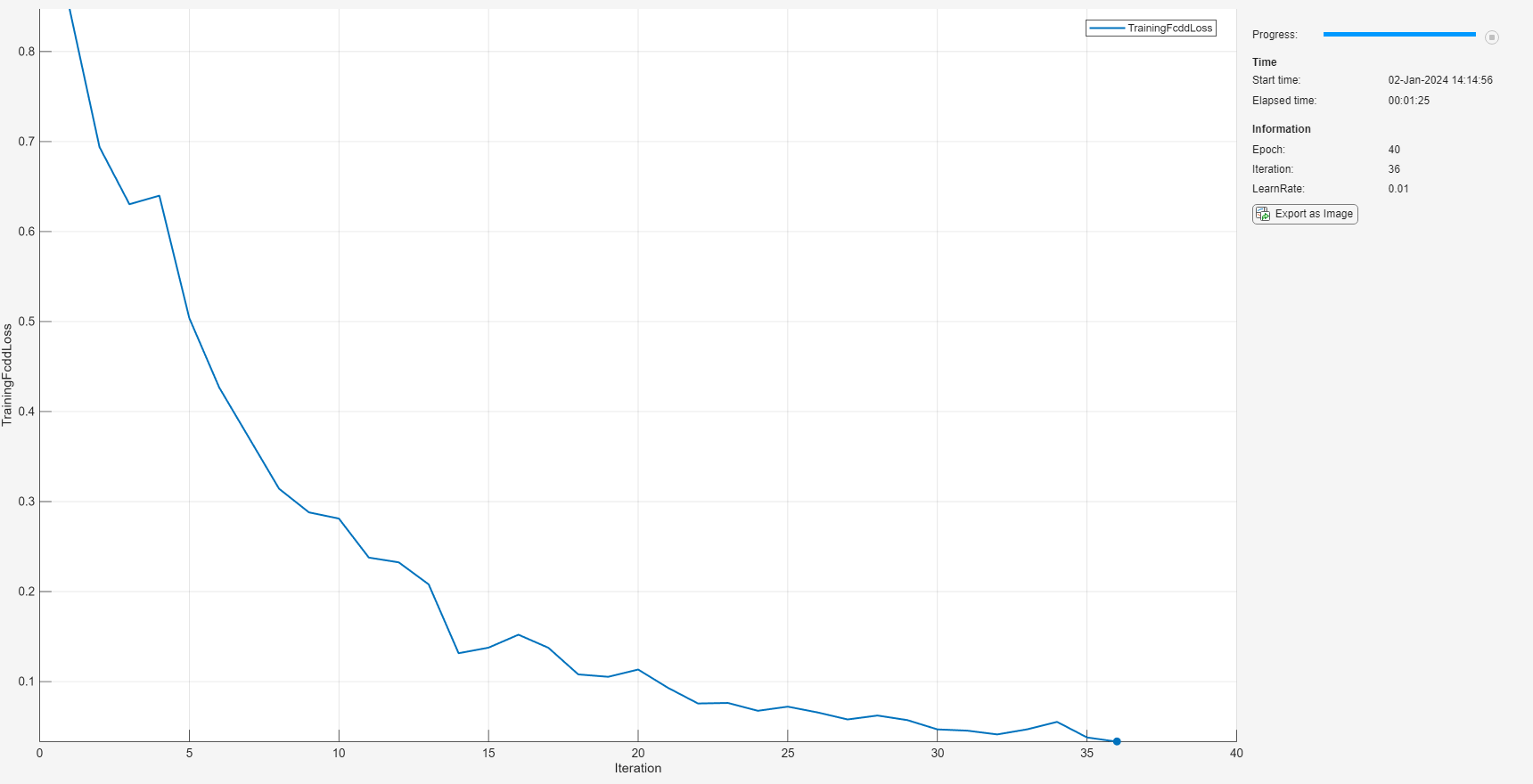
    Train the anomaly detector.

    detector = trainFCDDAnomalyDetector(dsNormal,dsAnomaly,untrainedDetector,options);
     
        Epoch    Iteration    TimeElapsed    LearnRate    TrainingFcddLoss
        _____    _________    ___________    _________    ________________
    

    Load a data set that consists of images of digits from 0 to 9.

    dataDir = fullfile(toolboxdir("vision"),"visiondata","digits","synthetic");
    dsTrain = imageDatastore(dataDir,IncludeSubfolders=true,LabelSource="foldernames");

    Create an fcddAnomalyDetector object with a ResNet-18 backbone.

    backbone = pretrainedEncoderNetwork("resnet18",3);
    untrainedDetector = fcddAnomalyDetector(backbone);

    Specify training options for SGDM optimization.

    options = trainingOptions("sgdm", ...
        Plots="training-progress", ...
        InitialLearnRate = 0.1, ...
        MaxEpochs=1, ...
        MiniBatchSize=300, ...
        ResetInputNormalization=false);

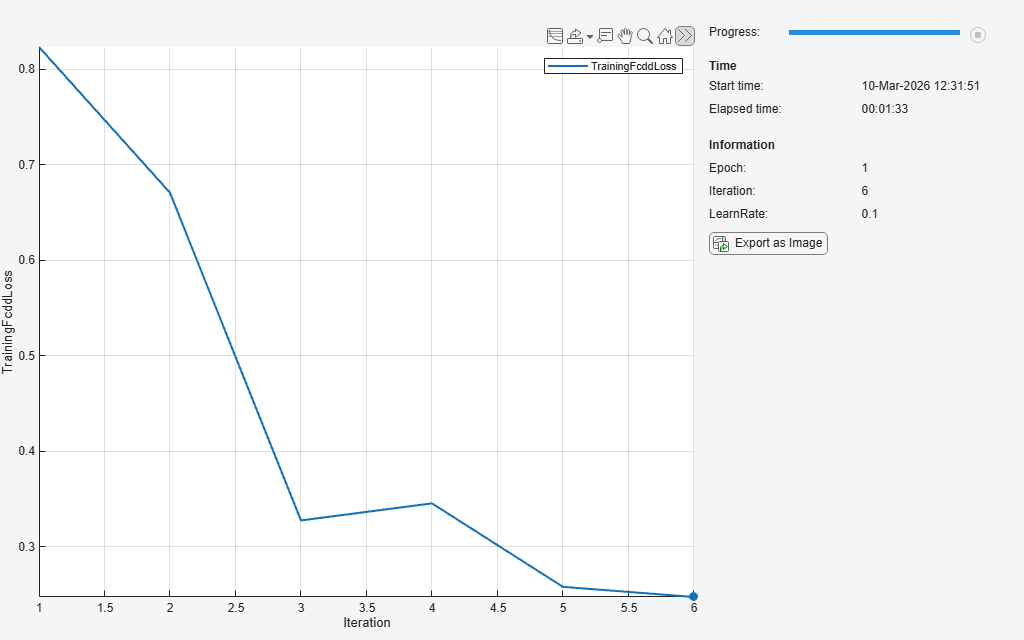
    Because anomaly data is not available for the digit images, train the anomaly detector without anomaly data.

    detector = trainFCDDAnomalyDetector(dsTrain,untrainedDetector,options);
     
        Epoch    Iteration    TimeElapsed    LearnRate    TrainingFcddLoss
        _____    _________    ___________    _________    ________________
    

    Input Arguments

    collapse all

    Untrained FCDD anomaly detector, specified as an fcddAnomalyDetector object.

    Labeled ground truth normal images, specified as a datastore.

    Labeled ground truth anomaly images, specified as a datastore.

    Training options, specified as a TrainingOptionsSGDM, TrainingOptionsRMSProp, or TrainingOptionsADAM object returned by the trainingOptions (Deep Learning Toolbox) function. To specify the solver name and other options for network training, use the trainingOptions function.

    You must set the BatchNormalizationStatistics property of the object as "moving".

    Note

    If you specify the OutputFcn function handle using the OutputFcn (Deep Learning Toolbox) name-value argument, it must use a per-epoch info structure with these fields:

    • Epoch

    • Iteration

    • TimeElapsed

    • LearnRate

    • TrainingLoss

    Name-Value Arguments

    collapse all

    Specify optional pairs of arguments as Name1=Value1,...,NameN=ValueN, where Name is the argument name and Value is the corresponding value. Name-value arguments must appear after other arguments, but the order of the pairs does not matter.

    Example: detector = trainFCDDAnomalyDetector(normalData,anomalyData,untrainedDetector,options,FreezeBackbone=false) does not freeze the backbone of the FCDD network during training.

    Use mask data in the anomaly training data to form the pixelwise loss, specified as a numeric or logical false (0) or true (1). When true, the anomaly training data in anomalyData must be a datastore that returns pairs of images as a two-element cell array of the form {anomalyImage,anomalyMask}. The first element, anomalyImage, is a sample image of an anomaly. The second element, anomalyMask, is a logical image of the same size as anomalyImage and has true valued pixels at locations where anomalyImage has anomaly content.

    If you are training the anomaly detector without anomaly data, you must specify UseMaskData as true to enable pixelwise loss for the synthetically generated anomaly data.

    Freeze the backbone of the FCDD network during training, specified as a numeric or logical true (1) or false (0). When true, the weight of layers in the backbone does not change during training.

    Monitor of detector training experiments, specified as an experiments.Monitor (Deep Learning Toolbox) object for use with the Experiment Manager (Deep Learning Toolbox) app. You can use this object to track the progress of training, update information fields in the training results table, record values of the metrics used by the training, and to produce training plots. For an example using this app, see Train Object Detectors in Experiment Manager.

    The app monitors this information during training:

    • Training loss at each iteration

    • Learning rate at each iteration

    • Validation loss at each iteration, when the options input contains validation data

    When the options input contains validation data, the app also monitors validation loss at each iteration.

    Output Arguments

    collapse all

    Trained FCDD anomaly detector, returned as an fcddAnomalyDetector object.

    Training progress information, returned as a structure array with these fields.

    • Epoch — Epoch

    • Iteration — Iteration

    • TimeElapsed — Total elapsed duration

    • LearnRate — Learning rate for each iteration

    • TrainingFcddLoss — FCDD loss at the end of each iteration

    • OutputNetworkIteration — Iteration number of returned network

    Algorithms

    When you train the anomaly detector without anomaly data, the function internally generates synthetic anomaly data using confetti noise on the normal data to train the anomaly detector. Confetti noise captures the localized nature of real anomalies using a simple, controllable model in the form of rectangular blobs of random sizes, at random positions, with random rotations. The blobs also have additional noise and random transparency. This enables the anomaly detector to simulate defects without real anomalies.

    Version History

    Introduced in R2022b

    expand all