主要内容

exportONNXNetwork

R2026b

Export YOLOX object detector to ONNX model format

Since R2026b

    Description

    Add-On Required: This feature requires the Visual Inspection Toolbox Model for YOLOX Object Detection add-on.

    Export a trained YOLOX object detector to an ONNX model file using the exportONNXNetwork function. You can create, train, and tune the object detection model in MATLAB®, export the trained model using the exportONNXNetwork function, and deploy the model in environments that run in ONNX Runtime.

    exportONNXNetwork(detector,filename) exports the trained YOLOX object detector model detector to the ONNX model file filename.

    example

    exportONNXNetwork(___,Name=Value) configures the exported ONNX model using one or more optional name-value arguments, in addition to the input arguments from the previous syntax. For example, OpsetVersion=15 specifies the version of ONNX operator set to use in the exported model as 15.

    Examples

    collapse all

    Create a pretrained YOLOX object detector.

    net = yoloxObjectDetector("small-coco")
    net = 
      yoloxObjectDetector with properties:
    
                     ClassNames: {80×1 cell}
                      InputSize: [640 640 3]
        NormalizationStatistics: [1×1 struct]
                      ModelName: 'small-coco'
    
    
    networkInputSize = net.InputSize(1:2)
    networkInputSize = 1×2
    
        640    640


    Export the YOLOX object detector to an ONNX model file.

    exportONNXNetwork(net,"yoloxSmallCoco.onnx")

    To simulate ONNX inference, import the ONNX model.

    netONNX = importNetworkFromONNX("yoloxSmallCoco.onnx",InputDataFormats="BCSS");

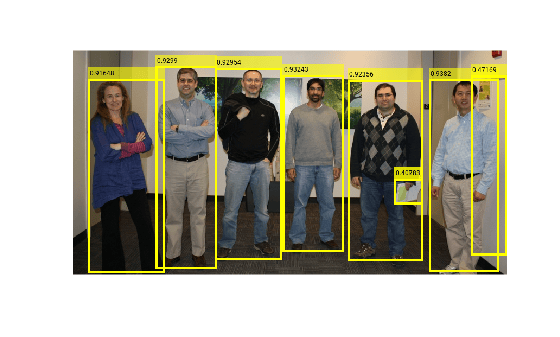
    Load a test image into the workspace.

    I = imread("visionteam.jpg");
    inputImageSize = size(I)
    inputImageSize = 1×3
    
        413    800    3


    Resize the input image to match the input size of the ONNX model while preserving the aspect ratio.

    [resizedImage,resizeFactor] = visualinspection.detection.yolox.resizeLetterbox(I,networkInputSize); 

    The import of the ONNX model follows the BCSS input data format. Because the ONNX input in BCSS format is equivalent to a dlarray with the SSCB format, convert the resized image to a dlarray of the SSCB format. For more information, see Conversion of ONNX Input Tensors into Deep Learning Toolbox Layers (Deep Learning Toolbox).

    resizedImage = dlarray(single(resizedImage),"SSCB");

    Obtain the raw predictions from the ONNX model.

    rawPredictions = extractdata(predict(netONNX,resizedImage));

    Postprocess the raw predictions to obtain bounding boxes, scores, and labels.

    [bboxes,scores,labels] = visualinspection.detection.yolox.postprocess(net,rawPredictions,ResizeFactor=resizeFactor);

    Visualize the detected objects.

    detectedImg = insertObjectAnnotation(I,"Rectangle",bboxes,scores,LineWidth=4);
    figure
    imshow(detectedImg)
    Input Arguments

    collapse all

    Trained object detector to export, specified as a yoloxObjectDetector object. The input images to the exported ONNX network must be of the size specified by the InputSize property of the yoloxObjectDetector object. You can resize input images to make them compatible with the model by using the visualinspection.detection.yolox.resizeLetterbox function.

    Name of the exported ONNX model file, specified as a string scalar or character vector. This value can be a relative or absolute path including the filename.

    Data Types: char | string

    Name-Value Arguments

    collapse all

    Specify optional pairs of arguments as Name1=Value1,...,NameN=ValueN, where Name is the argument name and Value is the corresponding value. Name-value arguments must appear after other arguments, but the order of the pairs does not matter.

    Example: exportONNXNetwork(detector,filename,OpsetVersion=15) specifies the version of ONNX operator set to use in the exported model as 15.

    Version of ONNX operator set to use in the exported model, specified as an integer in the range [6, 20]. If the default operator set does not support the network you are trying to export, then try using a later version. Decide the operator set version based on target runtime constraints and requirements of downstream frameworks in the deployment pipeline. If you export the network with an operator set and then import the exported network in another framework that the does not support that operator set, then the import in the other framework can fail. To ensure that you use the appropriate operator set version, consult the ONNX operator documentation [3].

    Data Types: single | double | int8 | int16 | int32 | int64 | uint8 | uint16 | uint32 | uint64

    Version of the ONNX operator set to use in the exported model, specified as an integer in the range [6, 20]. If the default operator set does not support the network you are trying to export, then try using a later version. Decide the operator set version based on target runtime constraints and the requirements of downstream frameworks in the deployment pipeline. If you export the network with an operator set and then import the exported network in another framework that the does not support that operator set, then the import in the other framework can fail. To ensure that you use the appropriate operator set version, consult the ONNX operator documentation [3].

    Data Types: single | double | int8 | int16 | int32 | int64 | uint8 | uint16 | uint32 | uint64

    Batch size of the ONNX network, specified as [] or as a positive integer. If you specify the batch size as [], the ONNX network has a dynamic batch size that improves flexibility across runtimes. If you specify the batch size as a positive integer k, the ONNX network has a fixed batch size of k. Certain environments might require a fixed batch size to optimize throughput.

    Data Types: single | double | int8 | int16 | int32 | int64 | uint8 | uint16 | uint32 | uint64

    Name of the ONNX network to store in the saved file, specified as a character vector or a string scalar. Specify names that are useful for cataloging and versioning models.

    Data Types: char | string

    References

    [1] Open Neural Network Exchange. https://github.com/onnx/. Accessed June 22, 2026.

    [2] ONNX. https://onnx.ai/. Accessed June 22, 2026.

    [3] ONNX Operators. https://github.com/onnx/onnx/blob/master/docs/Operators.md Accessed June 22, 2026.

    Version History

    Introduced in R2026b