主要内容

visualinspection.detection.yolox.postprocess

R2026b

Postprocess raw predictions from YOLOX object detector

Since R2026b

    Description

    Postprocess raw predictions from a YOLOX object detector using the visualinspection.detection.yolox.postprocess function. This function is useful when you preprocess input images for YOLOX object detection in ONNX Runtime.

    • Export a trained YOLOX object detector to an ONNX model file using the exportONNXNetwork function.

    • Preprocess test images for inference in ONNX Runtime using the visualinspection.detection.yolox.resizeLetterbox function.

    • Run the inference using the ONNX model externally or by simulating ONNX inference in MATLAB®.

    • Postprocess raw predictions from the ONNX inference using the visualinspection.detection.yolox.postprocess function.

    The detect object function of the yoloxObjectDetector object performs the preprocessing and postprocessing internally. If you do not need to run inference in ONNX Runtime, you can continue using the detect function.

    [bboxes,scores,labels] = visualinspection.detection.yolox.postprocess(detector,predictions) postprocesses the raw predictions predictions of the trained YOLOX object detector detector into bounding boxes, scores, and labels.

    [___] = visualinspection.detection.yolox.postprocess(___,Name=Value) tunes the algorithm using one or more optional name-value arguments in addition to the arguments from the previous syntax.. For example, ResizeFactor=3 specifies the resize factor to use to convert the raw predictions to bounding boxes as 3.

    example

    Examples

    collapse all

    Create a pretrained YOLOX object detector.

    net = yoloxObjectDetector("small-coco")
    net = 
      yoloxObjectDetector with properties:
    
                     ClassNames: {80×1 cell}
                      InputSize: [640 640 3]
        NormalizationStatistics: [1×1 struct]
                      ModelName: 'small-coco'
    
    
    networkInputSize = net.InputSize(1:2)
    networkInputSize = 1×2
    
        640    640


    Export the YOLOX object detector to an ONNX model file.

    exportONNXNetwork(net,"yoloxSmallCoco.onnx")

    To simulate ONNX inference, import the ONNX model.

    netONNX = importNetworkFromONNX("yoloxSmallCoco.onnx",InputDataFormats="BCSS");

    Load a test image into the workspace.

    I = imread("visionteam.jpg");
    inputImageSize = size(I)
    inputImageSize = 1×3
    
        413    800    3


    Resize the input image to match the input size of the ONNX model while preserving the aspect ratio.

    [resizedImage,resizeFactor] = visualinspection.detection.yolox.resizeLetterbox(I,networkInputSize); 

    The import of the ONNX model follows the BCSS input data format. Because the ONNX input in BCSS format is equivalent to a dlarray with the SSCB format, convert the resized image to a dlarray of the SSCB format. For more information, see Conversion of ONNX Input Tensors into Deep Learning Toolbox Layers (Deep Learning Toolbox).

    resizedImage = dlarray(single(resizedImage),"SSCB");

    Obtain the raw predictions from the ONNX model.

    rawPredictions = extractdata(predict(netONNX,resizedImage));

    Postprocess the raw predictions to obtain bounding boxes, scores, and labels.

    [bboxes,scores,labels] = visualinspection.detection.yolox.postprocess(net,rawPredictions,ResizeFactor=resizeFactor);

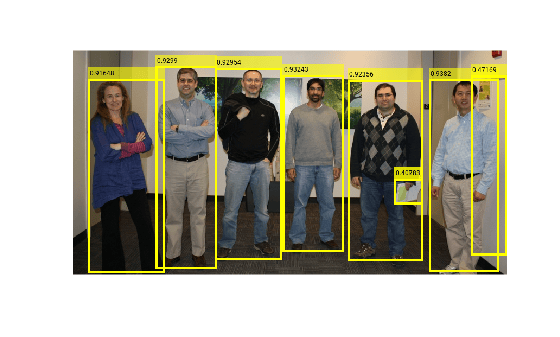
    Visualize the detected objects.

    detectedImg = insertObjectAnnotation(I,"Rectangle",bboxes,scores,LineWidth=4);
    figure
    imshow(detectedImg)
    Input Arguments

    collapse all

    Trained YOLOX object detector, specified as a yoloxObjectDetector object. The YOLOX object detector must be the same detector you export to ONNX.

    Raw predictions from the ONNX model of the YOLOX object detector, specified as an M-by-N-by-B numeric array. M is the number of spatial features in the model architecture, N is the length of the feature vector, and B is the number of images in the batch. The predictions must be raw predictions, without sigmoid activation, as returned by the ONNX model. The columns in the raw predictions represent these values.

    • First four columns — Center coordinates (x, y) and dimensions (width, height) of the bounding boxes.

    • Fifth column — Objectness score.

    • Remaining columns — Class prediction logits.

    Name-Value Arguments

    collapse all

    Specify optional pairs of arguments as Name1=Value1,...,NameN=ValueN, where Name is the argument name and Value is the corresponding value. Name-value arguments must appear after other arguments, but the order of the pairs does not matter.

    Example: visualinspection.detection.yolox.postprocess(detector,predictions,ResizeFactor=3) specifies the resize factor to use to convert the raw predictions to bounding boxes as 3.

    Resize factor, specified as a numeric scalar. The function uses the resize factor to map bounding boxes from the network input size to the original image size. To accurately identify the locations of detected objects, you must use the same resize factor used by the visualinspection.detection.yolox.resizeLetterbox function to resize the images during preprocessing.

    Detection threshold, specified as a numeric scalar in the range [0, 1]. The function removes detections that have scores less than this value. To reduce false positives, increase this value at the possible expense of missing some objects. You can decide the value of the detection threshold based on the tolerance in your application for false positives or false negatives, whether your data set has class imbalances, and whether downstream processing has the capability to handle false positives or negatives.

    Strongest bounding box selection for each detected object, specified as a numeric or logical 1 (true) or 0 (false).

    • true — Return the strongest bounding box for each object. The function calls the selectStrongestBboxMulticlass function, which uses nonmaximal suppression to eliminate overlapping bounding boxes based on their confidence scores. The function uses the "Union" ratio type of the selectStrongestBboxMulticlass function as the overlap ratio. The overlap ratio of an object pair is the ratio of the areas of intersection to the areas of union of the two detected objects. The function removes overlapping bounding boxes if the overlap ratio is above the threshold specified by NMSThreshold.

    • false — Return all the detected bounding boxes. You can write a custom function to eliminate overlapping bounding boxes.

    Overlap ratio threshold for nonmaximal suppression (NMS), specified as a scalar in the range [0, 1].

    When you specify SelectStrongest as true, the function computes the overlap ratio of an object pair as the ratio of the areas of intersection to the areas of union of the two detected objects. When the overlap ratio is above the threshold, the function removes bounding boxes around the reference box. Decrease the threshold to reduce the number of selected bounding boxes. However, if you decrease the threshold too much, you might eliminate boxes that represent objects close to each other in the image. Determine the overlap ratio threshold based on the typical object spacing and occlusion patterns in your images.

    When you specify SelectStrongest as false, the function ignores this name-value argument.

    Output Arguments

    collapse all

    Locations of of the detected objects in the input image or images, returned as one of these options.

    • M-by-4 matrix — The input is a single test image. M is the number of bounding boxes detected in the image.

    • B-by-1 cell array — The input is a batch of images, where B is the number of test images in the batch. Each cell in the array contains an M-by-4 matrix specifying the detected bounding boxes of the corresponding image.

    Each row in an M-by-4 matrix represents a bounding box of the form [x y width height], where x and y are the coordinates of the top-left corner of the box in the original image space.

    Detection confidence scores for each bounding box, returned as one of these options.

    • M-by-1 numeric vector — The input is a single test image. M is the number of bounding boxes detected in the image.

    • B-by-1 cell array — The input is a batch of test images, where B is the number of test images in the batch. Each cell in the array contains an M-element row vector, where each element indicates the detection score for a bounding box in the corresponding image.

    A higher score indicates higher confidence in the detection. The confidence score for each detection is a product of the corresponding objectness score and maximum class probability. The objectness score is the probability that the object in the bounding box belongs to a class in the image. The maximum class probability is the largest probability that a detected object in the bounding box belongs to a particular class.

    Labels for bounding boxes, returned as one of these options.

    • M-by-1 categorical vector — The input is a single test image. M is the number of bounding boxes detected in the image.

    • B-by-1 cell array — The input is an array of test images. B is the number of test images in the batch. Each cell in the array contains an M-by-1 categorical vector containing the names of the object classes in the corresponding image.

    Algorithms

    The visualinspection.detection.yolox.postprocess function postprocesses the raw predictions of the YOLOX object detector using these steps.

    • Decodes bounding boxes from the raw predictions using anchor points and strides from the yoloxObjectDetector object.

    • Applies sigmoid activation to objectness and class prediction scores, then computes final confidence as the product of objectness and class probability.

    • Filters detections by removing those below the confidence threshold and outside valid size ranges.

    • Converts coordinates from a center-based format to a top-left corner format and scales from the network input space back to original image coordinates using the resize factor.

    • Applies nonmaximal suppression (NMS) to eliminate duplicate or overlapping detections of the same object, keeping only the highest confidence boxes.

    Extended Capabilities

    expand all

    Version History

    Introduced in R2026b